← Chapter 6. Workplaces: Operator, Foreman and Maintenance · Contents · Chapter 8. Monitoring production and analysing what is happening →
Machine data may be needed by another information system; an external application may need to read or change DPA production objects; and a user may sometimes need a remote view of equipment. These are different tasks. They involve different participants, addresses, access rules and observable results by which you can determine whether the exchange is working.
What this chapter covers
This chapter covers VNC, the outbound OPC UA Server, data publication through Kafka and MQTT, and the public API — the DPA Host programming interface: choosing an operation, authentication and a small C# application. We will first establish the direction of each exchange, then move on to configuration and verification of each interface.
1. Exchange directions and interface boundaries
Start with the task on the external side
Begin with two questions: who connects to whom, and what result is required outside DPA? Receiving a value from a machine, sending that value to another system, and changing a Job from an external application require different interfaces. Sharing a protocol or network address does not make these exchange methods interchangeable.
An external program can connect to DPA as a client — requesting data or asking DPA to perform an operation. With Kafka and MQTT, a broker sits between DPA and the external program. DPA publishes messages and the external program receives them as a consumer. A topic is a named message-stream address on the broker; Kafka and MQTT use different topic-selection rules and message formats.
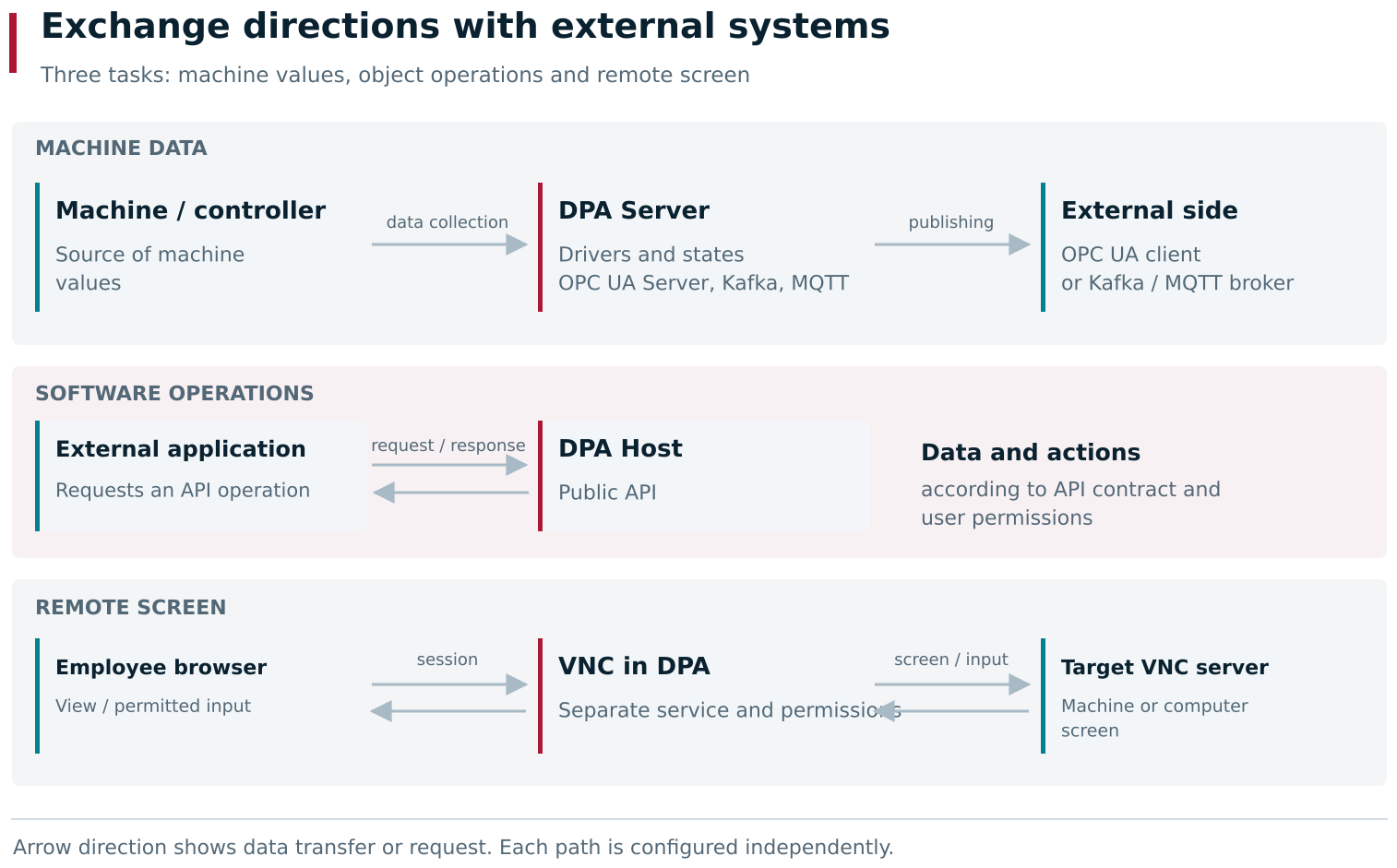
Collecting machine values, calling an API operation and opening a remote screen solve different tasks. OPC UA Server exposes data to an external client, while Kafka and MQTT send messages to a broker from which an external program consumes them. Calls to the DPA Host API and VNC sessions have their own access rules.
| Task | Interface | Result to verify |
|---|---|---|
| Bring machine values into DPA | Equipment Driver, including the OPC UA driver | Values from the required device or channel reach DPA Server and are used by DPA |
| Provide data to an external OPC UA client | Outbound OPC UA Server | The client connects to the DPA server, sees the required nodes and receives their values |
| Send driver-state changes to an external application | Kafka or MQTT | The consumer on the external side receives a message in the required topic with the expected data |
| Read or change DPA objects from a program | DPA Host public API | An authenticated request performs the selected operation; the response and subsequent readback show the expected result |
| View a remote equipment screen and, when permitted, control it | VNC | The required target screen opens and permitted input reaches that target |
Inbound OPC UA driver and outbound OPC UA Server
OPC UA defines a client-server interaction. DPA’s role depends on the task being solved.
When DPA receives data from an OPC UA server on a machine or controller, the DPA OPC UA driver acts as the client. It is configured with the external target, the nodes to read, and the relationship between the received values and machine data. Equipment connection is described in Chapter 3.
When another program connects to DPA’s OPC UA Server, the client is on the external side. It connects to the DPA server address and works with the address space exposed by that server — the set of nodes through which the client finds the required objects and values. Creating an inbound OPC UA driver does not by itself enable the outbound publication server. The outbound interface has its own configuration and must be verified separately by a client.
The separation is also visible in DPA Server configuration. Open the Settings menu from the gear button on the right of the top bar and select Monitoring. In its tree, expand DPA Host and the required DPA Server. The server has separate child branches: Drivers and Interfaces. Kafka, MQTT and OPCUA are under Interfaces.
Driver states and production objects
When publishing machine data, it is important to understand which values are actually exposed by the interface. A driver state is a named set of fields that the driver receives from equipment or forms while polling it. Fields may contain, for example, an operating mode, the number of the current CP, or a numeric measurement. The relationship between a field and an Indicator in DPA Host is described in Section 2 of Chapter 3.
Kafka and MQTT publish selected driver states. The presence of a Product, Job, Ticket or calculated KPI in DPA therefore does not mean that those objects automatically appear in Kafka or MQTT messages. If an external program needs production objects or an operation on them, start by defining the required public-API operation. For a machine value, first identify the required driver, its state and field, then configure publication.
The value itself is not the only important part of a measurement: the time to which it belongs and whether it was obtained successfully also matter. An empty value after a read error must not automatically be interpreted as zero, and an old stored value must not be treated as a new measurement. Read the time, quality and error representation according to the rules of the selected interface.
Network reachability and user access
Choose the correct connection point for every direction. A program calling the DPA Host API connects to Host; an OPC UA client connects to the outbound OPC UA Server; a Kafka or MQTT consumer connects to the corresponding broker. The Host address used in a browser does not replace the addresses of the other participants.
Access checks also happen at different layers. For the API, the DPA account used for the operation matters. VNC additionally takes assignments for a particular connection into account. Brokers and OPC UA have their own authentication and connection-security settings. These mechanisms do not replace one another: for example, permission to edit an interface in DPA does not define the password used to connect to an external broker.
Before configuring an interface, write down the data source, external participant, connection address, required data and expected result. Complete verification on the side for which the exchange was configured: a value read by the client, a message received by the consumer, the result of an API operation, or an action on the remote screen. A visible menu item, saved configuration or running process proves only that one part of the path is ready.
2. VNC remote access
VNC transfers the screen of a remote computer or equipment panel to the user’s browser. In control mode, mouse and keyboard actions are sent over the same connection. This is an independent way to work with a remote screen: machine values and Indicator history enter DPA through the path described in Chapter 3.
Two prerequisites are required: the VNC microservice must be connected to DPA Host, and the target VNC server — on the machine, panel or computer — must be reachable from that service. Check these two conditions first. The presence of a VNC item in the Enterprise structure does not mean that the service is connected or that the remote screen is available. Before use, make sure that the VNC microservice is installed, connected to DPA Host and synchronised according to the Installation and Operations Guide.
Where the connection is configured
Open Settings menu → Enterprise structure, find the required Work center, expand it and select the VNC child item. It contains three tabs:
- Common — target address and connection parameters;
- Users — who may view and control the remote screen;
- Capture screen — opening the remote screen.
Changing the connection parameters and user list requires Edit VNC settings in “Enterprise structure” module. This permission controls administration of the feature. Access to the VNC session itself is assigned separately to each user for the particular Work center.
On Common, specify the address and port of the target VNC server. The VNC microservice establishes the connection to that target, so the address must be reachable from the computer on which the service is running.
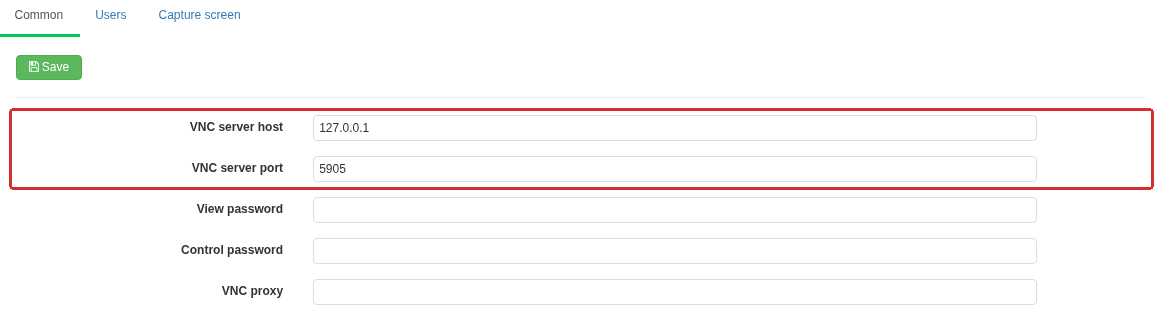
The Common tab contains the target host, port and passwords for the two connection modes. The outlined host and port belong to the target VNC server; the VNC microservice establishes the connection to that server.
| Field | Meaning |
|---|---|
| VNC server host | Host name or IP address of the remote machine, panel or computer running the VNC server |
| VNC server port | Port of the target VNC server. This is the remote VNC connection port, not the DPA microservice port |
| View password | Password sent to the target VNC server when a viewing session is opened |
| Control password | Password sent to the target VNC server when a control session is opened |
For example, 127.0.0.1 in the host field means the computer running the VNC microservice itself. If the service and the machine are on different computers, specify the machine address that is reachable from the service.
The passwords in this form belong to the target VNC server. They do not replace the DPA login password or the user assignments on Users. If the target server distinguishes viewing and control passwords, enter the corresponding passwords here.
After changing the parameters, click Save. Open a new VNC session to verify the new values: an already established connection was created with the parameters that were in effect when it was opened.
Opening the remote screen
Before opening the screen, assign the user VNC access to the required Work center as described in Section 7 of Chapter 2. An Operator, Foreman or Mechanic assignment does not provide VNC access by itself; control must also be allowed separately.
- Select Capture screen.
- Click View to open the screen without normal input being sent from the web client, or Control if mouse and keyboard actions must be sent.
- Wait for the target image. Opening the VNC tab or page alone does not mean that a connection to the target VNC server has been established.
- Confirm that the screen belongs to the intended equipment. Before any control action, check the visible state of the remote application.
- To end viewing inside the tab, click Close.
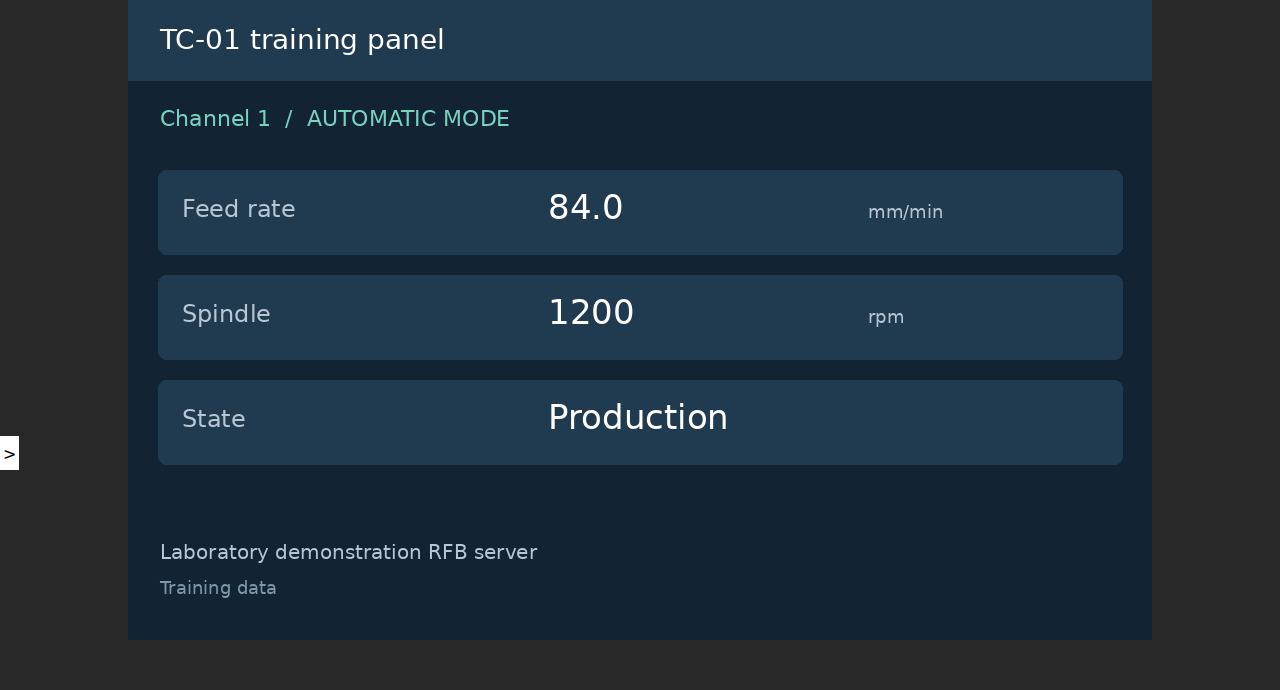
The remote screen opens from the context of a Work center, while the session itself uses the separate VNC microservice. A successful remote session therefore confirms both the route from DPA Host to VNC and the onward connection to the equipment’s VNC server.
Under New window, two icons are available: the eye opens a separate viewing window, and the keyboard opens a separate control window. An administrator can give an assigned user such a link for the required Work center. When the recipient opens it, DPA checks the recipient’s account and VNC assignment, not the permissions of the person who copied the link.
A slide-out panel on the left of the separate session contains a scaling button. It toggles fitting the remote image to the visible area; it does not change the desktop size on the target itself.
The Control button may still be visible to a user who is not permitted to control the target. In that case, the control-session request is rejected. Check the user’s assignment and the Control column rather than reinstalling the microservice.
The input-blocking boundary in view mode
In view mode, the DPA web client does not send ordinary mouse and keyboard input, and opening the control page requires separate permission. The VNC microservice itself, however, does not filter forwarded input according to whether the DPA session was opened for viewing. If the target VNC server accepts commands with the view password, or with no authentication at all, a “view only” assignment in DPA is not sufficient to guarantee that control is impossible: a custom client could send input through the permitted viewing connection.
When a user genuinely needs observation-only access, restrict input on the target VNC server as well. Use its view-only mode or viewing-only password where supported, and configure control permissions separately. Different password-field labels in DPA do not create different privileges at the target if the target itself does not distinguish those passwords or allows control with both. Take this boundary into account before granting access to a real equipment panel.
If the screen or control is unavailable
Diagnose the first missing result in the chain: user access, page opening, connection to the target, image delivery, or input delivery.
| Observation | What to check |
|---|---|
| The VNC service is unavailable | Connection of the service to DPA Host and whether the service is actually running; then open a new session |
| Viewing is rejected | Assignment of the current user to the required Work center and whether the correct target was selected |
| Viewing works but control is rejected | The separate permission in the Control column |
The page opens but there is no image, or Fail to connect is shown | Reachability of the target host and port from the VNC-service network, operation of the target VNC server, and the selected password |
Connection closed is shown | An established connection was interrupted; check the target and network, then open the session again |
| An old session behaves the same after connection settings were changed | Close the old session and open a new one using the saved parameters |
| The screen is visible in control mode but input has no effect | DPA control permission, the selected password and restrictions on the target VNC server itself |
Fail to connect does not identify one unique cause: the same message can accompany an unreachable target or target authentication failure. After correcting the address, password or service state, verify a new session until the image appears and, for control, until the expected action reaches the selected target.
3. Outbound OPC UA Server
The outbound OPC UA Server exposes the DPA Server driver tree, its devices and current values to an external OPC UA client. An external system can, for example, read machine feed rate or subscribe to a channel-state change. Equipment channels also expose CP-transfer operations. This is a separate DPA Server interface; it does not require the VNC or Messenger microservice.
Do not confuse it with the OPC UA driver. The driver connects to an external equipment server and collects data into DPA; the interface described here accepts connections from external clients. Driver, channel and Indicator preparation is covered in Chapter 3.
Enabling the server
Open Settings menu → Monitoring, expand the required DPA Host and DPA Server, then select Interfaces → OPCUA. Working with this setting requires Access to “Monitoring” module.
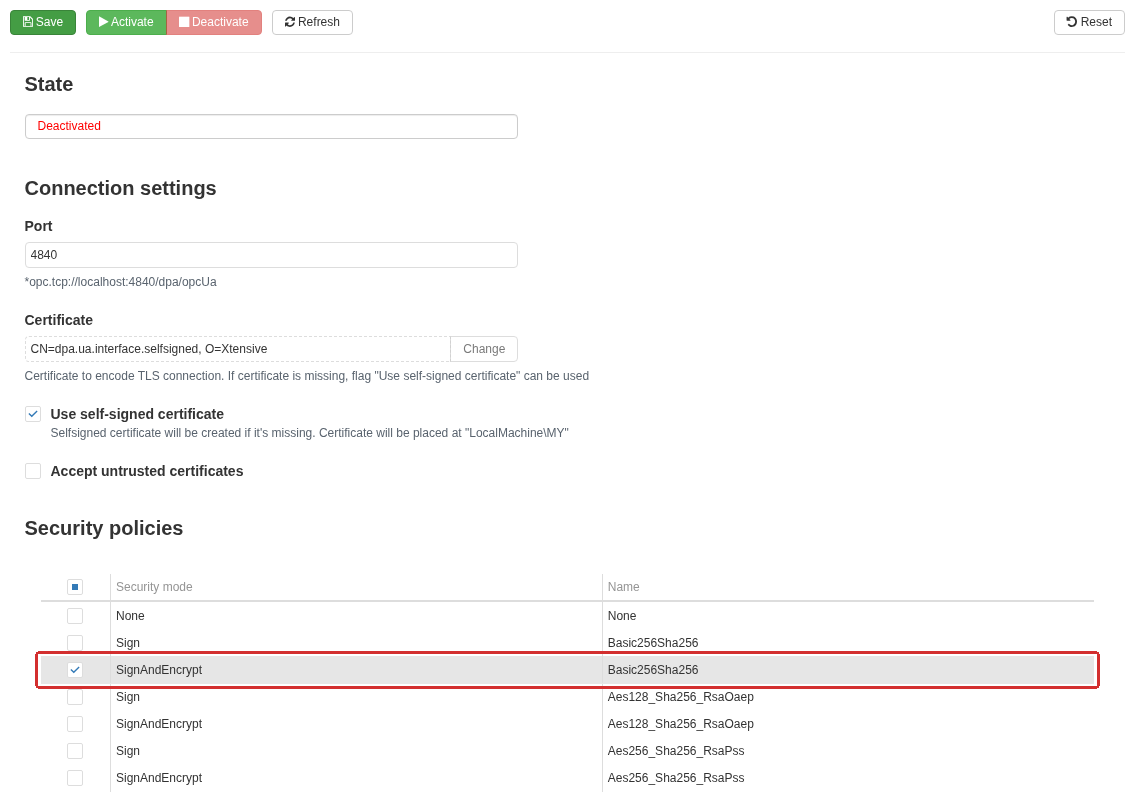
Outbound OPC UA Server configuration under Monitoring → DPA Host → DPA Server → Interfaces → OPCUA. The interface is stopped before the parameters are changed. Only SignAndEncrypt / Basic256Sha256 is selected; None / None remains cleared. Automatic acceptance of untrusted certificates is disabled.
- If the interface is already running, click Deactivate. While it is activated, connection parameters and policy selection cannot be edited.
- Set the Port. The initial value is
4840. - Select a Certificate with Change, or enable creation of a self-signed certificate.
- Select the required rows in Security policies. At least one row must be selected; the mere presence of a row in the table does not mean that it is enabled.
- Save the settings and click Activate. Activate first saves the entered parameters as well. Wait for the Activated state.
- Connect an external client and verify reading the required value. Activated confirms that the interface has started; it does not verify the complete client path.
Refresh reads the saved parameters and state again. Reset places the initial parameters into the form; they take effect only after saving and starting the interface. It is not a command for restoring the last working configuration.
Connection address and certificate
The endpoint address has the form:
| |
Here, dpa-server.example.org is the name of the computer running the selected DPA Server and must be reachable by the external client; 4840 is the configured port. The form hint contains localhost, which from another computer would refer to the client computer itself. Replace it with a reachable name or IP address of DPA Server. Preserve the path and case of dpa/opcUa.
Also check the addresses returned by endpoint discovery: the client must be able to resolve and reach the server name advertised there.
The certificate represents the server’s OPC UA application. The selected certificate must be available to the DPA Server process together with its private key. If self-signed-certificate creation is enabled, DPA Server creates a service certificate when one does not already exist; the name in the form changes to CN=dpa.ua.interface.selfsigned, O=Xtensive.
The certificate store belongs to the computer and account under which DPA Server runs. Windows uses LocalMachine\My; Linux uses CurrentUser\My for the process account. The form hint mentioning LocalMachine\MY does not reflect this Linux distinction. Installing the certificate only in the administrator’s browser does not make it the DPA Server certificate.
The client must trust the server certificate, and the server must trust the client’s application certificate when a protected mode is used. Accept untrusted certificates allows an untrusted client certificate to be accepted automatically. This can be useful for an initial check in an isolated environment, but it changes the application-trust boundary: for normal operation, establish trust for the required certificates and leave automatic acceptance disabled. This option does not make the client trust the server certificate.
What the selected policy means
Each table selection is a pair of Security mode and policy Name. The server can expose several selected pairs; the client must choose one that it supports.
| Mode | What it provides |
|---|---|
None with policy None | Connection without message signing or encryption |
Sign | Message signing to verify integrity and sender; message contents are not encrypted |
SignAndEncrypt | Message signing and encryption |
For Sign and SignAndEncrypt, the available policies are Basic256Sha256, Aes128_Sha256_RsaOaep and Aes256_Sha256_RsaPss. Selecting a more secure pair does not disable a simultaneously selected None / None; clear that selection if unencrypted connections must not be accepted.
The OPC UA client connects using anonymous user identity. Login with a DPA username and password is not provided here. Application-certificate validation and message protection are not login as a web-user account. A user’s normal access scope through the Enterprise structure does not filter the drivers exposed by this connection. Restrict network reachability of the endpoint and the set of trusted applications with the entire published content in mind, including CP-transfer methods.
Data-tree structure
In the https://dpaxt.io/UA/dpa/ namespace, Objects contains Drivers and Counters. The names below are OPC UA client node names, not sections of the DPA web interface.
| Node | Contents |
|---|---|
Drivers → <driver> | Configured drivers of the selected DPA Server |
Driver Enabled, Type, Identifier | Whether the driver is enabled, its type and identifier |
States → <state> | Configured driver states; the name includes the class and device number |
State Identifier, IsActive | State identifier and whether the state is active |
State Data | Fields of the current data-acquisition result |
Devices on the driver and nested devices | Device structure exposed by the driver |
Control program on a channel | CP transfer and associated call counters |
Counters → ControlProgram | Aggregate CP-transfer-operation counters |
OPC UA does not have a separate list of selected states to publish like Kafka and MQTT do below. The tree is built from DPA Server driver configuration. For value changes to reach external interfaces, publication must be enabled on the driver state itself. A state appearing in the OPC UA tree does not enable publication automatically. Open Monitoring → DPA Host → DPA Server → Drivers → <driver> → States, expand the required group and select the state. Publish on the form shows the current setting; the Publish and Don’t publish buttons above the form change it.
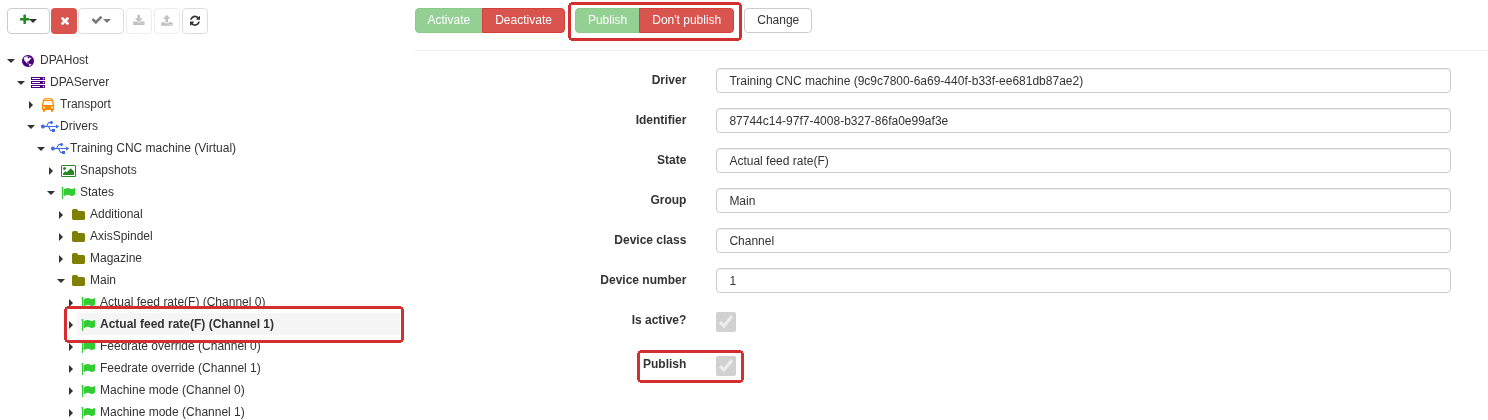
The Actual feed rate(F) (Channel 1) state shows that the Publish checkbox only displays the current setting. Use the Publish and Don’t publish buttons above the form to change it.
Names and fields depend on the driver, state and data actually received. An empty Data folder does not automatically mean that DPA has no such Indicator: this tree represents the driver result before subsequent DPA Indicator processing.
First locate the node by browsing the tree. In an integration, retain the driver identifier, state identifier and field name. For example, the string portion of a field NodeId has the form:
| |
A client may display ns=2 before that string portion. This is the namespace index for the particular connection. Determine it from the namespace URI rather than hard-coding the number seen in one connection. Display names can change; a state that is deleted and created again receives a different identifier even if it is given the same name.
Reading and subscribing
- Open
Objects → Drivers, select the driver and the required state underStates. - Check driver
Enabledand stateIsActive. - Under
Data, select the field and read its value together withStatusCodeandSourceTimestamp— the result-quality code and source timestamp. - Create a subscription to the field if subsequent changes are required.
- Change a known condition at the source and compare the DPA result with the new value received by the external client.
The server exposes current values, not the archive of Indicators. A subscription period does not make the equipment driver poll faster. A data-change subscription also does not have to deliver the same value on every poll; check the client’s value- and time-change filters.
Do not turn a bad quality result into zero. A missing field may return BadNodeIdInvalid; a previously observed object that was deleted can return BadObjectDeleted; a driver-licence problem can return BadLicenseNotAvailable; and a state-acquisition failure can return BadInternalError or a more specific field error code. The existence of the node, or even a previous non-zero value, does not prove that the current data is fresh and valid. A numeric value transmitted as Duration is expressed in milliseconds.
This path is intended for data retrieval. In this release, dynamic Data fields may advertise write access and accept a write: a client subscribed to a field can change the published OPC UA copy and read the changed value back. This does not send a write command to the equipment and is not a way to change a DPA Indicator. Do not use such writes as an integration mechanism; take into account that an admitted client can distort the published copy. The separate CP-transfer method has a different purpose and is described below.
Transferring a CP through a channel
A driver’s Devices node represents its device structure. A channel contains Control program, which uses a temporary-file-transfer mechanism: an operation creates a temporary file node, a numeric FileHandle, and, where required, a CompletionStateMachine execution-state node. Perform every action that uses an issued handle in the same OPC UA session.
| Method | Arguments and result |
|---|---|
GenerateFileForRead | Accepts a string containing the CP name; returns FileNodeId, FileHandle, CompletionStateMachine |
GenerateFileForWrite | Accepts a ControlProgramUploadOptions structure with ProgramName and Folder; returns FileNodeId and FileHandle |
CloseAndCommit | Accepts FileHandle; starts application of the transferred file and returns CompletionStateMachine |
Activate | Intended to select a CP by string name; the limitation of this release is described below |
To download a CP from the equipment to the external client:
- Call
GenerateFileForReadwith a CP name understood by the selected driver. - Wait for the returned state node to move from
ReadPreparetoReadTransfer. If it entersError, read its childErrorMessagefield. - Read
Sizeon the temporary file node and retrieve data with itsReadmethod, passing the issued handle and the required byte count. - Close the file with the file node’s
Closemethod.
To upload a CP from the external client to the equipment:
- Build
ControlProgramUploadOptions:ProgramNameis the CP name andFolderis the destination folder in terms of the selected driver. This is an OPC UA structure, not a JSON string. - Call
GenerateFileForWriteand send the bytes through the temporary file node’sWritemethod. - Call
CloseAndCommitonControl program. - Wait for the state to move from
ApplyWritetoIdle: return from the method itself does not mean that the equipment accepted the file. If it entersError, readErrorMessage. - After successful completion, close the temporary file with
Close. Verify the CP presence and contents on the target side.
One transfer node supports only one simultaneous file sender. Attempting to create a second sender returns BadNotSupported. Do not leave temporary transfers unfinished: ClientProcessingTimeout is 60000 ms by default, and inactive objects are cleaned up after that period. A lost handle or a new session requires the transfer to be started again. The temporary file is already open when it is created; do not call its Open method separately.
When reading, take into account a limitation of this release: Read returns a buffer of the requested length and pads the remainder with zeroes when fewer bytes remain. Reading after end-of-file can therefore return a non-empty all-zero block. Do not detect the end of a CP from an empty response. Read exactly the remaining byte count according to Size, in small blocks — for example, up to 4096 bytes per request. Block size is also limited by the client and server transport settings; MaxByteStringLength on the temporary file does not remove those limits. Do not strip zero bytes from file contents arbitrarily, because they may be part of the file.
The Activate method is visible in the tree but returns BadNotImplemented in the verified standard server package. Do not rely on selecting a CP through this method without a separate check of the installed build. File transfer, successful completion of CloseAndCommit, and selection of the active CP are different results. Availability of a particular operation also depends on the driver and equipment.
Nested Counters show call counts, successful completions, errors and transferred-byte volume; the aggregate branch sums the operations. These are runtime interface counters, not a CP-version log and not proof that a CP was actually executed on the machine. They are built again after a restart.
If the client does not receive the expected result
| Observation | Next check |
|---|---|
| The port is unreachable | Operation of the intended DPA Server, interface state, configured port and network reachability from the client computer |
| The state remains Activation in process instead of Activated | Error text below the state; availability of the port, certificate and private key |
| The client rejects the policy | Whether the selected mode and policy match; whether the server selection required by the client was cleared |
| Certificate error | Validity period, application name and URI, server access to the private key, and mutual certificate trust |
| Connection succeeds but the required field is absent | Correct DPA Server, configured drivers and states, state activity and whether its data appears |
| The value exists but does not change | Result quality and timestamp, operation of the source, driver polling, publication of the state itself and the subscription filter |
| A transfer method returned but the file is not present yet | Completion-state node and ErrorMessage; then verify the result on the target device |
| Zeroes appear at the end of the downloaded CP | Compliance with Size and the final-block length; do not use an empty response as the EOF condition |
4. Kafka exchange
The Kafka interface publishes DPA Server driver states to a topic on an external broker. The external application acts as a consumer: it reads records from that topic and performs its own processing. DPA is the sender here; this interface does not read commands from Kafka.
A working broker, an available topic and write permission for the sender are required. The broker network must be reachable from the DPA Server computer. The selected driver states must be active and have publication enabled. The transmitted values belong to driver states, before subsequent processing by DPA Indicators.
Where the exchange is configured
Open Settings menu → Monitoring, expand the required DPA Host and DPA Server, then select Interfaces → Kafka. Access to “Monitoring” module is required. There are three tabs:
- Interface configuration — broker connection, security, retries and the send queue;
- Drivers states to publish — which states are sent and how they are named;
- Statistics — state of the Kafka producer and its exchange with brokers.
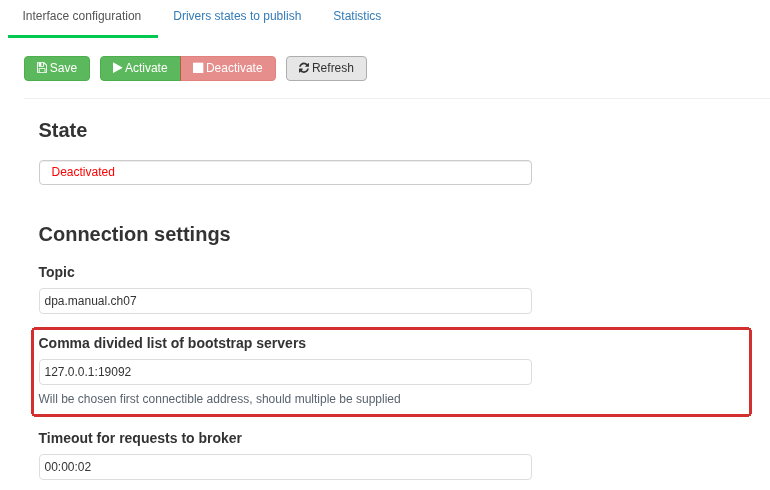
The Interface configuration tab: the topic and bootstrap broker address are configured for the selected DPA Server. The outline highlights the address reached by DPA Server itself. The interface is stopped before the parameters are changed.
On Interface configuration, first stop an already enabled interface with Deactivate. Connection parameters cannot be edited while the interface is enabled. Fill in the form, save it, and click Activate. Starting also saves the form first. After a few seconds, click Refresh to read the state again. Initial broker-availability detection depends on statistics that update at an interval of about five seconds.
Activated means that the producer sees an operating broker. It does not prove that states are selected, that a particular record was delivered, or that the external application processed it. Activation in process can appear both during the initial connection and after connectivity is lost. Read the error text shown below it.
Reset places the initial parameters into the form, while Refresh reads the saved configuration again. To apply initial parameters after a reset, save and start the interface; reset does not restore the last working configuration.
Connection parameters and topic partitions
A topic can consist of several partitions. Record order is defined within a partition. The partition for each new record is selected by the producer’s partitioner algorithm. Durations in the form use hh:mm:ss format.
| Field | Purpose |
|---|---|
| Topic | One topic to which this interface sends all selected states |
| Comma divided list of bootstrap servers | Initial broker addresses, for example kafka-a.example.org:9092,kafka-b.example.org:9092 |
| Timeout for requests to broker | Limit for broker requests and message delivery; 2 to 60 seconds |
| Client id | Producer name used in Kafka statistics and diagnostics; it is not a login or password |
| Client rack | Optional description of the client’s physical location |
| Partitioner algorithm | How the producer selects a topic partition for a record |
The available algorithms are ConsistentRandom (initial), Consistent, Murmur2, Murmur2Random and Random. Coordinate the algorithm with the record keys and the requirements of the receiving application. In particular, random distribution must not be treated as a guarantee that all messages with one key stay in one partition.
The initial address host.docker.internal:9092 is an example for a particular Docker arrangement. It does not mean “any installed broker”. Enter the real addresses for the deployment network. localhost and 127.0.0.1 refer to the computer running the DPA Server process, not to the administrator’s browser computer.
Bootstrap addresses are used to discover the cluster. The producer then uses the addresses advertised by the broker itself. Reachability of one bootstrap port is therefore insufficient if the broker advertises names or ports that DPA Server cannot reach.
Connection security and authentication
Under Security protocol, select the mode that matches the broker listener. The address, protocol and authentication method must agree.
| Form selection | Connection protection and sender identity |
|---|---|
| PLAINTEXT | Unencrypted connection without client-certificate validation |
| SSL | TLS protection; anonymous connection or client-certificate authentication |
| SASL PLAINTEXT | SASL authentication without TLS |
| SASL SSL | SASL authentication over TLS |
For SASL, Plain, Scram SHA256 and Scram SHA512 are available. Enter the username and password of the broker account. This is not a DPA web-user account. Matching the client name and username does not grant write access to the topic; broker permissions for that account are configured on the broker. Do not send a Plain-mechanism password over an unencrypted connection.
For TLS, select the Certification authority certificate to validate broker certificate and configure Use broker certificate to check broker domain name. The connection name must match the certificate. Disabling name validation does not fix a wrong address or an untrusted certificate chain.
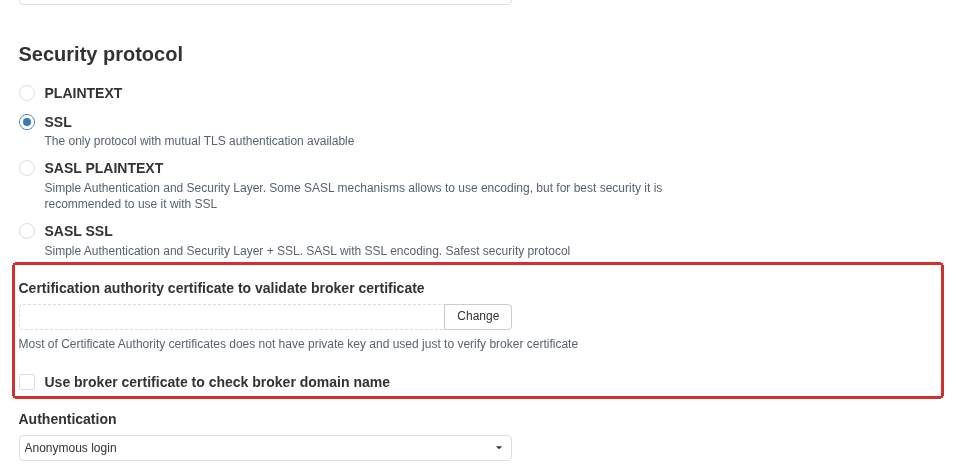
Selecting SSL exposes the CA certificate used to validate the broker and a separate option for validating its domain name. In this screenshot SSL is selected temporarily without saving the configuration.
Under Authentication, Client certificate (mtls - mutual tls) means the sender’s own certificate with its private key. It is selected from certificates available to DPA Server, not from the browser certificate store. The DPA Server process needs access to the private key; this connection uses an RSA key and the key must allow export. The CA certificate validates the broker, while the client certificate represents the sender to the broker — these are different purposes.
Which states are written to the topic
Open Drivers states to publish. An empty table means there is nothing to send even when the broker connection is already active.
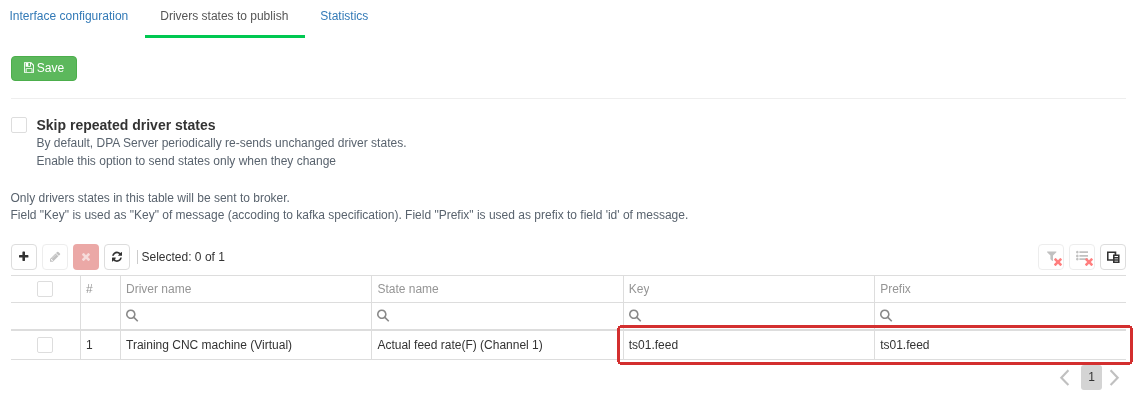
One source is selected on Drivers states to publish. The outline highlights explicit Key and Prefix values: the first belongs to the Kafka record, while the second is used in field identifiers inside the JSON. Periodic resending suppression is disabled.
- Click Add and select the required states in States of active drivers. Check the driver name, class and device number: identically named states from different channels are different sources.
- Set a Key and Prefix if required. They can be edited in the table cells or by selecting rows and opening key/prefix editing.
- Choose whether states that have not changed for a long time should be resent periodically.
- Click Save on this tab. Saving the connection form does not save the state list.
- Verify that the consumer receives a message.
This table selects states only for this Kafka interface. It does not activate a driver state or enable publication on the state itself. Check these conditions separately in driver configuration. Open Monitoring → DPA Host → DPA Server → Drivers → <driver> → States, expand the group and select the required state. Is active? and Publish show the current configuration and are not direct switches. Use Activate and Publish if the corresponding condition is disabled.
Removing a row stops that source from being selected for subsequent publication; it does not delete records that are already stored in Kafka.
Key belongs to the complete message for one state. When no key is specified, <driver GUID>/<state GUID> is used. A grey value in the cell shows the initial substitution. Prefix is included in the field identifiers inside the JSON. If it is not specified, the state name with class and device number is used, for example Actual feed rate(F) (Channel 1).
Key and prefix are independent. For example, with both set to ts01.feed, the Kafka record has the key ts01.feed, while its feed field has the identifier ts01.feed.Actual feed rate(F). Changing the prefix changes names in the JSON; changing the key affects partition distribution and how the consumer handles the key. Coordinate such changes with the receiving application.
For bulk editing, select several rows. A field containing different previous values must not be interpreted as one common value: change only what genuinely needs to become identical for all selected rows. Clearing the key or prefix field restores the initial substitution; after closing the dialog, save the table.
Skip repeated driver states suppresses periodic resending of unchanged states. Without it, DPA Server normally repeats long-unchanged states approximately once a minute. With it enabled, the absence of a new message may simply mean that the data did not change. That alone proves neither healthy nor failed connectivity; verify the connection and a known source change separately.
Record format
The record body is UTF-8 JSON. A state with one field can, for example, produce:
| |
| Field | Meaning |
|---|---|
timestamp | State-result time as Unix time in milliseconds |
values | Fields of one state; a message can contain several |
id | <prefix>.<field name> |
v | Field value; type depends on the state result |
q | Whether the state result was successful |
t | Timestamp of that result, also in milliseconds |
e | Error text; null for a successful result |
The same timestamp is also used for the Kafka record timestamp. For an unsuccessful result, known fields are sent with v: null, q: false and error text in e. If the source’s field names are not yet known, values can be empty. Do not replace an error-quality value with zero, and do not assume that timestamp is the machine-controller clock: it is the state-result time on the DPA Server side.
The Kafka key is record metadata, not part of the JSON shown above. Each record also has a partition number and an offset — its position inside that partition. Reading the same offset again returns the old record, not a new change.
Retries, ordering and the send queue
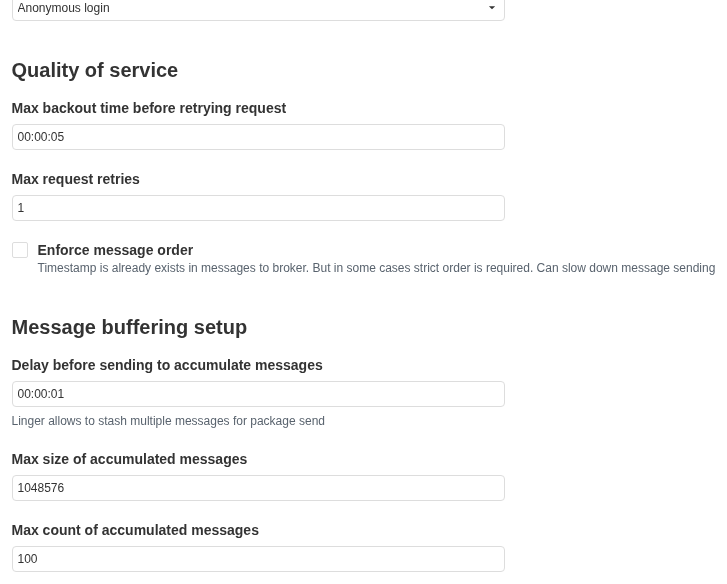
The Quality of service and Message buffering setup groups. Maximum batch size and maximum message count set the limits for one batch.
Quality of service controls producer retries, while Message buffering setup controls the delay and internal sending queue. These settings do not create an archive of every DPA change that occurred while the broker was unavailable.
| Field | Actual effect |
|---|---|
| Max backout time before retrying request | Upper bound on retry delay; 1 to 5 seconds |
| Max request retries | Retry-attempt limit; 0 disables retries. Attempts are also limited by delivery lifetime |
| Enforce message order | Enables producer protection against writing the same message again during retries — idempotence |
| Delay before sending to accumulate messages | Allows several records to accumulate before sending; 1 to 60 seconds and less than the broker request timeout |
| Max size of accumulated messages | Maximum total message size in one batch, in bytes |
| Max count of accumulated messages | Maximum number of messages in one batch |
With the initial values 1048576 and 100, for example, one batch contains at most 1 MiB and at most 100 messages. Sending starts when either limit is reached or when the configured delay expires.
Producer idempotence does not mean that the external application executes a business action exactly once. Ordering applies to the stream inside one Kafka partition; this setting does not create one total order across every partition in a topic. The receiver must handle permitted duplicates, ordering and its own repeated record processing.
When the broker is unavailable or the queue overflows or expires, updates can be lost. In particular, once the interface has already been classified as not working, new events are not passed to it. After connectivity is restored, later changes and permitted periodic repeats can be sent again; automatic replay of the complete history from the outage is not provided. If the receiving system requires such history, that is a separate integration requirement.
Verifying the complete path
- Check that the driver state is active and published, then confirm that it is selected in this interface’s table.
- After starting the interface, click Refresh on Interface configuration.
- On Statistics, click Refresh. Check that the broker is
UP, review send counters and whether messages remain queued. Statistics may initially be absent. - Read a record from the required topic with a consumer. Compare the key, field identifier, value, quality and timestamp with the selected source.
- Verify another known source change. If resending is suppressed, one unchanged value is not sufficient for this check.
- When testing recovery, wait for a new message after the outage. Re-reading an older record at the same partition offset does not prove recovery.
Successful broker exchange still does not mean that the consumer performed its intended action. A complete verification ends with the result in the receiving application.
| Observation | What to check |
|---|---|
| Interface is enabled but there are no messages | Selected states, their activity and publication, resend suppression, and whether new data exists |
| The bootstrap address is reachable but connectivity is then lost | Broker addresses advertised by the cluster and whether DPA Server can reach them |
| Authentication or access error | Listener protocol, SASL mechanism/client certificate, broker credentials and topic write permission |
| TLS error | Trust chain, broker name, certificate validity and access to the client private key |
| The external application receives records but cannot find the field | Configured prefix and the actual field name in values[].id |
| There is a time gap after an outage | Queue and timeout limits; there is no automatic export of the missing history |
| An old value repeats | Permitted periodic resending of unchanged states and record timestamps |
5. Exchange through MQTT
MQTT transfers messages through a broker. DPA connects as a publisher and sends selected driver states. An external application subscribes to the required topics on the same broker. This interface does not accept commands for equipment or production objects from MQTT.
Before configuration, obtain the broker address, permission for DPA to publish, and permission for the external application to subscribe. Check broker reachability from the DPA Server computer. The source state must be active and have publication enabled. To check it, open Settings menu → Monitoring, then select DPA Host → DPA Server → Drivers → <driver> → States → <group> → <state>. Is active? and Publish show the current configuration; Activate/Deactivate and Publish/Don’t publish change it. Selecting a state in the MQTT settings does not by itself enable polling of that state.
Connecting to the broker
Open Settings menu → Monitoring, expand the DPA Host and required DPA Server, and select Interfaces → MQTT. The Access to “Monitoring” module permission is required. There are two tabs: Interface configuration and Drivers states to publish. MQTT has no separate statistics tab here.
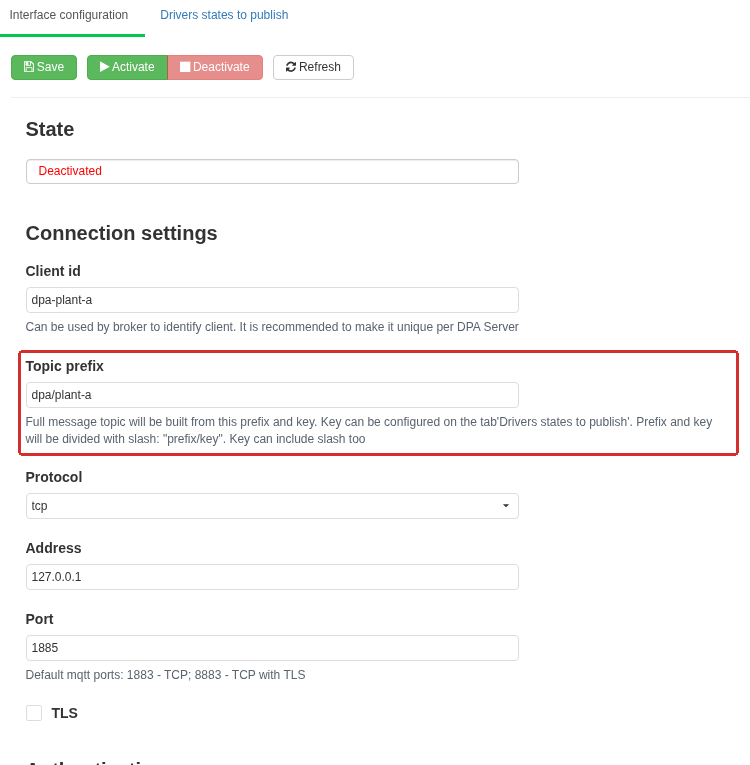
The MQTT Interface configuration tab. The common topic prefix is highlighted; the key of a particular state is configured on the adjacent tab. Host and port belong to the broker reachable from DPA Server.
If the interface is already enabled, click Deactivate. Fill in the parameters, click Save, then Activate. Starting also saves the form parameters first. Refresh rereads the saved settings and state; Reset places the initial parameters into the form, where they still need to be saved. Connection parameters cannot be changed while the interface is enabled.
| Field | What to enter |
|---|---|
| Client id | Unique name for this connection at the broker. The initial value is dpa |
| Topic prefix | Common initial part of topics, for example dpa/plant-a. The initial value is dpa |
| Protocol | tcp — the connection method available here |
| Address and Port | Broker name or IP address and its port. Initial values are localhost and 1883 |
| TLS | Use of a protected connection; additional fields are described below |
| Authentication | Anonymous connection or broker user name and password |
localhost means the DPA Server computer, not the employee’s browser computer. MQTT commonly uses port 1883 without TLS and 8883 with TLS, but the final port is defined by the broker administrator. A port number by itself does not enable TLS.
Use different client IDs for different DPA Servers and other publishers. If another client connects with the same ID, the broker can terminate the previous connection. Such displacement can look like repeated disconnects even when the network is healthy.
Activated shows that a broker connection exists. It does not confirm permission for a particular topic, publication of a selected state, or receipt of a message by the external application. If the connection is lost, the interface attempts to reconnect. Read the error message and verify the result at the subscriber.
TLS and credentials
For an anonymous connection, the broker must allow publication without credentials. When Username and password is selected, enter User name and Password — broker credentials, not an employee’s DPA sign-in password.
When TLS is enabled, select a Certificate. In this implementation, the selected certificate is sent to the broker as the DPA client certificate. Selecting it does not add the broker certificate to a trust store. The certificate must be available to DPA Server; installing and storing it belongs to server administration.
Accept untrusted certificates has broad effect: when enabled, remote-certificate validation is allowed to succeed despite trust errors. This option therefore does not prove the broker’s identity. For a production connection, establish trust for the certificate and broker name and then verify the connection with this option disabled. Validate revocation status of server certificate determines whether revocation-check errors are taken into account. The selected client certificate must have a private key, and the broker must trust it.
TLS and authentication configure different aspects of the connection. Match both to broker requirements: it may require a user name and password, a client certificate, or both. Saving the form does not prove that TLS negotiation and publication authorisation will succeed.
State topic and field names
On Drivers states to publish, click Add, select the required states of active drivers and click Select. For every source, the table contains a topic Key and a field-identifier Prefix. When the list is ready, click Save. Only states added to this table are sent to the broker.
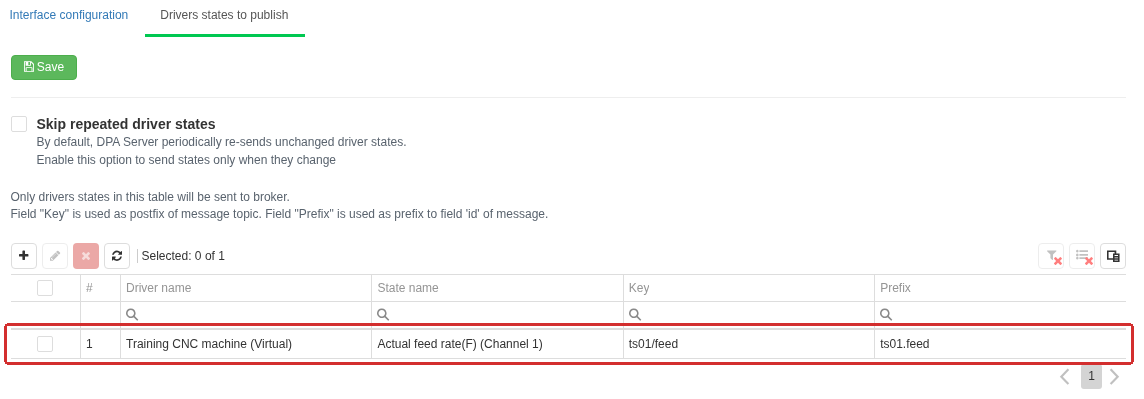
The Drivers states to publish tab. For the selected state, Key defines the topic suffix, while Prefix defines the beginning of field identifiers inside the message.
When Key is empty, DPA uses the driver and state identifiers separated by a slash. When Prefix is empty, it uses the state name with the device number. Skip repeated driver states disables periodic sending of long-unchanged states: after it is enabled, a message is sent when the data changes. The absence of new messages in this mode does not by itself mean that the connection has failed.
The MQTT topic is formed as:
| |
For example, with common prefix dpa/plant-a and key ts01/feed, the message is published to dpa/plant-a/ts01/feed. Slashes in the key create topic levels. If the key is empty or consists only of spaces, driver and state identifiers separated by slashes are used instead. DPA does not automatically add a machine designation based on the Work center name.
Do not confuse these three values:
| Setting | Where it is used | Example |
|---|---|---|
| Topic prefix | Common part of the broker address | dpa/plant-a |
| State Key | Topic suffix after the common prefix and slash | ts01/feed |
| State Prefix | Beginning of each field id inside the JSON | ts01.feed |
Choose keys so that different states have different topics when the consumer must distinguish sources by topic. If topics coincide, messages from different sources are mixed; the retained last message is also shared for that topic. Keep spelling, case and slashes consistent: DPA does not correct addresses for the external application. Do not use subscription wildcards + and # in a topic name being published. A subscriber can use them in its own subscription filter; that is the other side of the exchange.
The publication flag on the source driver state is still required. If the subscriber receives other topics but not the required one, check not only the topic key but also the source state, selection in the MQTT list and retransmission suppression.
Message contents
The message body is UTF-8 JSON. Root field timestamp contains the state-result time and values contains its fields. Each field carries identifier id, value v, successful-result flag q, time t and error text e. Time is Unix epoch milliseconds. For example:
| |
id is composed from the state prefix and field name separated by a dot. With an empty prefix, the state name with the device number is used. v preserves the value type. q shows whether state acquisition succeeded; on error, known fields are sent with v: null, q: false and an explanation in e. Do not interpret a read error as a zero measurement. Time t belongs to the source data, not to the moment when the subscriber reads the message.
With MQTT 5, DPA additionally sends a Content Type property with value JSON. This is an MQTT packet property; no additional field with that name is added to the body. The application must be able to read the ordinary JSON body as well.
Protocol version and QoS
Quality of service contains the protocol version, QoS level and Timeout. Durations use hh:mm:ss; the timeout may be from one second to ten minutes, with initial value 00:00:30.
Versions 3.0.0, 3.1.1 and 5.0.0 are available. Choose a version supported by both broker and consumer. The initial version is 5.0.0. The message-expiry interval from DPA settings is transmitted only with MQTT 5.
QoS is the delivery level for one message between MQTT participants:
| Form selection | Level | Meaning |
|---|---|---|
| At most once | 0 | No delivery acknowledgement; loss is possible |
| At least once | 1 | Acknowledged delivery; duplicate delivery is possible |
| Exactly once | 2 | Acknowledgement exchange prevents duplicate delivery within this MQTT transfer |
The initial level is QoS 1. DPA uses the selected level when publishing to the broker. The form hint saying that QoS applies only from broker to consumer is inaccurate. The consumer’s subscription specifies its own level; final delivery to the consumer also depends on broker and subscription capabilities.
QoS 2 does not promise exactly-once execution of a business operation across the entire external system. Message processing, result persistence and application protection against repeated execution remain consumer responsibilities. This DPA interface also has no durable event queue for replaying the complete history after an outage: events that occur while the interface is not working are not accumulated for such replay. After recovery, verify new publications.
Fragmentation and packet size
Under Message buffering setup, Disable packet fragmentation is enabled initially. Here fragmentation refers to how one MQTT packet is written to the network connection. It does not split one large state into several independent JSON messages and does not configure the number of fields in a message.
When the option is cleared, Maximum packet size, bytes becomes available. In this release, it specifies the maximum incoming MQTT 5 packet size advertised by the client. It does not limit outgoing JSON size: a larger message can still be published as one packet. Do not use this field as a way to split outgoing data or as proof that the broker accepts a large JSON body. The server accepts values from 1024 to 268435456 bytes, with initial value 1024. Check broker and consumer limits separately.
Retained message and expiry
Retain messages enables retain. The broker stores the latest retained message for a topic and gives it to a new subscriber immediately after subscription. This is useful for obtaining the last known state even when DPA is currently disconnected.
Retain does not create measurement history: a new retained message replaces the previous retained message in the same topic. It also does not make the value fresh. The consumer must evaluate data time t and quality flag q, not the time at which it connected. Changing DPA settings and disabling retain does not automatically remove a message already retained by the broker.
Messages expiration interval sets message expiry in MQTT 5. DPA sends it to the broker in seconds. The interval also applies to a retained message: after expiry, the broker no longer provides it to a new subscriber. Do not use a fractional second as an independent expiry interval. With MQTT 3.1 or 3.1.1, this property is not sent even when the field is filled in.
An empty field means that DPA does not specify an expiry interval. It does not override broker storage rules or limits and does not promise infinite history. For messages kept while a subscriber is offline, the subscriber session, subscription and broker policy also matter; retained messages and an offline subscriber’s queue are separate mechanisms.
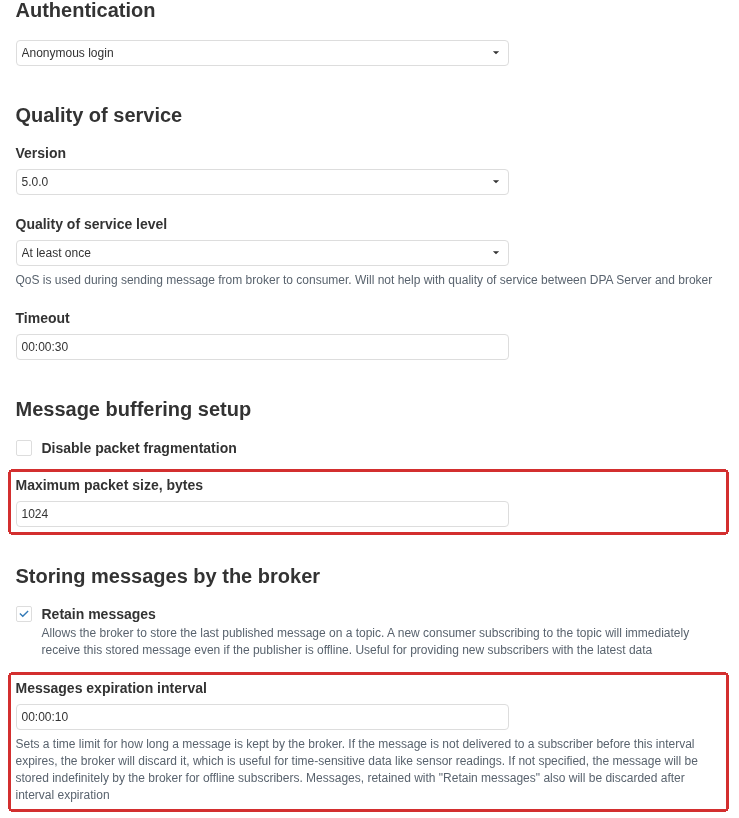
MQTT delivery and retention settings. The outline highlights the advertised receive-packet limit and the message-expiry period. Retain messages allows a new subscriber to receive the last retained value for the topic.
Verification with a subscriber
- Connect an external subscriber to the same broker and subscribe to the full topic of the required state. Check its own permissions and QoS level.
- In DPA, check the source state, selection on the publication tab, key and prefix. Save the settings and start the interface.
- Wait for a message. Match topic,
id, value, quality and time with the selected source. Activated alone does not prove this result. - If retain is enabled, connect a new subscriber. Distinguish the immediately delivered retained message from the next live update by data time and the subscriber’s retain flag.
- If an MQTT 5 expiry interval is configured, stop new publications and verify that the retained message is absent after expiry. Continued updates replace the retained message and restart the interval.
- Check recovery after a short broker outage: first verify a new message after reconnection, then its processing by the application. Do not treat a restored connection as replay of missed history.
If messages are absent, begin with three places: the source driver state, the MQTT connection state and the broker log. A working subscription to a similar topic does not prove that the full address is correct. A single publication can fail while the connection remains active: check whether the topic is valid, whether the publisher has write permission and whether broker size limits are satisfied. After correcting the problem, wait for a new source message.
6. Purpose and boundaries of the public API
The DPA Host API lets an external program call DPA functions over HTTP: read reference and production data, create or modify objects, and perform available operations. For example, an integration can retrieve a list of Products, create a Job, or read its execution results. Account permissions and the rules of the objects themselves still apply.
For a program, the important thing is the operation contract: the exact HTTP address and method, input parameters, response format and execution conditions. The presence of a suitably named class in the data model does not mean that it can be sent to an arbitrary address to obtain the required action. Start with the operation that matches the task.
Where to find the description
Open Settings menu → API description and select the Host tab. It contains embedded Swagger — an interactive view of the OpenAPI description. OpenAPI represents the contract in machine-readable form: paths, operations and data schemas. The Host document itself is available at /docs/Host/docs.json relative to the DPA Host address. The Swagger page can also be opened separately at /docs/index.html.
Tabs for available microservices can appear alongside Host. Their set depends on configured connections and synchronisation state. If a microservice operation is needed, select that service’s description: the Host document does not replace the documents of other components. The presence of a tab does not prove that the selected service will respond at this moment.
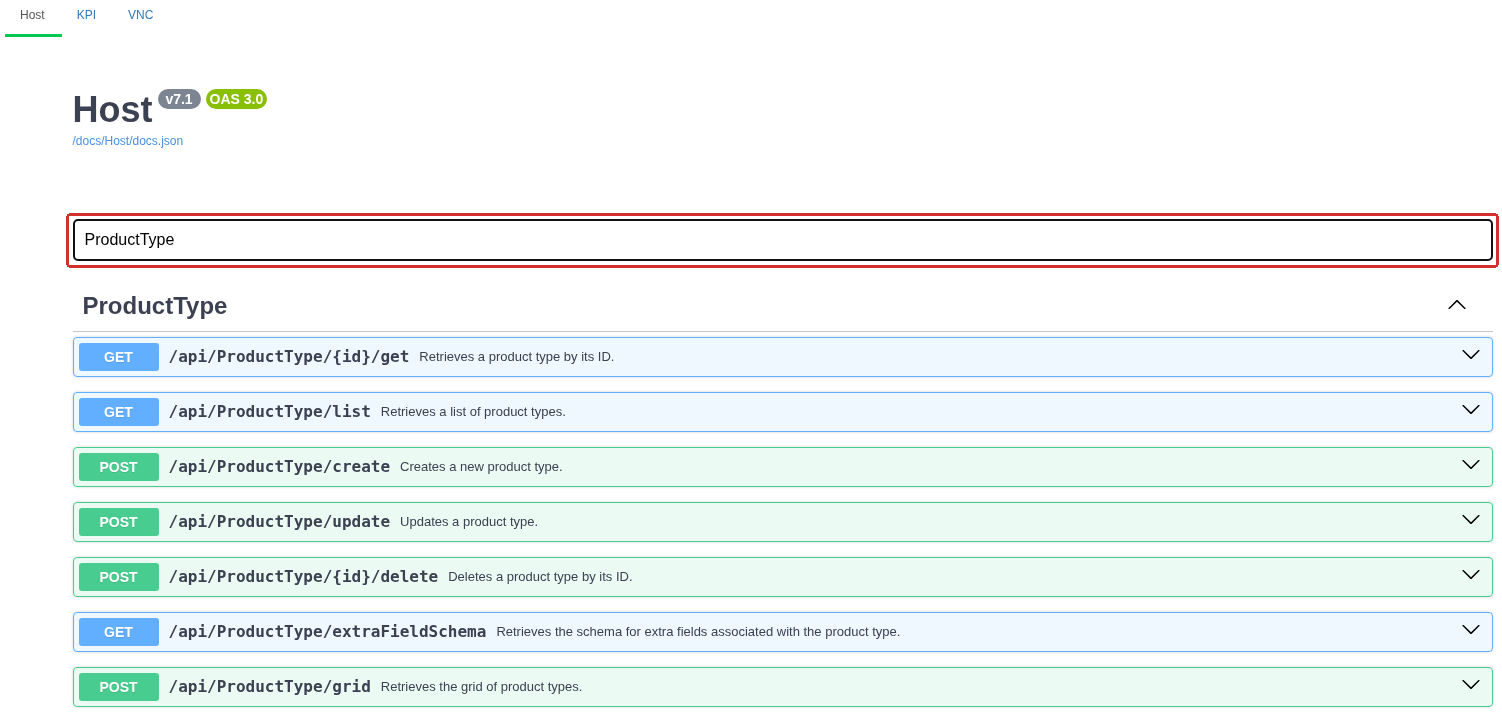
The API description area on the Host tab. Filter by tag leaves the ProductType group, where list reading, creation, update and deletion of product types are shown as separate operations.
Use Filter by tag to keep one operation group, for example ProductType for product types. This filters groups; it is not a full-text search inside every parameter. Expand the required row to see its method, path and brief purpose. Group and schema descriptions can be in English even when the main DPA interface is in another language.
The following groups are useful starting points:
| What is required | Where to start in the Host description |
|---|---|
| Product, type and version reference data | Product, ProductType, ProductVersion |
| Technologies and production planning | Technology, ProductionOrder, WorkOrder, Jobs |
| Enterprise structure and equipment | EnterpriseStruct, EnterpriseStructManagement, Equipment |
| Production history and analytics | Journals, Gantt, Analytics |
| Tickets and Signals | Ticket, Signals, Signals2Handler, Signals2Trigger |
| Accounts and sign-in methods | Account, User, Security, SecurityManagment |
These names are pointers into the catalogue. Within a group, choose the specific operation by purpose and parameters: similar names do not guarantee the same data scope, permissions or side effects.
How to read one operation
Consider GET /api/ProductType/{id}/get, which retrieves a Product type by identifier. GET is the HTTP method; {id} is a placeholder in the path, not a literal part of the address. Replace the braces and id with the identifier of the selected record. Obtain that identifier from a DPA response; do not derive it from a name or table row number.
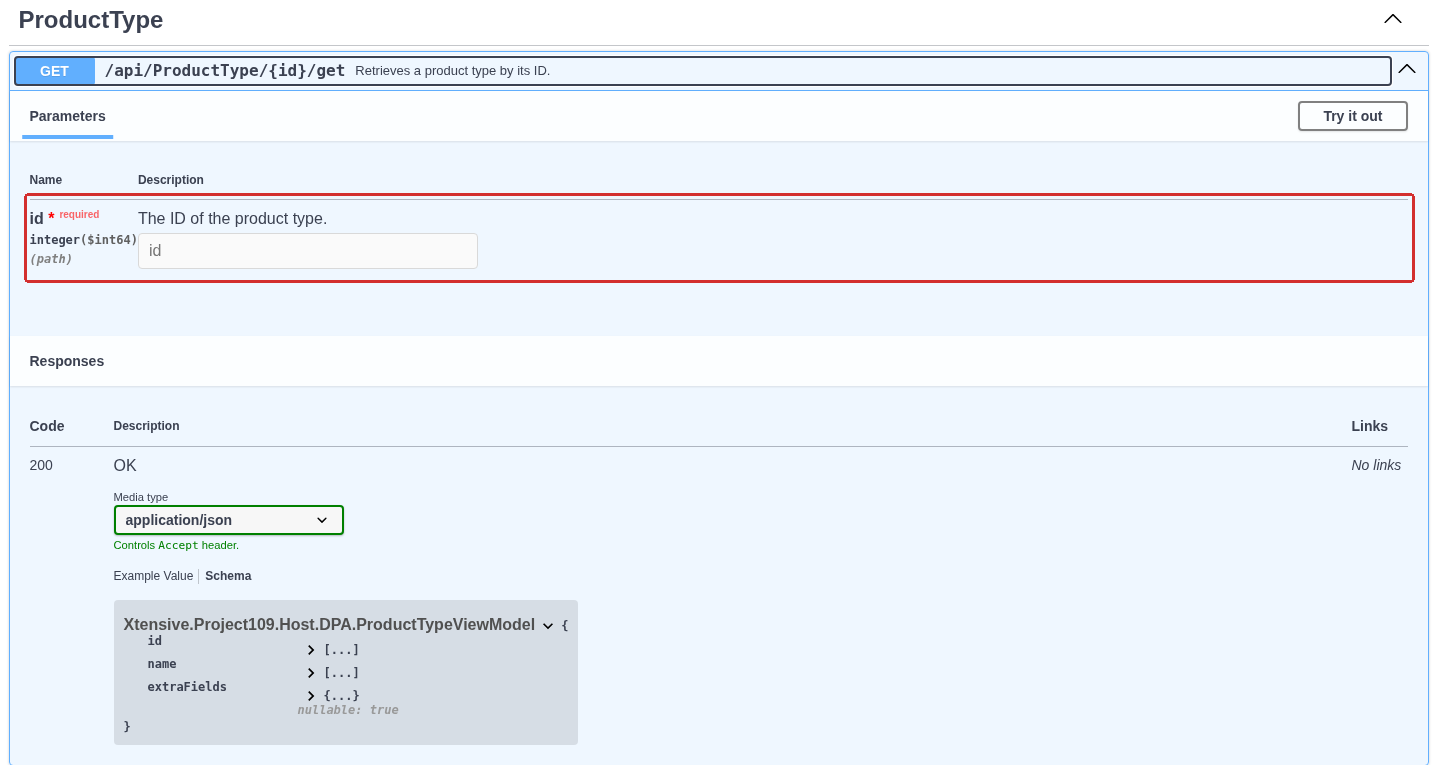
Expanded operation GET /api/ProductType/{id}/get. The required path parameter id is highlighted; the successful response code and returned-object schema are shown below.
In the expanded description, check:
- Parameters — names, types and locations of parameters.
pathmeans a value in the URL path;querymeans the query string after?. An asterisk andrequiredmark a required parameter. - Request body, when present — the body and its schema. For JSON, use
Content-Type: application/json. Do not move the body into the query string or wrap an object in an extra property unless the contract requires it. - Responses — the expected response shape.
application/jsonhere identifies the desired response format through theAcceptheader; it does not replaceContent-Typefor a body being sent. - Schema — fields and nested data types. Example Value shows an example structure, but placeholder identifiers and strings must be replaced with real data.
Do not choose a method by habit. For ProductType, for example, reading the grid uses POST /api/ProductType/grid, updating uses POST /api/ProductType/update, and deletion uses POST /api/ProductType/{id}/delete. POST is used both for a read with a compound filter and for modifications. Do not infer the nature of an action from the HTTP method or Swagger row colour alone.
Try it out makes the fields editable, and Execute actually sends the request. This is a live DPA function: an operation that creates, deletes, starts or modifies something performs that corresponding action. Begin with reading an object you understand. Credentials and permissions are covered in Section 7, and a complete sample program in Section 8.
Data schema and actual result
Every operation has its own input model and response model. InputModel usually denotes input data and ViewModel a representation of a result; always inspect the schema of the selected operation. Do not send an entire read response back as an update request: service fields and nested views can differ from the input model.
For a Product type, the input model contains id, name and extraFields. Creation uses a new name and the server returns the identifier of the result; an update requires the identifier of an existing record. extraFields belongs to configured additional fields. Their current composition can be read through GET /api/ProductType/extraFieldSchema. The dictionary schema shown in Swagger does not enumerate the extra fields configured in a particular installation.
Read integer($int64) as a 64-bit integer. In C#, long is suitable for such an identifier. For dates, inspect the format and time-zone offset: time in the JSON API must not automatically be interpreted as the millisecond number used by Kafka/MQTT messages. For an enum, use values from that enum’s own schema rather than text from a localized UI label.
Distinguish an absent field, null, an empty string and an empty array. Their effect is defined by the particular operation. For example, when a Job is updated, the component-reservation list represents the desired reservation set: sending only one new row instead of the complete required set can remove previous reservations. A partial JSON body does not automatically become a partial object update.
A response can contain service type information, including $type. Ordinary reading of id and name does not require parsing an assembly name from such a field. If an input model permits several variants of a nested object, read its variant-selection rules; do not substitute the name of an arbitrary internal class.
Lists, grids and data portions
GET /api/ProductType/list returns an array of Product types. POST /api/ProductType/grid accepts grid-query parameters and returns an object containing data and, when a total count is requested, totalCount. These are different response shapes; do not try to parse both as an array.
Example grid request body:
| |
skip is the number of rows to omit and take is the number to request in this portion. For the next portion, increase skip by the number already read. totalCount applies to the complete selected result set, not to the length of one data portion. Fix the sort order when traversing several portions; if the reference data is being modified concurrently, such traversal is not a single point-in-time snapshot.
Filter and sort parameters must refer to fields in the model used by that grid. Do not copy them without checking into another grid: another method can use a different row model and different conditions. Restrict time range, equipment and portion size where the contract provides those parameters.
Permissions, errors and retrying a request
The Host catalogue does not describe the authorisation scheme and every permission check on every row. The absence of a lock symbol or a separate 403 in Swagger does not make an operation anonymous. Successfully reading a list also does not grant permission to create or delete its records. A user’s access scope is applied by operations that work with the corresponding production data; an administrator’s result must not automatically be assumed to be the result for any other account.
After a request, read the actual HTTP status code and response body. Do not treat every JSON response as success, and do not try to parse an HTML sign-in page as a DPA object. An error can be a string or an object containing a message; a successful operation can return an object, identifier, array, or no body. Handling must match the selected operation.
If a modifying request times out or the connection is interrupted, the result can be indeterminate from the client’s point of view: the server may already have completed the action. Before repeating creation or result registration, first check whether the required object already appeared. This catalogue does not promise a universal key that turns every repeated DPA HTTP request into a safe retry of the business action.
Develop an integration against the description from the installed system and recheck it when changing releases. The v7.1 label in the documentation title does not freeze the detailed contract set of every build. This chapter shows how to choose and verify an operation; take the complete path and schema list from the installed Host document.
7. Authorising API requests
To perform a protected operation, a program must first prove the account identity — authenticate. DPA then checks whether that account is allowed to perform the requested action. A correct password does not replace an edit permission, and an API-documentation page opening successfully does not prove access to the operations described there.
For an ordinary application calling Host, consider two methods: Basic credentials in every request, and signing in with a user name/password followed by use of a session cookie. Both perform operations on behalf of a DPA user.
Basic: credentials in every request
The user must have the Login/Password sign-in method configured and Authentication login/password must be enabled in the system. Accounts and sign-in methods are described in Chapter 2. Basic uses the login and password of this sign-in method. A Windows domain password or an external user-provider token does not automatically become a local DPA password.
The program adds this header to every request:
| |
The angle brackets and explanation are not part of the real header. First concatenate login, colon and password into one string; then obtain its UTF-8 bytes and Base64-encode them. Use the exact scheme name Basic. Do not encode the login and password separately and do not send the Base64 value in the request body. A colon inside the password is preserved: the first colon in the decoded string is the separator.
Base64 is reversible encoding, not password encryption. For connections between computers, use HTTPS and validate the Host certificate. Store the password outside the program source and do not write the authorisation header to logs. The example in the next section reads credentials from the environment.
There is no need to call POST /api/Account/Login before using Basic. This method does not issue a separate access_token or a Bearer token: the program proves the user with its Basic header in every request.
Sign-in and session cookie
The second method suits a client that supports cookies: after one sign-in, it stores the server-issued session and sends the cookie with subsequent requests. To sign in, send POST /api/Account/Login with JSON:
| |
The values above are placeholders; a real request needs the actual password. Set Content-Type: application/json. A successful response contains isAuth: true, and the server issues a cookie through Set-Cookie. A cookie-capable HTTP client must retain it and send it to the same Host. Copying only the JSON response does not preserve the session, and the sid field is not a token for a Bearer header.
Check not only HTTP 200 but also isAuth. If a password change is required, sign-in can return 200 with isAuth: false and passwordMustChanged: true. The user is not authenticated yet; a protected read after such a response remains unavailable. With an incorrect login or password, the sign-in operation returns 400 with a message. This is different from 401 on a protected request without valid authorisation.
rememberMe affects whether the cookie is persisted between client sessions. It does not make sign-in permanent. After the cookie expires or is lost, sign in again. POST /api/Account/Logout clears the cookie and returns a redirect to the sign-in page. For an API client, this is session termination, not a JSON data response. Logging out of a cookie session does not change the password: Basic with valid credentials remains an independent sign-in method.
Why a Swagger check can be misleading
Swagger opened from DPA in the same browser uses the session that already exists there. An operation can therefore succeed without manually entering an authorisation header. Such a check demonstrates the permissions of the browser user, not those of an independent external program.
A valid cookie also takes precedence over Basic in the same request. If the browser is already signed in as an administrator, even an incorrect Basic header does not prove failure: the request can succeed through the administrator cookie. Test the external client separately, without another user’s stored cookies.
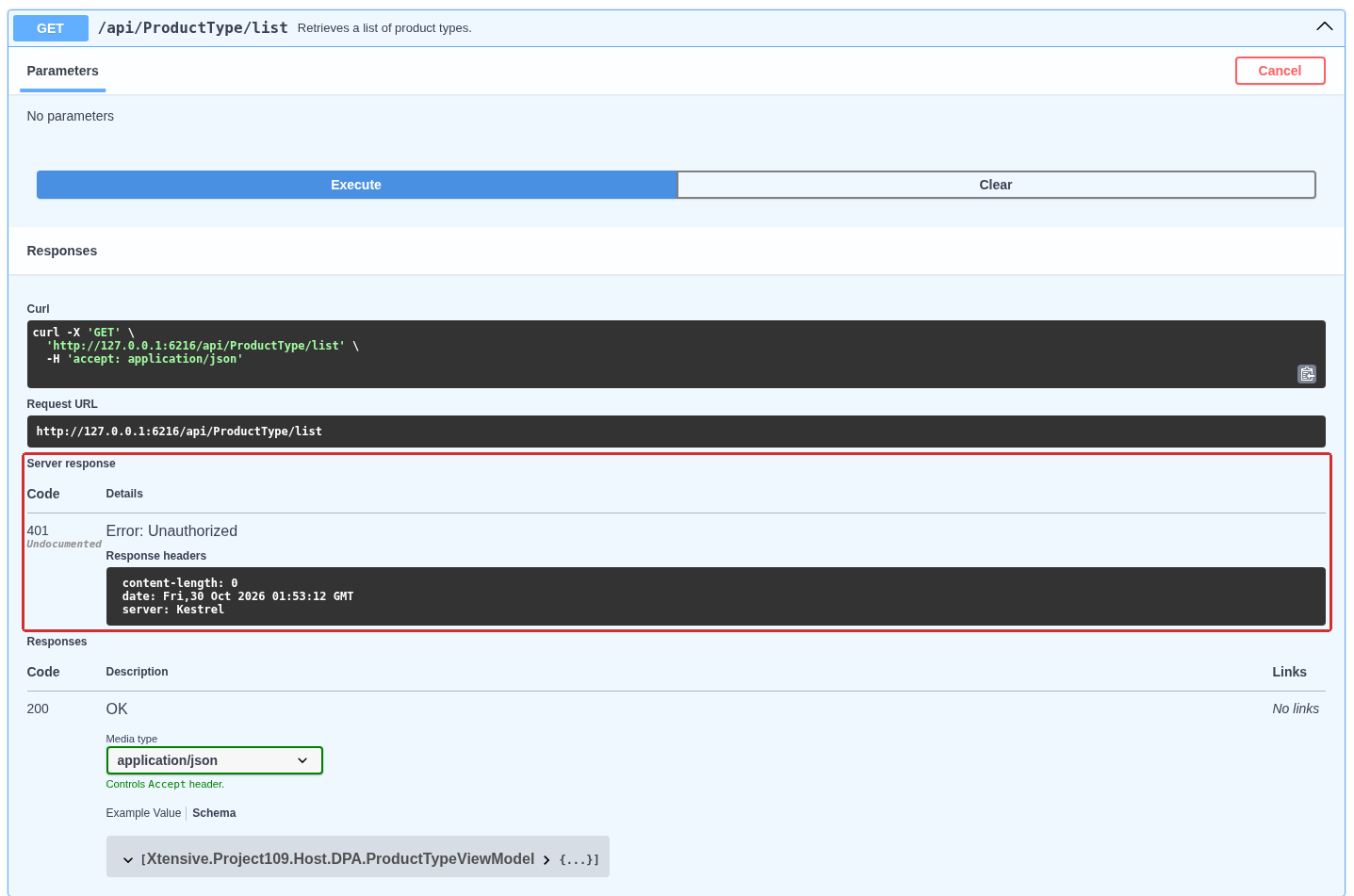
A product-type-list request without valid authentication. Server response contains 401 Unauthorized; Swagger separately shows the documented successful 200 response below it. Undocumented refers to the response description and does not remove the authentication check.
The Host catalogue has no separately configured Authorize form for Basic. Send requests from your own HTTP client, or use an existing browser session while understanding whose account Swagger is using. The absence of a lock icon on an operation and an Undocumented label on a returned 401 do not mean that the operation should be anonymous: the status came from the server even though it is not listed among the documented success responses.
Permissions after sign-in
Assign the integration account the required permissions through that account and its groups. Check read and modify access separately. For example, reading the Product-type list requires sign-in, while creating, updating and deleting additionally require Edit reference books in “Reference books” module (except for those whose access is limited by certain rights). A user without this permission can retrieve the list but receives 403 when creating a record.
For production requests, the user’s access scope and the operation’s own conditions also matter: selected Work centers, Job state, permitted transition and related objects. Do not replace a check performed under the integration account with a successful administrator request.
Disabling a user stops new protected requests both with that user’s Basic credentials and with an already issued cookie. A forced-password-change requirement has a different boundary: it blocks form sign-in, but in this release it does not block Basic with the same correct password. Do not rely on that flag alone for immediate revocation of integration access. Disable the user to stop further requests. Changing the password stops Basic with the old password, but by itself does not close already issued cookie sessions.
Other sign-in methods and tokens
Do not mix credentials from different interfaces:
| Data | Intended use |
|---|---|
| Local DPA login and password | Basic or cookie sign-in through Account/Login |
| Windows sign-in and Microsoft SSO | The corresponding configured sign-in process; a successful browser sign-in creates a DPA user session |
| SCIM provider token | Provisioning users and groups through /scim; configuration is described in the external-identity section of Chapter 2 |
Service apiToken of a connected application or microservice | Special service-to-service interaction within configuration of that component |
Service tokens and temporary internal grants are not a universal password for every external application. For an ordinary client in this chapter, use the Basic or cookie-session method described above with a known account. Configuring SSO does not automatically make an arbitrary OAuth token a replacement for the Host Basic header.
Distinguishing failures
| Result | First checks |
|---|---|
401 on a protected operation | Valid cookie or correct Basic credentials; enabled sign-in method; whether the user is disabled |
403 | Which account the request is using and whether it has the required permission for the action |
400 on Account/Login | Sign-in error text, exact login/password and whether that sign-in method is allowed |
200 but isAuth: false on sign-in | Whether a password change is required; a protected session has not yet been issued |
| HTML or redirect instead of expected JSON | Whether the request was redirected to the sign-in page; whether the HTTP client hides the intermediate response by following redirects automatically |
500 after manually constructing Basic | Check header syntax and Base64 validity: malformed Base64 in this release can produce 500 instead of a 401 rejection |
Do not endlessly repeat the same request after a sign-in failure. Correct the cause, perform a simple protected read, and only then test the target action. A 500 error by itself does not identify the cause: when Basic is formed correctly, read the error body and Host log.
8. Minimal C# request examples
The example below is a self-contained .NET 8 console client. It calls the Product-type reference book: lists records, creates its own record, verifies it with a separate read, renames it, and reads it again. Deletion is left as a separate command so that the created record can first be found in the DPA interface.
The client uses Basic and deliberately does not store cookies. It also does not follow redirects automatically: instead of unexpectedly receiving a sign-in page, the program shows the response code and error text. Use HTTPS for an ordinary connection. The example permits unencrypted HTTP only for a loopback address such as http://127.0.0.1:6216.
Preparing the project and account
Create a console project without external NuGet packages:
| |
Use a separate local DPA account for the example. Sign-in permission is sufficient for reading the reference book. demo creates and modifies a Product type, so also assign Edit reference books in “Reference books” module (except for those whose access is limited by certain rights). Do not use a personal administrator account in a permanent integration.
Replace Program.cs with the following code:
| |
Run parameters
Pass the Host address, login and password through environment variables. In Bash, the password can be read without displaying it on screen:
| |
In PowerShell, read the password through a protected prompt and pass it temporarily to the dotnet process through the current session environment:
| |
Do not put the password in a command line, source file or shared configuration file. After the session ends, remove DPA_PASSWORD from the environment if the terminal will continue to be used for other work.
Client modes:
| Command | Result |
|---|---|
dotnet run -- list | Reads GET /api/ProductType/list and prints server id values and Product-type names |
dotnet run -- demo | Creates a Product type with a random suffix, reads it, renames it and verifies the result with another read |
dotnet run -- delete ID_FROM_OUTPUT | Deletes the record created by the example using its positive server id |
For delete, substitute the number printed by demo, not the literal text ID_FROM_OUTPUT. Do not use an arbitrary id from an existing reference book: the delete command does not distinguish an example record from a production record.
Checking the result in the interface
After demo, open Applications menu → Reference books, then double-click Product types. Find the exact name API example <random suffix> — renamed. The # column in this table is the row ordinal, not the server id, so use the number printed by the program for subsequent API requests.
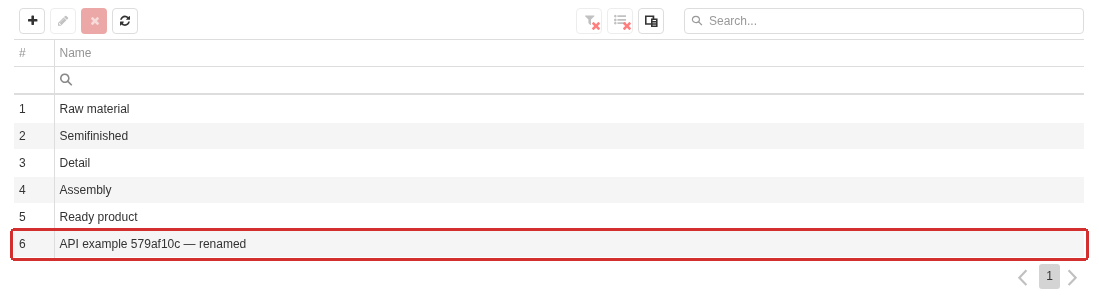
The Product type created and renamed by the API application in the ordinary Product types reference book. The exact name with its random suffix is highlighted. The # column contains the row number, not the object’s server id.
The empty extraFields object in the example applies only to the newly created example record. When updating an existing Product type, first read its actual additional-field schema and values. Do not send an empty dictionary as a universal way to “leave fields unchanged”: the contract of a particular installation can contain required additional fields.
Errors and an indeterminate modifying-request result
SendAsync treats only 2xx codes as success, reads the response body and reports the server message. 401 indicates a sign-in problem or disabled user, 403 means the account lacks permission for the action, and 400 usually means that the input does not match the operation contract. Diagnose and correct these responses rather than repeating the same request with unchanged data.
After a timeout, the result of a modifying request is unknown: the server may have completed the action before the client stopped waiting. Do not automatically repeat create, update or delete. First perform a safe read or search by the unique name and determine the actual state.
In this release, requesting a missing Product type can return 500 with an object-not-found message instead of the expected 404. Do not immediately interpret such a response as the whole Host being unavailable. Read the error text, retrieve the list again and verify the id that was used. Repeating deletion of an already deleted record can produce the same 500.
After verification, delete only your own example record with delete and the number printed by demo. Then run list again and verify that the exact example name has disappeared. Deleting by the ordinal shown in the # column is not allowed.
9. Verifying an external interface
An external interface is verified only when the expected result appears on the external side of the exchange. Successfully saving a form, an Activated state, a broker connection, or a successful Swagger request from a browser that is already signed in verifies only one part of the path.
For an end-to-end check, define a control scenario in advance: what action creates the result, which source participates, where the result must arrive, and how a new event will be distinguished from old data. Use a control marker — a unique value, name or identifier created specifically for the current check. Associate it with the action time so that the new result can be distinguished from previously stored data.
Preparing a control scenario
- Name the direction of exchange and the final recipient. For Kafka and MQTT, the recipient of the check is not only the broker but also the external consumer that read the record or message.
- Choose a separate test object or safe action. For example, use your own Product type for the API, a test published state for Kafka/MQTT, or a controllable VNC target that is not real production equipment.
- Record the exact source: DPA Server, driver, state, channel, topic, topic partition or API path. A similarly named different object is not sufficient.
- Specify the identity of the external side: API account, OPC UA application certificate, MQTT client ID or Kafka consumer group.
- Define the expected result and maximum wait time. Preserve original values of any settings changed for the test so they can be restored afterwards.
| Interface | Control source or action | Where to observe the final result |
|---|---|---|
| VNC | Open the selected target; for control, one safe predefined input action | Image and expected action at the VNC target itself |
| OPC UA Server | Change a test value at the source; transfer a separate test CP file | OPC UA client read/subscription; for file transfer, operation state and checksum of the received contents |
| Kafka | New value of a state with publication enabled | External consumer of the required topic and partition |
| MQTT | New value of a state with publication enabled | External subscriber to the exact topic |
| API | Read or modify your own test record with a unique name | HTTP response, subsequent independent read and, where useful, the ordinary DPA screen |
Do not use an old event as the control marker. For CPs, distinguish file transfer from activation: successful upload of a test file does not authorise running it on equipment.
End-to-end verification for each interface
VNC. Follow the path from user assignment to opening a specific target described in Section 2. For viewing, wait for a changing image rather than only an empty client page. For control, perform one predefined safe action and verify it at the target. A visible screen does not mean that control is permitted; separately account for the Control assignment and input restrictions on the target VNC server.
OPC UA Server. Connect an independent OPC UA client to the exact endpoint from Section 3. Verify the selected security policy and certificate trust, then perform Browse, Read and a subscription to a specific node. Change only the test source and obtain a new value with a new source timestamp. For file transfer, compare size and checksum before and after the transfer; check the completion state separately from the mere presence of a file node.
Kafka. Start the external consumer before the control change and point it at the exact topic. After changing the published state, compare key, partition, offset, timestamp and JSON with the expected parameters from Section 4. The offset — the record position within a topic partition — helps distinguish a new record from one already read. When testing connection recovery, first record the loss of connectivity, then create another control marker after recovery and obtain that new record. Activated by itself after the broker returns does not replace this check.
MQTT. Connect a separate subscriber before creating the control value and subscribe to the exact topic from Section 5. Compare topic, field names, value, quality, time, QoS and expiry properties with the configuration. If retain is enabled, separately record the retained-delivery flag and message time: a message delivered immediately after subscription can be the previous retained value. To verify expiry, reconnect after the configured interval and use a new control marker for the next test.
API. Use a new client without cookies from another browser session. Choose method, path and body from the contract in Section 6. First perform a simple authorised read using Section 7, then the target action. After a modification, read the object with a separate request and compare the server id, unique name and changed fields. The C# example can be used for a training check. Delete only the object created by the check and finish with another list read.
Proving that the result is fresh
The same value before and after an action does not show that the whole path is working. Establish freshness with several signals together:
- the unique control marker is present at both source and recipient;
- source time belongs to the current action and is converted to a known time zone;
- Kafka offset increased in the required partition, while the API returned a new server
id; - the MQTT consumer distinguishes a normal delivery from a retained message;
- the OPC UA subscription received a change after it was established rather than only an initial value;
- a subsequent independent read returns the same result that the modifying request reported.
Also record action-start time, receipt time and the selected wait window. A long delay may be an allowed queue or retry, but it should be explained by configuration. Do not move the start of the window retroactively after a delayed result arrives.
Negative check and recovery
When commissioning an interface, create one controlled failure condition on a test object: use incorrect credentials, close a test port, disable publication of the test state, or temporarily stop a test broker. First obtain the expected failure, then restore the condition and repeat the scenario with a new control marker. The disappearance of an error message does not replace a new result at the recipient.
| Observation | First area to check |
|---|---|
| Client cannot establish a connection | Address, DNS, port, route, firewall, TLS and certificate trust |
| Connection is established but there is no new data | Exact source, publication flag, state selection, interface operation and correct topic |
| Broker received data but the external consumer did not | Topic and partition, client group/ID, read permissions, initial offset and message schema |
API returns 401 | Sign-in method, login/password, user state and absence of an unexpected cookie |
API returns 403 | Permission for the specific action and the integration account’s access scope |
| An old value is received | MQTT retained message, Kafka offset, source time, retransmission suppression and selected time window |
| VNC shows the screen but does not send input | Control assignment, selected password and input restriction on the target itself |
| Errors disappear after recovery but there is still no result | Create a new control marker and repeat the path to the final recipient |
Do not change address, permissions, format and retry settings simultaneously: with several changes at once, it is impossible to tell which one restored the path. Verify one area, read the saved setting back, and only then proceed to the next.
Recording the verification result
Keep a compact record from which the check can be repeated:
| Field | What to record |
|---|---|
| Interface and direction | VNC, OPC UA Server, Kafka, MQTT or API; who initiates the exchange |
| Endpoint | Name or address, port, API path, or topic and partition, without secrets |
| Client identity | Account, certificate, consumer group or client ID, without password or private key |
| Source | DPA Server, driver, state, channel or modified object |
| Control marker | Unique value, name, id, time, offset or checksum |
| Recipient result | Exactly what the external client read or performed, and when |
| Failure and recovery | Which one condition was broken, which failure was observed, and which new marker arrived after recovery |
| Cleanup | Which test object was deleted and which settings were restored |
Verification is complete when a new control marker reaches the final recipient, its contents match the source, the expected failure was localised, and a new result succeeds after recovery. This record does not replace component logs during investigation, but it prevents an intermediate green status from being mistaken for a healthy external interface.
← Chapter 6. Workplaces: Operator, Foreman and Maintenance · Contents · Chapter 8. Monitoring production and analysing what is happening →