1. What DPA is and the problem it solves
DPA is a digital production management system. It builds an operational picture of the enterprise from data received directly from equipment and relates that picture to production context: Work centers, Jobs, Control programs, personnel, Downtimes, output, maintenance, and other production objects.
At its simplest, DPA answers two different but closely related questions:
- what is happening in production right now;
- what happened earlier, in what context, and with what result.
The first part is real-time observation. DPA receives and processes machine data so that users can see equipment states, Indicator and process-parameter values, running processes, and other operating information available for a particular Work center. The purpose is to maintain a current understanding of production at any moment, rather than receive a retrospective report once per shift: which Work centers are running, which are idle, what is being performed, what values are arriving from equipment, and where an event needs attention.
Machine data alone, however, is not a complete production model. A signal value, state change, or CP name reported by a machine becomes much more useful when DPA understands its context. The same point in time can relate to a particular Work center, shift, Job, Technology, Control program, Operator, Downtime reason, or another production object. DPA therefore goes beyond collecting telemetry: it relates equipment data to what the enterprise planned to do and what actually happened.
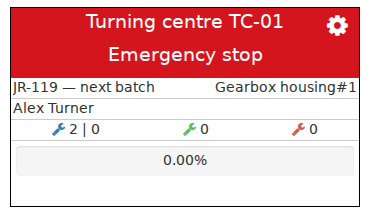
The operational Work center view connects the current equipment state to its production context. Machine data is presented as part of the work taking place at a specific production location.
History gradually forms from the real-time data stream. States become time intervals, events become Journal records, Job execution becomes actual results, and deviations become material for analysis. Users can move from “what is happening now?” to “what happened during this shift?”, “why was the equipment idle?”, “which Control program was running?”, “how much output was registered?”, or “how did the indicator change over the selected period?”.
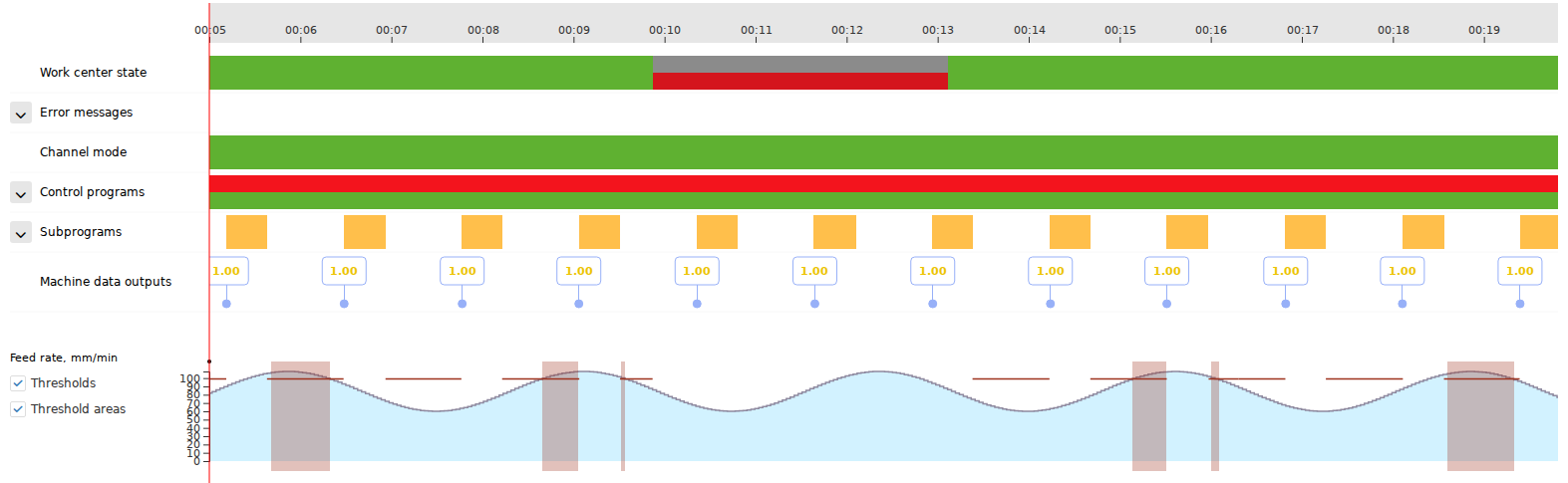
The Gantt chart displays the stored history of a Work center on a shared time axis. State intervals and selected production data can be compared within the same period, turning the current picture into a history that can be revisited to investigate what happened on the equipment.
This relationship between the present and history is especially important in production analytics. An analytics screen in DPA need not be a report about a period long since completed. Dashboards can show both current values and measures accumulated since the start of a shift, day, or another period, regularly refreshed as new data arrives. A large shop-floor Dashboard can therefore show the current equipment state alongside the production result accumulated so far. The same system later supports retrospective examination through charts, Journals, KPIs, and Reports.
DPA connects the equipment and human sides of production. Equipment supplies actual data, but many production events acquire their final meaning through people’s work: an Operator executes a Job and registers output; a Foreman supervises progress and handles exceptions; maintenance staff receive and perform technical tasks; technologists and engineers prepare Control programs and production context; and managers and analysts use the accumulated picture to make decisions.
DPA is therefore best understood as a shared environment where equipment data, the production plan, people’s actions, and actual execution history are connected, rather than as an isolated machine-monitoring system or a collection of independent production modules.
Deploying DPA does not require every possible process to be introduced at once. A deployment can begin with equipment connections and real-time monitoring, then expand into analytics, Downtime accounting, Control program management, production Jobs, personnel workplaces, maintenance, reporting, and integrations. Each installation uses the capabilities needed by its production process.
The central idea can be expressed in one sentence: DPA shows what is actually happening in production now, relates events to their production meaning, and retains that picture so that it can be revisited to analyse, manage, and improve the process.
2. Understanding DPA through the production cycle
The interface of a large production system is inevitably divided into pages, reference books, Journals, workplaces, and functional modules. This helps navigation, but the structure of menus alone does not explain DPA. A real production process rarely fits into one menu item: a task passes through several system areas, and the same object appears in different views according to what the user is doing.
Throughout this guide, DPA is therefore considered primarily as several connected parts of the production cycle:
receive data → understand the state → add production context → prepare the work → plan → execute → observe → respond → retain and analyse the result.
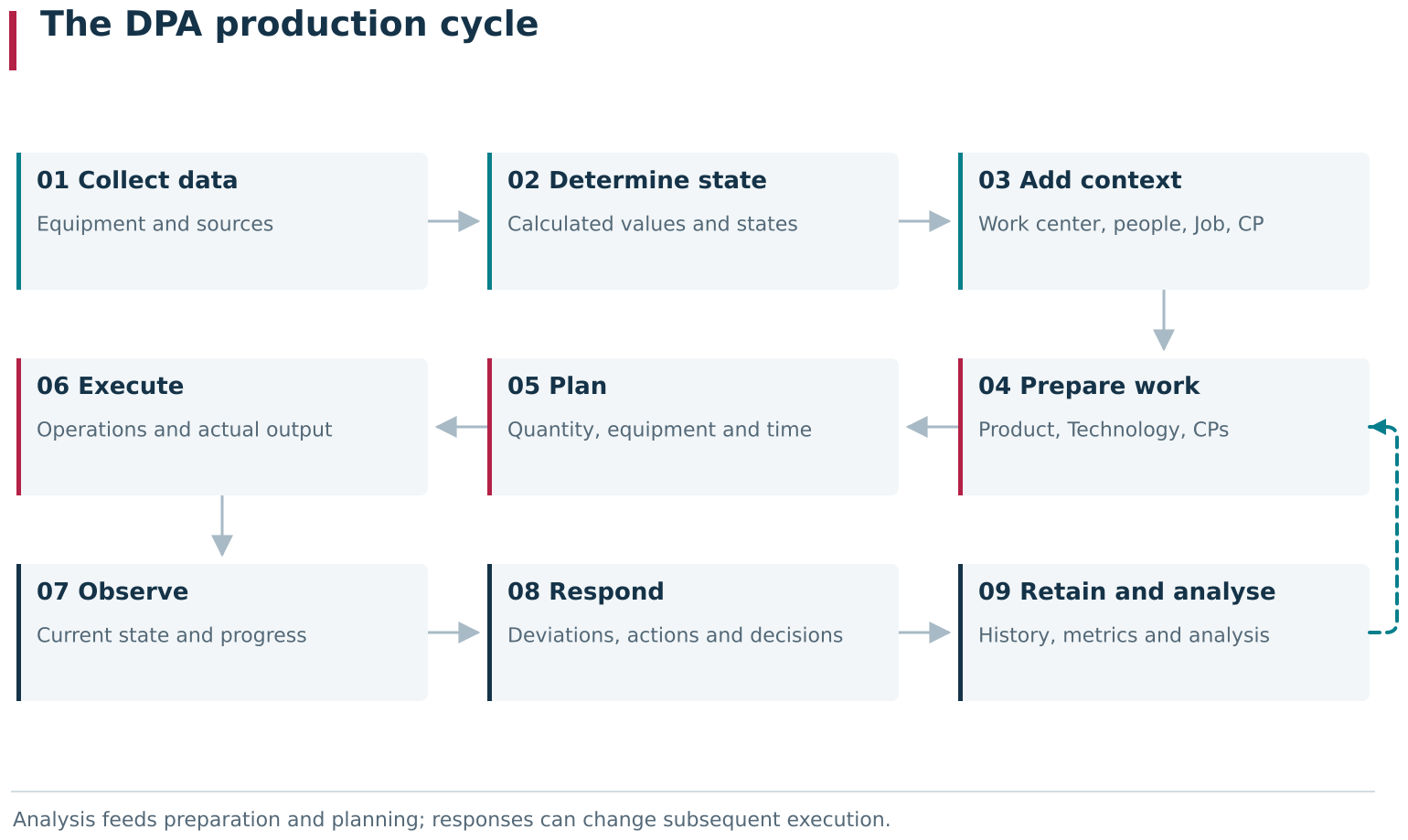
The diagram brings the DPA production cycle into one view: machine data becomes a meaningful state and production context, prepared work becomes a plan and actual execution, and observation and response become retained results and subsequent analysis. Feedback paths show how analysis and detected deviations can affect preparation, planning and further execution.
Receive data. DPA must first obtain actual information from equipment. Sources can include CNC machines, PLCs, robots, production lines, and other equipment. This level supplies the raw values, events, and operating signs from which a more meaningful production picture is built.
Understand the state. Individual machine values rarely match the language people use to discuss production. DPA transforms the data stream into more stable concepts: Work center states, operating and Downtime intervals, Indicators, events, running CPs, and other observable characteristics. This is where a set of signals starts answering the practical question “what is the equipment doing now?”.
Add production context. The next step is to understand both what the machine is doing and which production work it belongs to. A Work center relates to the enterprise structure, personnel, and schedule; the work being performed can relate to a Job and Technology; a Control program detected on equipment can relate to its CP version in the catalog; and a process parameter can relate to acceptable values for a particular context. The same telemetry is no longer an isolated set of numbers.
Prepare the work. Before production begins, DPA can describe what the enterprise intends to manufacture and how: Products, Technologies, Operations, Control programs, Parameter sets, reference data, and other preparation elements. This layer defines the expected structure of subsequent execution.
Plan. The prepared model becomes specific work: Production orders, Work orders, Jobs, and assignments to Work centers, shifts, and time intervals. Planning answers “what needs to be done, where, and when?”.
Execute. The plan becomes an actual result only in production. Role-specific workplaces are particularly important here. In the Operator workplace, the Operator starts and executes a Job, progresses through its Operations, and registers actual output. The Foreman workplace provides a supervisory and dispatching context. The Maintenance workplace connects technical problems and maintenance tasks with maintenance personnel. At this level, abstract production objects become specific human actions and actual equipment work.
Observe. Execution is visible while it is happening, rather than remaining a black box until the shift closes. Current telemetry, Monitoring, time-based views, the Gantt chart, Journals, and Dashboards show the process as it unfolds. Monitoring shows what is happening now; the Gantt chart reveals how a situation developed over time; and a Journal provides the saved events and intervals.
Respond. When the system detects a deviation or a person identifies a problem, events can lead into another process: Downtime classification, a Signal, a notification, a Ticket, a Foreman’s decision, or a maintenance action. Observation can therefore initiate an organised response, rather than ending with a picture on a screen.
Retain and analyse the result. As execution proceeds, DPA accumulates facts, intervals, and results for use in Journals, Reports, KPIs, Dashboards, and other analytics. There is no rigid boundary between real-time observation and analytics: some measures can be recalculated and refreshed during the current shift, after which the same context becomes material for retrospective analysis.
This chain is not a strictly linear pipeline. Production continually creates feedback loops. Downtime analysis leads to changes in reason catalogs or organisational rules; experience executing a Job influences its Technology; a process-parameter deviation prompts action before the Operation finishes; and tool or equipment condition changes maintenance plans. DPA’s value lies in allowing these processes to share a common production picture rather than operate as unrelated accounting systems.
The same object therefore appears repeatedly throughout the guide. The Work center appears in equipment configuration, planning, workplaces, monitoring, downtime, and maintenance. The Job appears in planning, the Operator workplace, execution history, and analytics. The Control program appears in engineering preparation, on equipment, in a Job, and in process-parameter control. These are different views of the same object at successive stages of the production cycle, rather than unnecessary repetition.
This reading approach is also useful when answering a practical question. To explain a particular result on a screen, looking for “the right module” is usually insufficient. A more useful chain is: where the source data came from → which context was applied → which action or rule took effect → where the result appeared → where it is retained next. The following chapters follow this principle.
3. Information held in DPA
Viewing DPA only through individual screens can make it seem to hold many unrelated types of data: Work centers in one area, Indicator values in another, Jobs elsewhere, and separate Journals, Downtimes, Control programs, Reports, and KPIs. In practice, much of this information describes the same production process from different perspectives and at different time scales.
For an initial overview, it helps to distinguish several information layers: what exists at the enterprise, what is happening now, what the enterprise intends to do, what was actually done, which events and deviations accompanied the work, and how this information is aggregated for analysis. These layers are connected; their value comes from DPA’s ability to relate them.
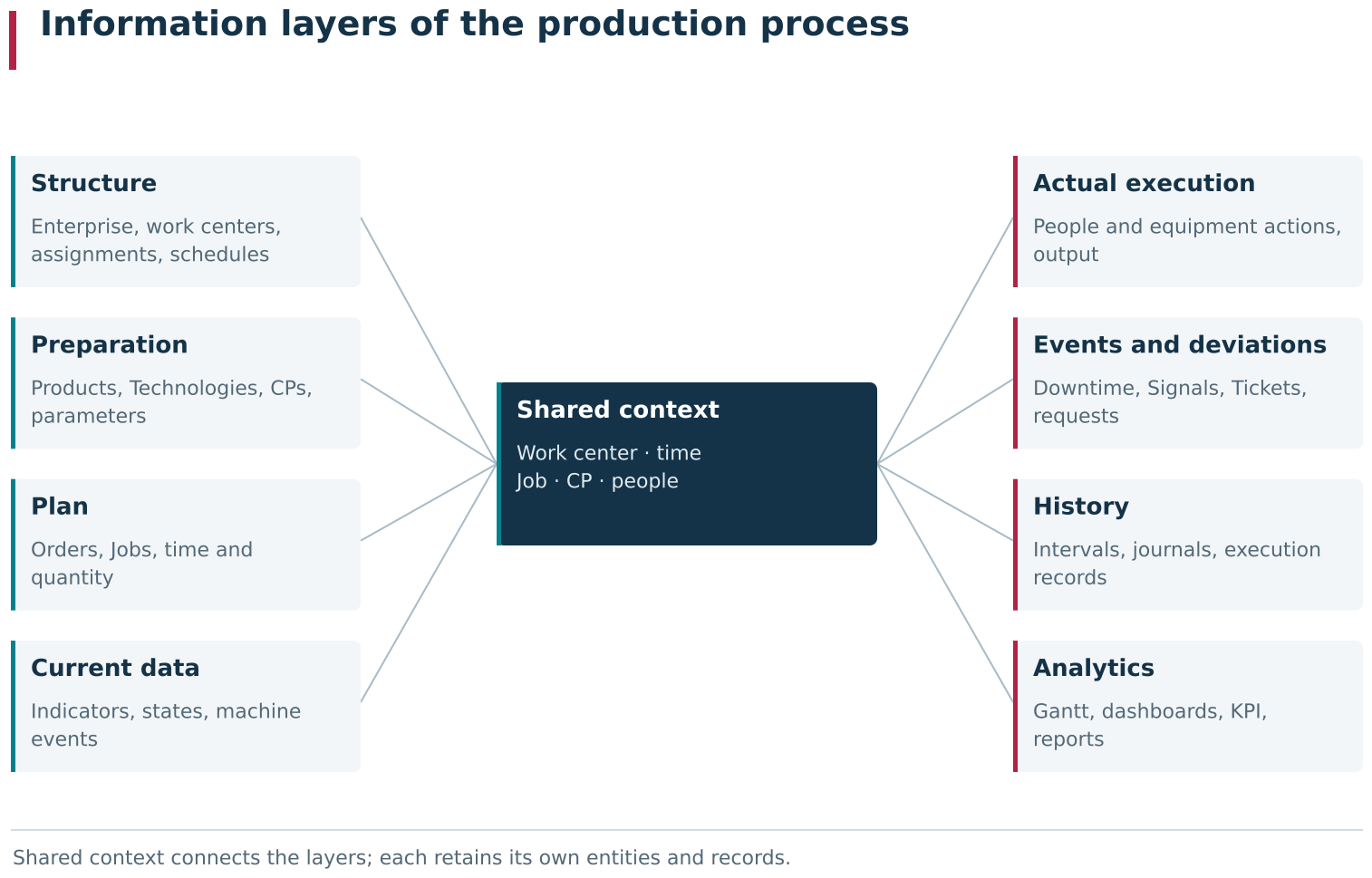
DPA stores several connected information layers of the production process. Enterprise context and the prepared production model give meaning to the plan, live machine data, actual execution and events; these in turn form history and analytical views. Shared references to Work center, time, Job, CP and people allow navigation between the layers while keeping their entities distinct.
Enterprise structure and persistent production context
The most stable layer describes the environment in which all other events occur. It includes the enterprise and its departments, Work centers, equipment groups, personnel and their assignments, schedules, reason catalogs, and other relatively persistent settings.
This information alone says nothing about what a machine is doing at this second, but gives subsequent data its meaning. An Indicator value belongs to a particular Work center, rather than an abstract signal source. A Downtime occurs on particular equipment and can be classified using reasons available in that context. Operators and Foremen gain access to the Work centers to which they are assigned. A schedule determines which time is working, shift, or unplanned time for a given Work center.
The enterprise structure in DPA is therefore more than a navigation tree. It is one of the layers through which the system understands exactly where an observed event is happening and which rules apply to it.
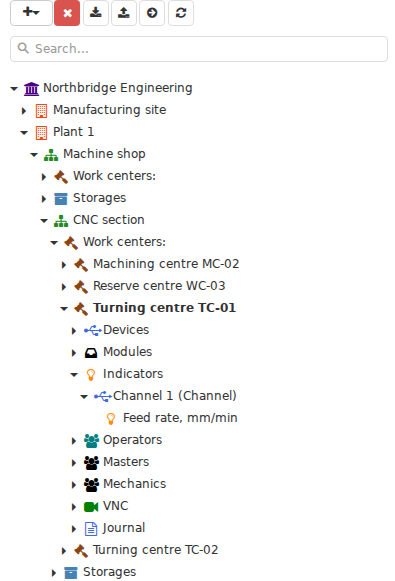
In Settings → Enterprise structure, the production context forms a hierarchy: departments lead to Work centers, with related devices, Indicators and staff assignments below them. This tree provides both navigation and the location to which DPA attaches subsequent data and settings.
Real-time data: what equipment is reporting now
At the other end of the spectrum is the most dynamic layer: data arriving from equipment. This includes Indicator values, states, messages, current Control programs, process parameters, and other available information about the operation of a machine or production line.
These data can change continually. When the equipment and driver operate in real time, the user sees current values and states as they reach DPA, rather than a machine’s last report. Some data change rarely; other values change many times per minute or more often. The actual frequency depends on the source, driver, collection settings, and the parameter itself.
Real-time data in DPA is not a demonstration feature confined to the Monitoring screen. Other system areas also use live data. A current Indicator value can appear on a Dashboard, participate in process-parameter control, contribute to the Gantt chart’s time-based picture, or trigger an event to which a person or another DPA mechanism responds.
The machine stream therefore provides both information available to inspect now and the source material for higher-level production logic.
Production and engineering preparation: what should happen
Before work starts on a machine, the enterprise already knows what it intends to manufacture and how. In DPA, this layer consists of Products, Product versions, Technologies and their Operations, Control programs and CP versions, Parameter sets, reference values, and other preparation objects.
It describes the expected production model, rather than current execution facts. A Technology defines the operations to perform. A Control program represents production code prepared for equipment. A Parameter set can define expected process values and acceptable limits. Reference books provide shared values subsequently used in operating processes.
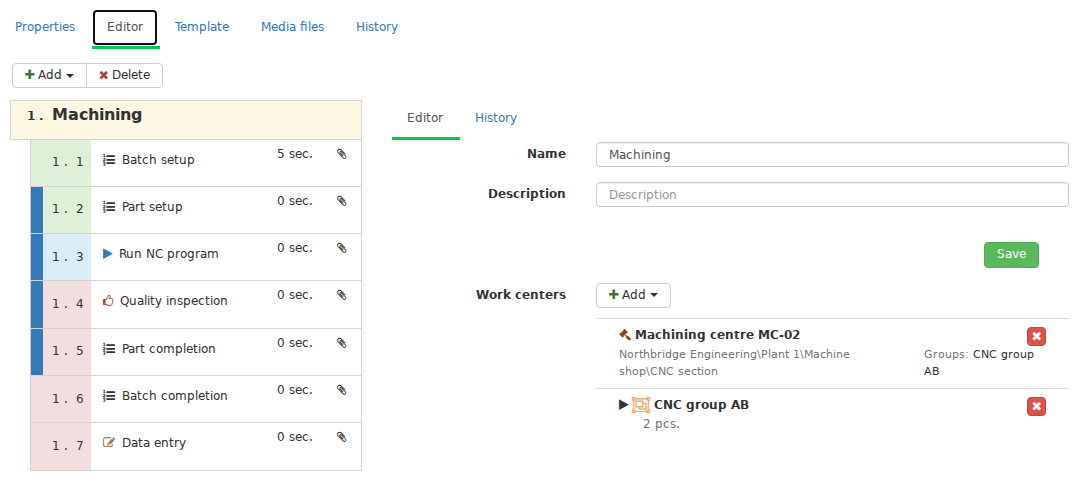
The Technology version editor describes future execution: Stages, eligible equipment and the sequence of Operations are configured before actual production takes place. This level specifies the intended process.
This layer makes meaningful comparisons with real-time data possible. DPA can do more than display the name of a CP running on a machine: it can attempt to match it to a particular CP version in the catalog. A current Indicator value can be checked in the context of the actual Control program and its parameters, rather than against an abstract, universal threshold.
The plan: what the enterprise intends to do, where, and when
The next layer turns the prepared production model into specific work. It contains Production orders, Work orders, Jobs, assignments to Work centers, execution schedules, Shift targets, and other planning objects.
Where a Technology mainly answers “how is this Product manufactured in principle?”, a Job answers the practical question what exactly must be done in this particular production case. It has its own lifecycle, planned quantity, time context, Work center, and other information needed for execution.
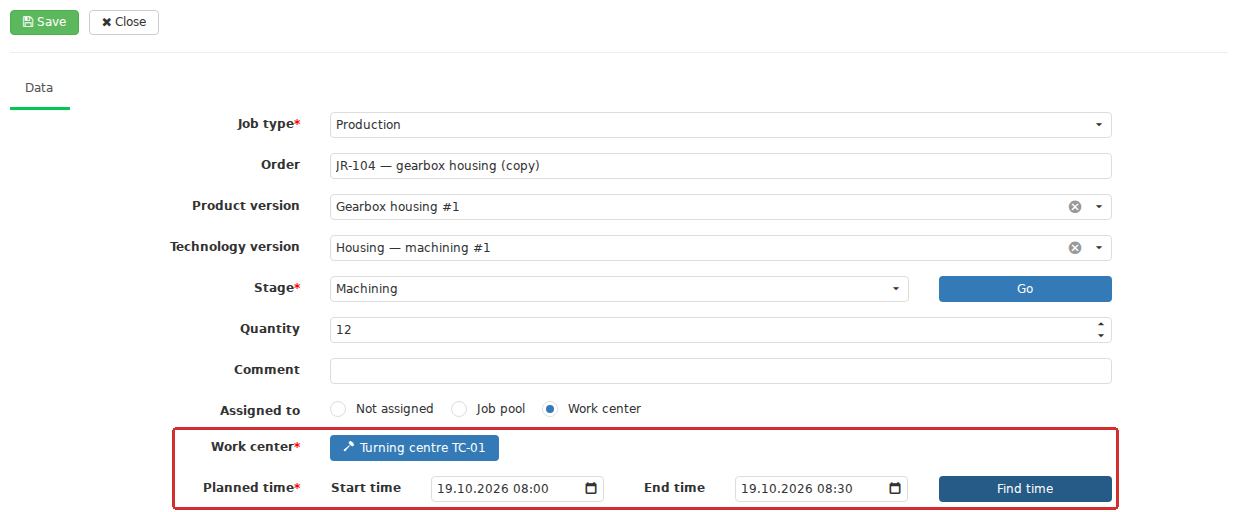
In planning, the prepared production model becomes a specific Job with a production context, quantity, Work center and execution time. DPA now specifies what must be done, where and when for this particular instance of work.
The plan also becomes another context against which DPA compares actual events. Planned and actual quantities can later be compared, as can scheduled time and actual execution, or the prescribed Control program and the CP detected on the Work center.
Actual execution: what production really did
During execution, facts are added to the planned objects. An Operator starts a Job, performs Operations, pauses or resumes the work, and registers actual output. At the same time, DPA continues receiving equipment data and building a time-based picture of its state.
Production facts can have different sources. DPA receives some information automatically from equipment; other facts arise only through a deliberate human action. For example, a machine’s counter of manufactured Products and the output registered for a Job are related but distinct data. Operator output registration has its own business meaning and becomes part of the history of a specific Job.
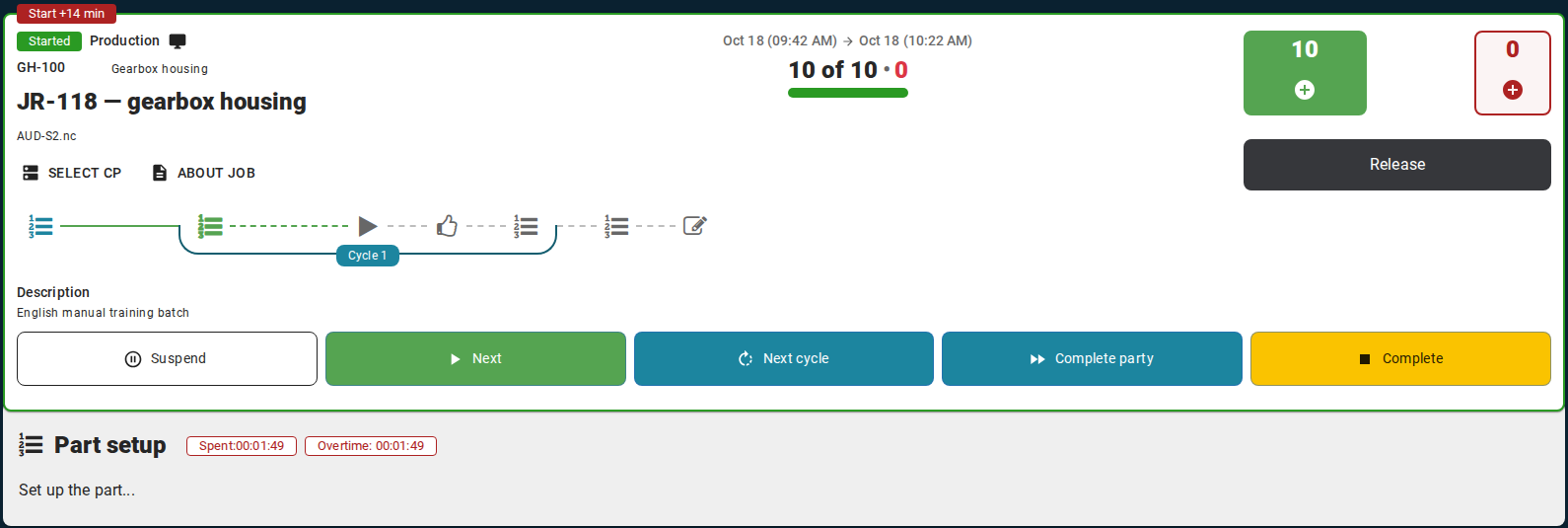
In the Operator workstation, a planned Job becomes actual execution: the user starts work, performs its Operations and registers output. The result belongs to the history of that Job and exists alongside machine data.
Actual production in DPA therefore combines observed equipment behaviour and registered production actions, linked by a common context, rather than simply archiving telemetry.
Events, deviations, and problems
Normal operation is only part of the production picture. DPA also retains and processes information that requires attention: equipment messages, breached conditions, Downtimes, Signals, Tickets, requests for a Foreman’s decision, and other events.
These models should not be reduced to a universal “problem table”. A Downtime is a time-based fact about equipment state. A Ticket coordinates people working on a problem. A Signal responds to a particular event or condition. A request to the Foreman in a production Job seeks approval for a particular exceptional action. These objects can arise around the same real situation while answering different questions and following different lifecycles.
By relating events to Work centers, Jobs, users, time, and other production information, DPA lets a problem be examined as part of the overall production process rather than as an isolated record.
History: how current data becomes a lasting picture of the past
Some current data exists only as a “value now”, but many processes gradually create persistent history. State changes form intervals. Control program execution acquires a start, an end, and a final status. A process-parameter violation can be saved as a Journal interval. A Job gains execution history and registered output. A Ticket progresses through states and user actions.
The same production process can thus be examined in two ways. While it is running, DPA helps users observe and control it in real time. Afterwards, accumulated records reconstruct what happened, when, and in what context.
History in DPA is generally not a separate copy of old screens. It uses specialised models: event and interval Journals, Gantt chart bands, object histories, Job actuals, and other persistent records. Each retains the aspect of the process needed for subsequent work.
Analytics, Dashboards, KPIs, and Reports
DPA also presents current and accumulated data in aggregated forms through Dashboards, KPIs, analytics widgets, charts, and Reports.
Avoid an artificial division in which real-time observation belongs only to monitoring and analytics only to the past. A Dashboard can combine a tile displaying the latest live Indicator value, a chart for a recent period, and a measure accumulating since the start of the current shift. It is a live analytical view of production that can refresh as new data arrives.
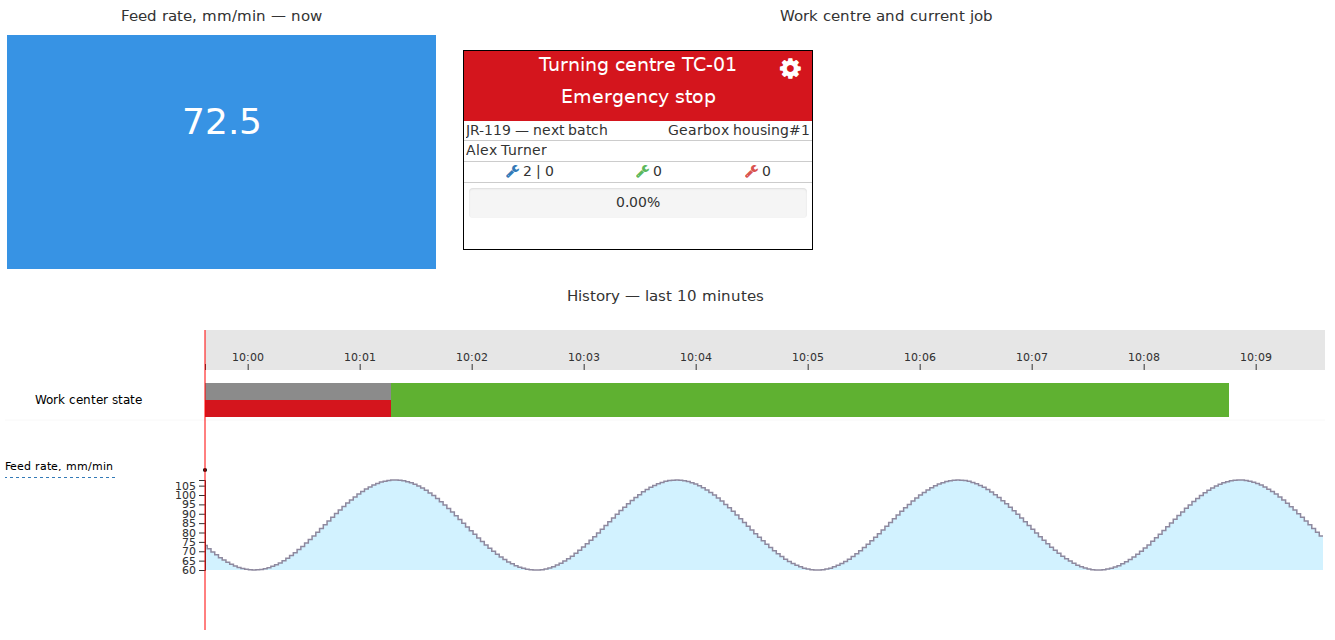
A simple Dashboard combines several analytical views: a current value, a short trend and a value accumulated over the period. It illustrates how DPA analytics can update live alongside production as well as describe past events.
This is why Dashboards are often displayed on large screens directly on the shop floor. One screen can show which Work centers are running, where a Downtime has occurred, how much output has been registered since the shift began, how utilisation is changing, and how the current result compares with expectations. Depending on the Dashboard, data can refresh at short intervals and remain current throughout the production period.
Reports serve another purpose: they produce a more complete snapshot for specified parameters and a selected period, providing a table or file that can be used outside the interactive screen. KPIs, in turn, aggregate many separate events and intervals into stable measures suitable for comparison and management.
A Dashboard, KPI, and Report are therefore different ways to question shared production information: see the current situation, follow a measure as it accumulates, or obtain a fixed analytical result for a selected period. They are not merely three presentations of the same table.
One production process, several connected views
The purpose of this section is not to memorise a data classification. The more useful idea is that DPA builds several connected views of the same production process.
A Work center exists as a configuration object while supplying real-time data, receiving a Job, running a Control program, changing states, experiencing Downtime, and generating events. It can appear on the Gantt chart, in a Journal, on a Dashboard, and in a Report. This does not duplicate one record across a dozen places. Each screen and report answers its own question, and shared production context lets the user move between those questions.
These connections make the data useful to different people. An Operator needs current execution and the actual Job result. A Foreman needs the states of several Work centers, exceptions, and problems. A technologist needs the Control program and process parameters. Maintenance personnel need a technical problem and its lifecycle. Managers need the overall picture and measures. All are using different views of one shared DPA information model, rather than independent versions of production.
4. The Work center as a common production reference
Seen only in the Enterprise structure tree, a Work center can look like an ordinary hierarchy item: an enterprise contains sites and departments, and departments list machines or other production units. DPA’s model goes further. The Work center is one of its main points for relating physical equipment, real-time data, the production plan, human actions, and accumulated history.
It therefore appears throughout the guide: equipment connection and driver configuration, Technologies and Job planning, the Operator workplace and Foreman workplace, the Gantt chart and Journals, Downtimes and Tickets, Control programs, process-parameter control, Dashboards, maintenance, VNC, and tool management. This is not a coincidental repetition of a field. In many subsystems, the Work center answers which particular production location this information belongs to.
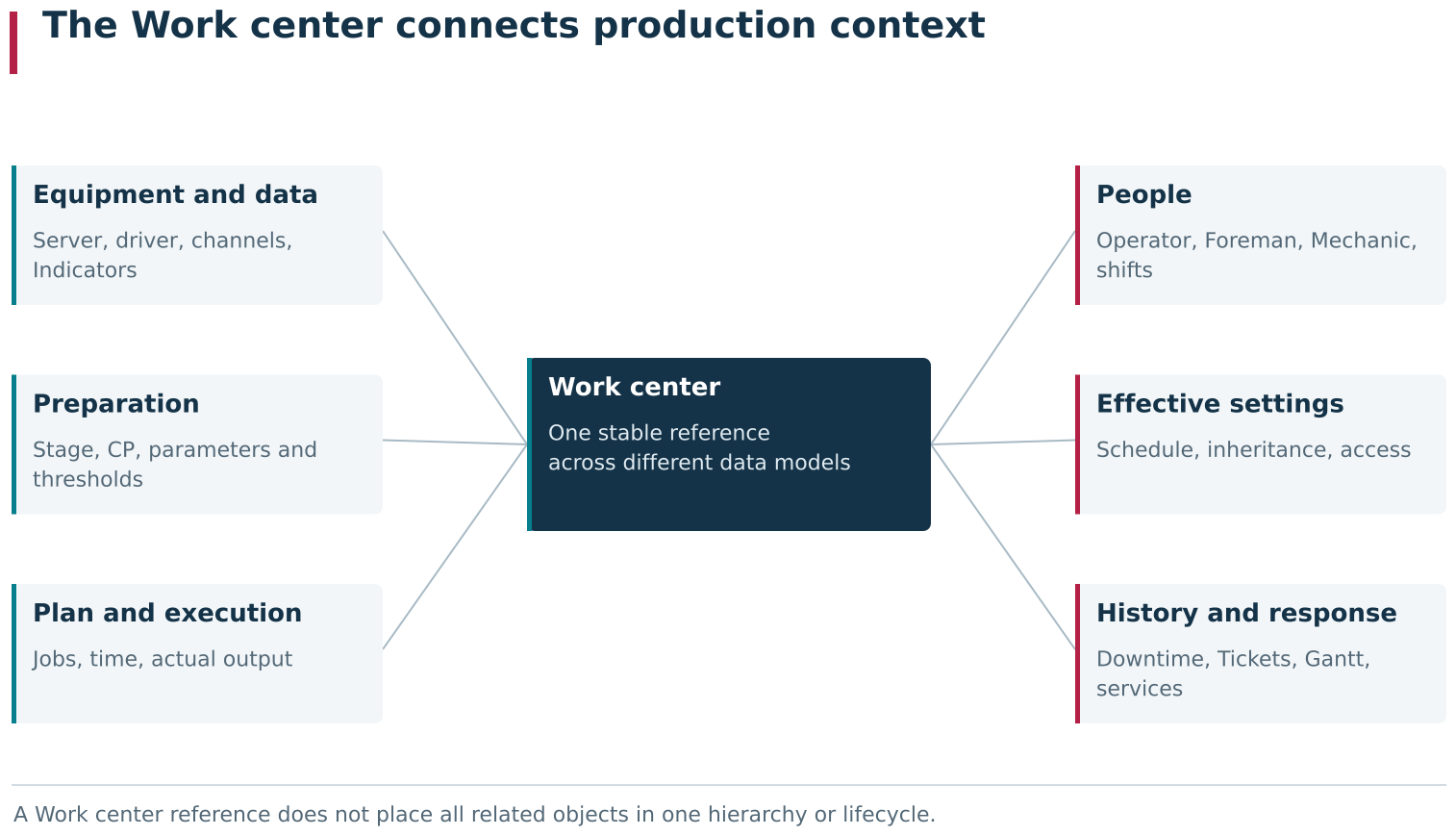
The diagram brings together Work center relationships that are spread across different DPA modules and cards. The same Work center provides context for machine data, production preparation and planning, people’s work, effective settings, actual execution and responses to problems. A specific Work center is therefore often a useful starting point when investigating a cause or analysing a situation.
A production identity separate from its machine connection
In most production configurations, a Work center naturally corresponds to a particular machine, line, or other production unit. In DPA, however, its identity is separate from the machine connection. A Work center can be created in advance, with a name, model, inventory number, department, and other identification details, even before a DPA Server and driver have been selected.
This has a practical benefit: the enterprise structure, production relationships, and some organisational settings can be prepared before equipment is physically connected for data collection. A DPA Server and driver are later associated with the existing Work center, giving DPA access to the driver’s device, channel, and Indicator structure.
An equipment connection is more than one data feed. For a multi-channel machine, DPA distinguishes the main channel from the channels used to calculate the summary state. Several production mechanisms use the main channel as the natural channel of the Work center. The summary state represents several machine channels as one understandable state of the production unit.
The Work center thus provides a stable production identity; the driver, devices, and current values form the machine-data layer attached to that identity. The device and Indicator tree can be rebuilt from driver data without creating a new Work center or losing its production context.
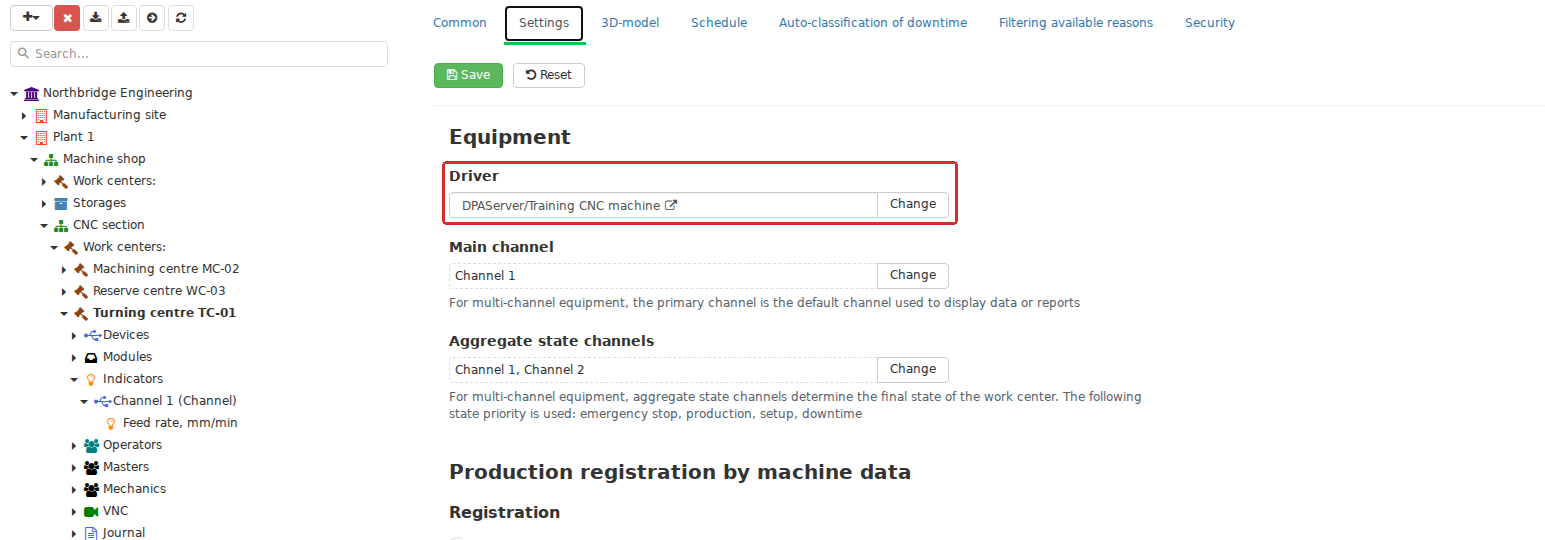
A Work center card connects an existing production object to DPA Server, a driver and the relevant channels. The machine structure is attached to this stable production identity, so changing or reconfiguring the connection does not create a new Work center.
From telemetry to the state of a particular production location
Machine data becomes more useful once DPA knows which Work center it belongs to. A device and Indicator tree is formed beneath the Work center; current states and historical state intervals are associated with it; and machine output records and other equipment events belong to it.
“The machine is currently in the Production state” therefore means more than a signal reading. It is the state of a particular Work center, which can be compared with its current Job, detected Control program, working Operator, incoming process values, and events occurring at the same time.
Real-time views show this relationship particularly well. The Work center monitoring service gathers the current machine state, maintenance-in-progress status, active and planned Jobs, and current output from Jobs and machine data around one production unit. Mimic Dashboards can add the current Operator and Foreman, Downtime reason, Tickets, and selected Indicator values. One screen can therefore show different aspects of one Work center’s current state rather than several independent summaries.
Connecting preparation, the plan, and actual execution
The Work center enters production preparation before a particular Job is created. A Technology stage defines the Work centers or Work centers groups eligible to perform the work. This is technological eligibility, not yet a planned assignment.
Planning creates a more specific relationship: a Job receives a particular Work center and a planned execution interval. Distinguish these two questions:
- where the Technology permits this work to be performed;
- which particular Work center this Job has been assigned to.
After the Job starts, the same Work center provides the context for actual execution. Planned and actual time, the current Operation, registered output, the machine output counter, and Operator actions meet here. The Work center’s own settings can directly change execution: for example, prohibit several simultaneous Jobs, require a Foreman’s participation in certain exceptions, restrict opening personal shifts, or use machine data in output registration.
Some DPA production logic therefore depends not only on the Technology or Job, but also on which Work center executes the Job and which rules apply there.
People are part of the Work center context
Production roles in DPA are assigned for particular Work centers, rather than abstractly across the whole enterprise. The same user can be an Operator on some Work centers, a Foreman on others, and a Mechanic or maintenance employee on the equipment they actually service.
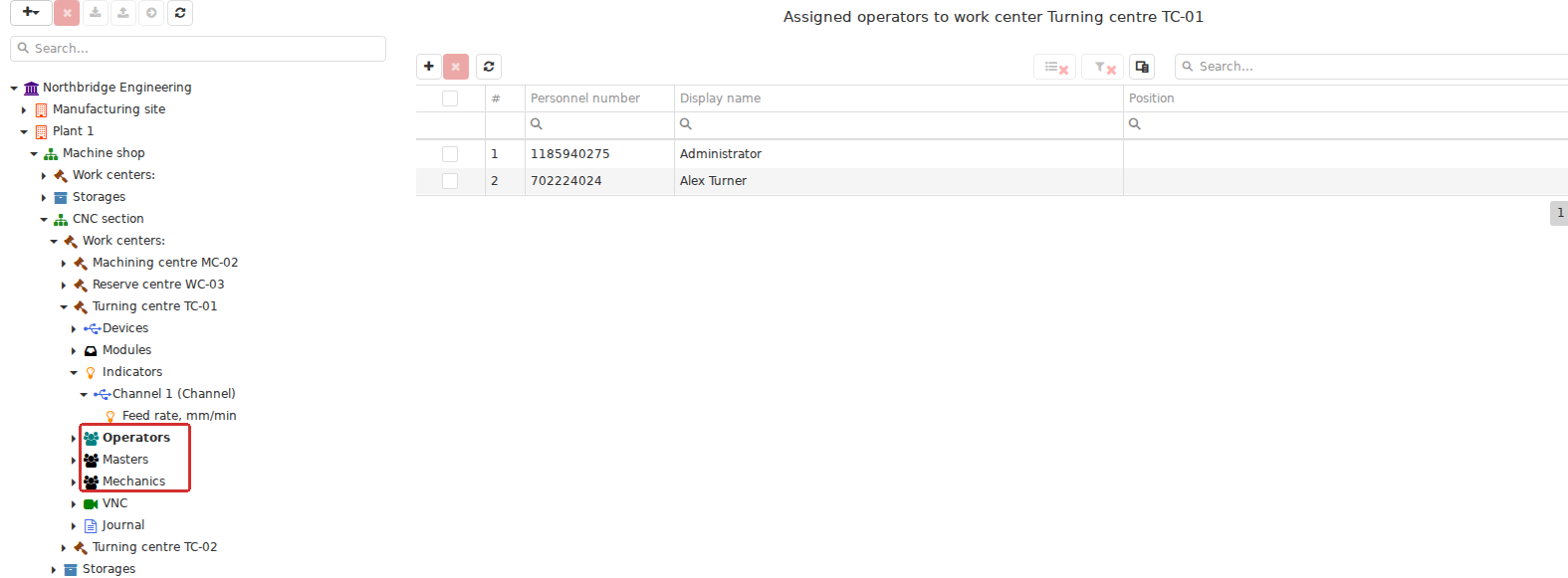
In the Enterprise structure, Operator, Foreman and Mechanic assignments belong to a particular Work center. A user’s production role is therefore linked both to their account and to the equipment they operate or supervise.
For an Operator, this assignment determines which Work centers appear in their workplace. When the relevant setting is enabled, an open personal shift adds another execution context. For a Foreman, assignment and an active Foreman shift similarly define the current supervision scope. User permissions, production role, and the Work center currently being operated or supervised are therefore related but distinct.
Cross-role scenarios use the same context. A request for approval of an exceptional Operator action concerns a particular Work center, and the Foreman’s authority to decide is checked for that Work center. A Ticket also relates to a particular Work center: a problem arises at a production location, a Foreman dispatches it, and maintenance personnel receive work within their responsibility scope.
Machine context for Control programs and process parameters
A Control program is an engineering object with versions, files, and parameters. During production, DPA also needs to know where this CP is intended or actually able to run. The CP catalog therefore supports relationships to Work centers and their groups. These relationships help match the CP name reported by a machine to a particular CP version in the catalog.
For Parameter sets, the relationship is more specific. Some values can be shared, while others are overridden for a particular Work center. The mapping between a parameter and a live Indicator also belongs to a Work center context. The same parameter or threshold can consequently have a different effective meaning on different equipment.
Real-time process-parameter control illustrates this relationship. DPA receives a live Indicator value, knows its Work center, determines the context of the running Control program or active Job, and applies the appropriate thresholds. Without the Work center, these would remain three separate sets of information: telemetry, the CP catalog, and engineering limits.
Position in the enterprise structure determines some effective rules
A Work center has its own settings, but they need not all be configured separately for every machine. Several important configuration types are inherited through the enterprise tree. For example, a Work center can use the nearest parent-level Schedule and inherit available reasons, automatic downtime-classification settings, and data-access rules for user groups.
This allows a common production policy to be set at enterprise, site, or department level and refined only where a particular Work center differs. Some settings can be detached from their parent and made local; the exact meaning depends on the setting and is explained in the relevant chapters.
A Work center’s position is therefore more than a navigation folder. It can determine its effective Schedule, accessible data, the reasons available in production processes, and other inherited rules.
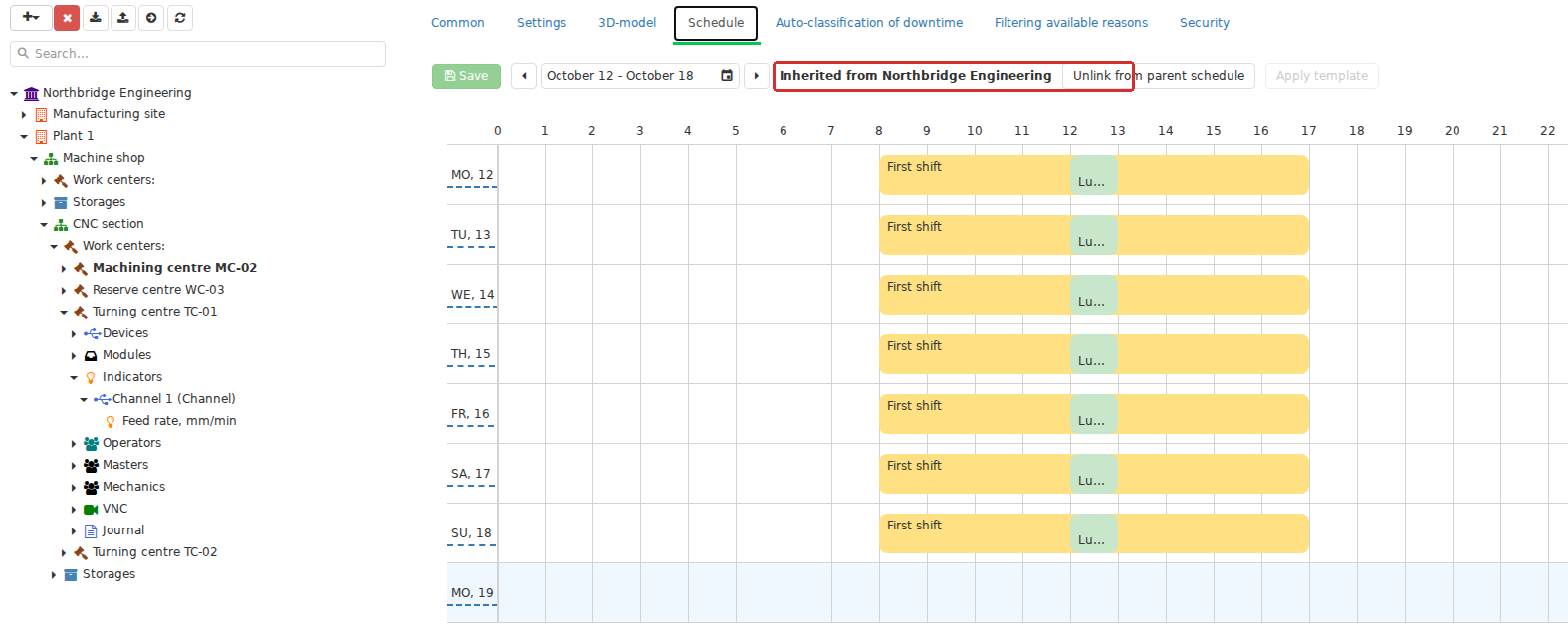
Some Work center settings depend on its position in the Enterprise structure. For example, a Schedule can be inherited from the parent level and made local when required. The screen distinguishes the Work center’s own settings from the effective configuration inherited from above.
Downtime, problems, and maintenance share the same context
When equipment stops operating normally, the Work center remains the common point for its information. State history is used to build operating and Downtime intervals; Downtimes can be assigned reasons; and Tickets, maintenance tasks, and other responses can exist alongside them.
Sharing a Work center does not make these objects equivalent. As noted earlier, a Downtime and a Ticket have different models and lifecycles. They appear together because they describe different aspects of a problem at the same production unit.
More specialised capabilities also attach to a Work center. VNC stores separate connection settings and viewing/control permissions for each Work center. Tool management uses the Work center as the location of tools in a Tools magazine and as the context for matching machine tool identifiers to persistent tool instances. When tool management is connected, its settings are integrated into the Work center settings as well.
This illustrates DPA’s architectural approach: a specialised service can contribute its own information while using the existing Work center model, rather than creating a parallel production model.
Why this model helps in practical work
Thinking of the Work center as a common context makes many DPA interfaces easier to understand. If a Job does not appear for an Operator, investigate not only the Job but its Work center assignment, Schedule, the Operator’s role, and their shift. If machine data shows a CP name but DPA cannot find a suitable CP version, check the catalog’s relationship to the Work center as well as the file. If a Downtime reason is unavailable, the effective value may come from that Work center’s inherited configuration.
Similarly, investigating a current situation can start with a production location: what is happening on this Work center, which Job is running, who is working on it, what the equipment reports, which rules apply, and what history already exists.
The Work center is thus a principal reference point for production information in DPA. It connects the physical machine with how the enterprise describes, plans, executes, observes, and analyses its work.
5. Main production entities and their relationships
With the Work center established, the other recurring objects can be brought into one picture. DPA has no universal production document containing everything else. It describes production through several related entities, each answering its own question: what is manufactured, how it should be manufactured, what output is required, which specific work must be performed, where it happens, and what actually occurred.
Think of the model as several overlapping relationships rather than one tree. Its simplest main chain is:
Product → Product version → Technology → Technology version → Technology stage → Job → Work center → actual execution.
This is only the main framework. Production orders and Work orders can connect above it; Control programs, Job pools, and Shift targets connect alongside it; and machine states, Indicators, Downtimes, Tickets, and other facts arise around it during execution. Understand each entity’s role rather than trying to nest them all inside one another.
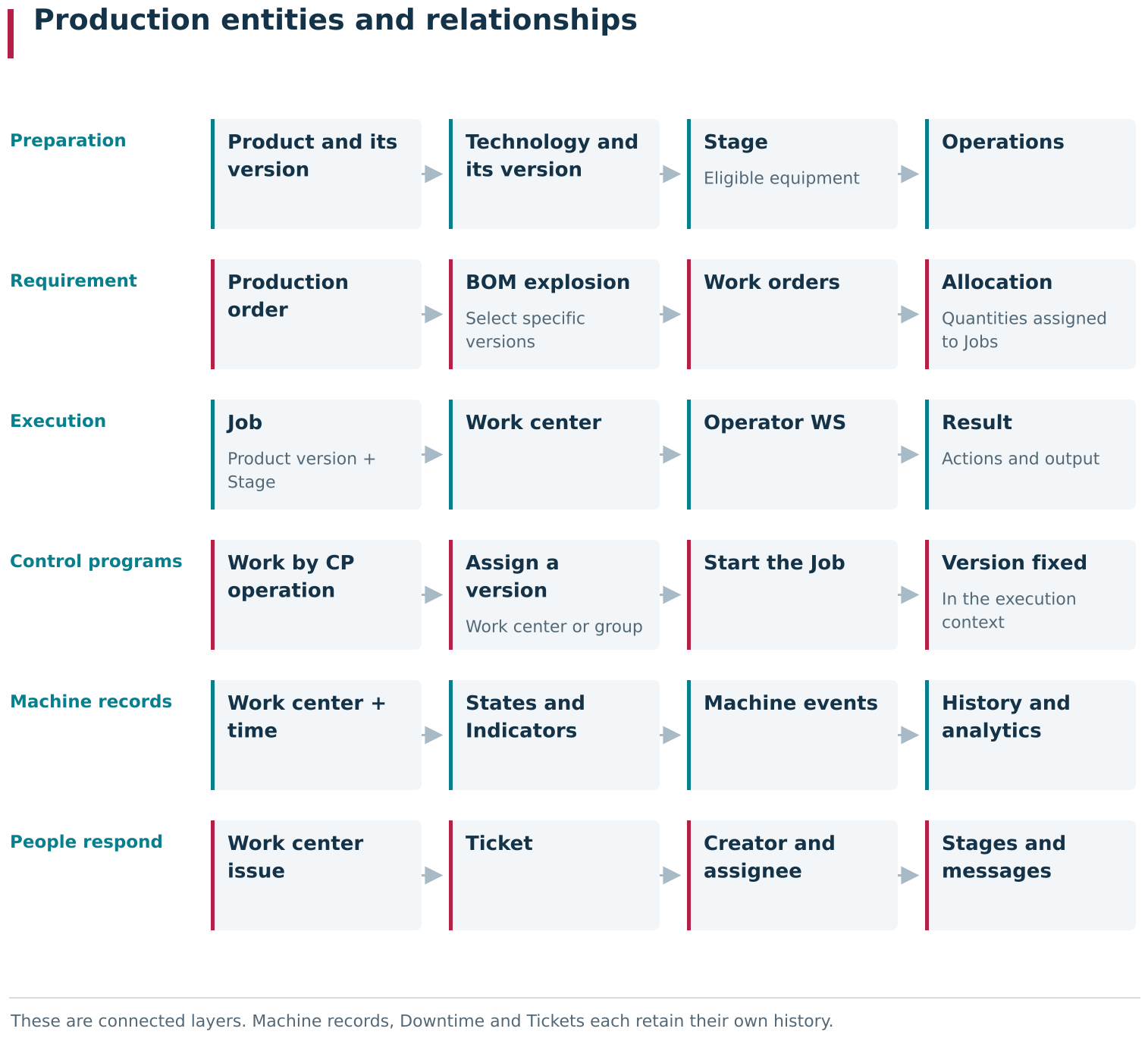
This map presents DPA’s main production entities as connected layers. Engineering preparation defines the Product, versions, Technology, stages and operations; planning turns requirements from Production orders and Work orders into specific Jobs; execution connects a Job with its Work center, people and actual result. CPs, machine data, downtime and tickets intersect this model through a specific Work center, time and execution context while retaining their own records and lifecycles.
Product: what is manufactured
A Product is a stable description of what the enterprise manufactures or uses in its production model. It has a code, name, unit of measurement, type, and other reference properties. Production work normally refers to a particular Product version, rather than merely to the abstract Product.
Versioning has a practical purpose. A Product can change over time, while completed work must continue to refer to the Product version applicable to it. In DPA, a Product owns its Product versions, and one version can be active and used as the current version when new production context is created.
The Product version connects the reference description of the result to engineering preparation. A Technology belongs to a particular version, not merely to the parent Product. Changing a product version and changing its manufacturing method are therefore related but different processes.
Technology: how the Product is manufactured
A Technology describes how a particular Product version is manufactured. It is also versioned: a Technology version contains one or more Technology stages, each containing ordered Operations and a list of the Work centers or groups eligible to perform that Stage.
This distinction matters. A Technology defines the production process as a specification, rather than representing a specific production run. It can allow a Stage on several machines and require CP execution, data entry, or quality inspection within that Stage. Those definitions alone do not mean that work will run on machine 17 today at 14:00.
A Technology stage is therefore a principal connection between engineering preparation and a future Job. It identifies:
- the Technology version it belongs to;
- the required Operations and their order;
- the Work centers eligible for this part of the process.
When a production Job is created, DPA relates it to a particular Product version and Technology stage. Assignment to one Work center is separate. “This machine can perform the Stage” and “this Job is assigned to this machine” are different relationships.
A Technology version has its own lifecycle. Even when a Job has equipment and time scheduled, its Technology version is not necessarily ready for execution: starting the Job checks that the Technology version is valid at execution time. This separates preparation and planning from authorised production use.
Production order: demand rather than execution
Where a higher production-planning layer is used, a Production order sits above individual Jobs. Its purpose is to record demand: which Product is required, in what quantity, and by which deadline. It can also hold ERP order references and other planning context.
A Production order specifies the Product itself. The particular Product version and Technology version are selected when the BOM explosion tree is built. During a new BOM explosion, DPA can take the active Product version and a suitable effective Technology version, then record both versions in the resulting Work orders.
The BOM explosion tree can break demand down further. If a Technology contains components that must be manufactured, dependent Work orders can be created for them. If a component comes from stock, it remains part of demand without requiring a separate production Work order. The interface calls this process BOM explosion.
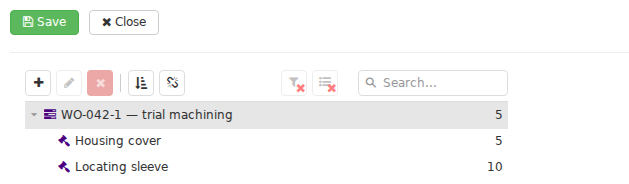
In Planning → Production orders, BOM explosion expands the original production requirement into a tree of specific Work orders. The resulting work records the selected Product versions and Technology versions. In this example, two child items have been added manually to the prepared tree.
A Production order is therefore a high-level statement of production demand, rather than a large Job on a particular machine.
Work order: connecting demand to specific production work
A Work order describes demand in more detail. It holds a particular Product version, a Technology version where needed, a quantity, and dependencies on other Work orders.
A Work order need not be a child of a Production order: DPA also permits independent Work orders. The model is therefore not a rigid chain of mandatory parents.
The relationship between a Work order and actual production Jobs is separate as well. Quantities are allocated between them: one or more suitable Jobs can fulfil a Work order, and a Job can contribute to the corresponding demand. Their production meaning must match: the Product version and, where specified, the Technology version.
The Work order thus answers what quantity must be provided for the selected Product version and Technology version, while the Job answers which specific work will be executed and recorded as performance.

The Jobs tab of a Work order links the production requirement to one or more compatible Jobs. This relationship allocates the required quantity to specific work, while the Work order and Jobs retain their own lifecycles.
Job: the basic unit of specific execution
A Job sits between the plan and actual production. A production Job specifies a Product version, Technology stage, and planned quantity. A particular Work center and planned time interval are assigned separately.
A Job can exist before equipment and time have been assigned. It becomes planned when it receives a particular Work center, start, and end. Later, through the Operator workplace, the same Job acquires an actual start, Operation execution history, registered output, pauses, completion, and other execution information.
A Job therefore represents more than a calendar row or an output record. It connects several aspects:
- what is manufactured: the Product version;
- how: the Technology stage and its Operations;
- how much is planned: the planned quantity;
- where and when: a particular Work center and planned interval;
- what actually resulted: actual time, registered output, personnel, and operation history.
The production plan can organise Jobs in additional ways. A Job pool defines the scope within which a Job can be offered to several Work centers, without assigning one particular Work center. A Shift target relates existing Jobs to an Operator and a shift interval, without becoming a new parent document for those Jobs. These are separate organisational views over the same Jobs.
Control program: connecting Technology to a real machine
A Control program has a distinct place in this model. It is an independent engineering object with versions, files, equipment relationships, and Parameter sets, rather than a kind of Technology or Job.
A Technology can, however, contain a CP-execution Operation. The Operation can specify which CP version to use on a particular Work center or group. When a Job starts, DPA uses these assignments to select the CP version for the assigned equipment and records it in that execution context.
The Technology remains the source of the engineering specification; the started Job receives a particular CP version selected for its actual context. Later changes to the Technology settings must not retrospectively alter which CP was prescribed for execution already under way.
In parallel, DPA can receive the name or contents of the CP actually running on the machine and match it to the catalog. One production context therefore contains three distinct questions: which CP the Technology specifies, which CP version is recorded for the Job, and which CP is actually detected on equipment.
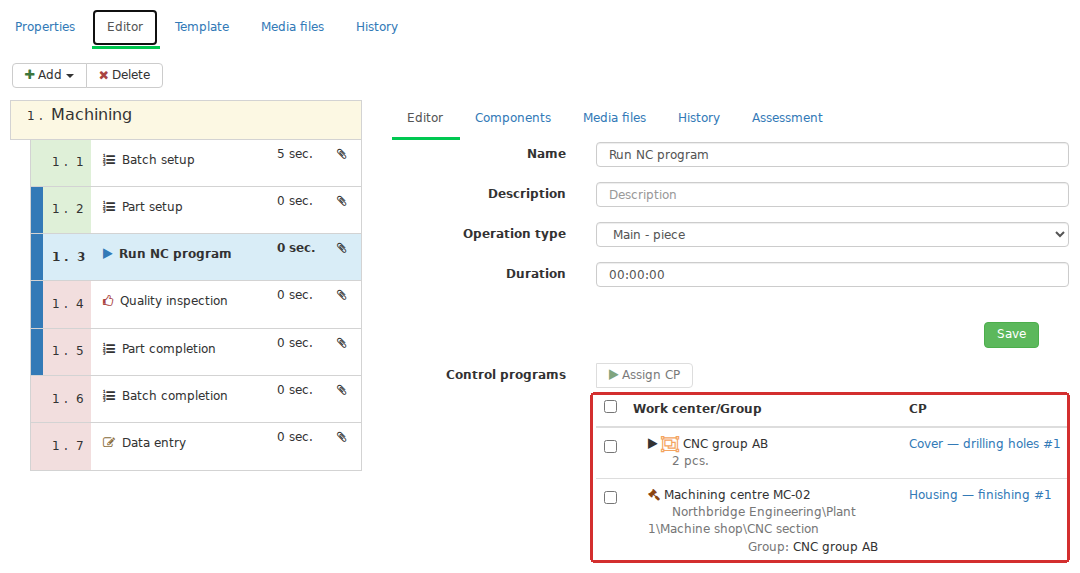
In a Work by CP operation, different Work centers or their groups can be assigned different versions of one control program, or versions of different control programs. When the Job starts, DPA selects the CP version for its assigned Work center and records that version in the execution context.
Machine data describes actual state without being owned by the Job
During execution, much real-time information appears around a Job: Indicators, machine states, the current CP, counters, events, and other data. Its principal connection to execution is the Work center and time.
Not every machine fact is a Job field. A Work center can be in a particular state regardless of whether a production Job is running on it. The machine output counter and the Job output registered by an Operator are also related but distinct facts.
This model lets DPA answer both “what is the machine doing now?” and “what has been recognised as the result of this production Job?”. A useful production picture makes these answers complementary without substituting one for the other.
Downtimes and Tickets describe the situation around execution
A Downtime primarily describes the state of a Work center over time. It can overlap a Job, have a reason, and contribute to analytics, but is not a child entity of that Job.
A Ticket belongs to a separate problem-coordination process. It relates to a particular Work center and has an author, assignee, stages, messages, and history. One real production situation can include a Job, a Downtime interval, and a Ticket: the work being performed, the equipment-state fact, and the organised human response to the problem are three different representations.
Maintenance is another related process. A Maintenance job describes servicing work, while a Ticket can request resolution of a particular problem. They can share a situation and a Work center while retaining different lifecycles.
Versions preserve the historical meaning of actual execution
Another principle runs through the model: recording specific versions. A Job refers to a particular Product version and, through its Technology stage, a particular Technology version. At startup, CP Operations also record the selected CP version in the Job context.
Production history can therefore retain its meaning after engineering definitions change. A new Product version, new Technology, or updated CP is intended for a new context; completed execution remains associated with the definitions applicable to it.
Reading the map in later chapters
Taken together, these relationships form several connected layers rather than a single tree:
Product → Product version → Technology → Technology version → Technology stage → Operations
Production order → BOM explosion tree → Work orders → allocation to Jobs
Job → particular Work center → Operator workplace → actual execution and output
CP Operation → CP version for the Work center → CP version recorded at Job startup
Work center + time → Indicators / states / Downtimes / machine events
Problem at a Work center → Ticket → cross-role handling process
A DPA project need not use every layer. An enterprise can create Jobs directly without Production orders, use monitoring without full planning, or gradually introduce CPs, maintenance, and more complex dispatching. When these processes are enabled, they connect through shared Products, Product versions, Technology versions, CP versions, Jobs, Work centers, and execution facts rather than forming independent parallel systems.
This map is useful throughout the following chapters. Each object is examined in greater detail, but its position remains the same: the Product defines what is manufactured, the Technology how it is manufactured, planning orders the demand, the Job the specific work, and the Work center the place of execution. Real-time data and human actions turn that plan into observable, retained production history.
6. Who works with DPA
The same system looks different according to the task a person brings to it. An Operator needs a particular Job on a particular Work center. A technologist needs the engineering process definition and Control programs. A planner needs future load and Jobs. A Foreman needs shift progress and exceptions. A manager needs the overall production picture rather than one machine.
For an initial introduction, it is more useful to consider these perspectives on one production system than a single “typical DPA user”. Two mechanisms that can initially seem similar must be distinguished.
First, DPA has explicit production roles associated with a Work center: Operator, Foreman, and Mechanic/Maintenance. They are assigned in an equipment context and used by specialised workplaces.
Second, there are broader functional roles: technologist, planner, administrator, analyst, and others. These need not be separate user types in the DPA model. What such a person can see depends on their permissions, accessible enterprise structure, and the modules needed for their work.
One employee can combine several roles. An engineer can handle both Control programs and Technologies, a Foreman can use analytics screens, and an administrator can participate in external integrations. DPA does not require the enterprise organisation to mirror interface section names.
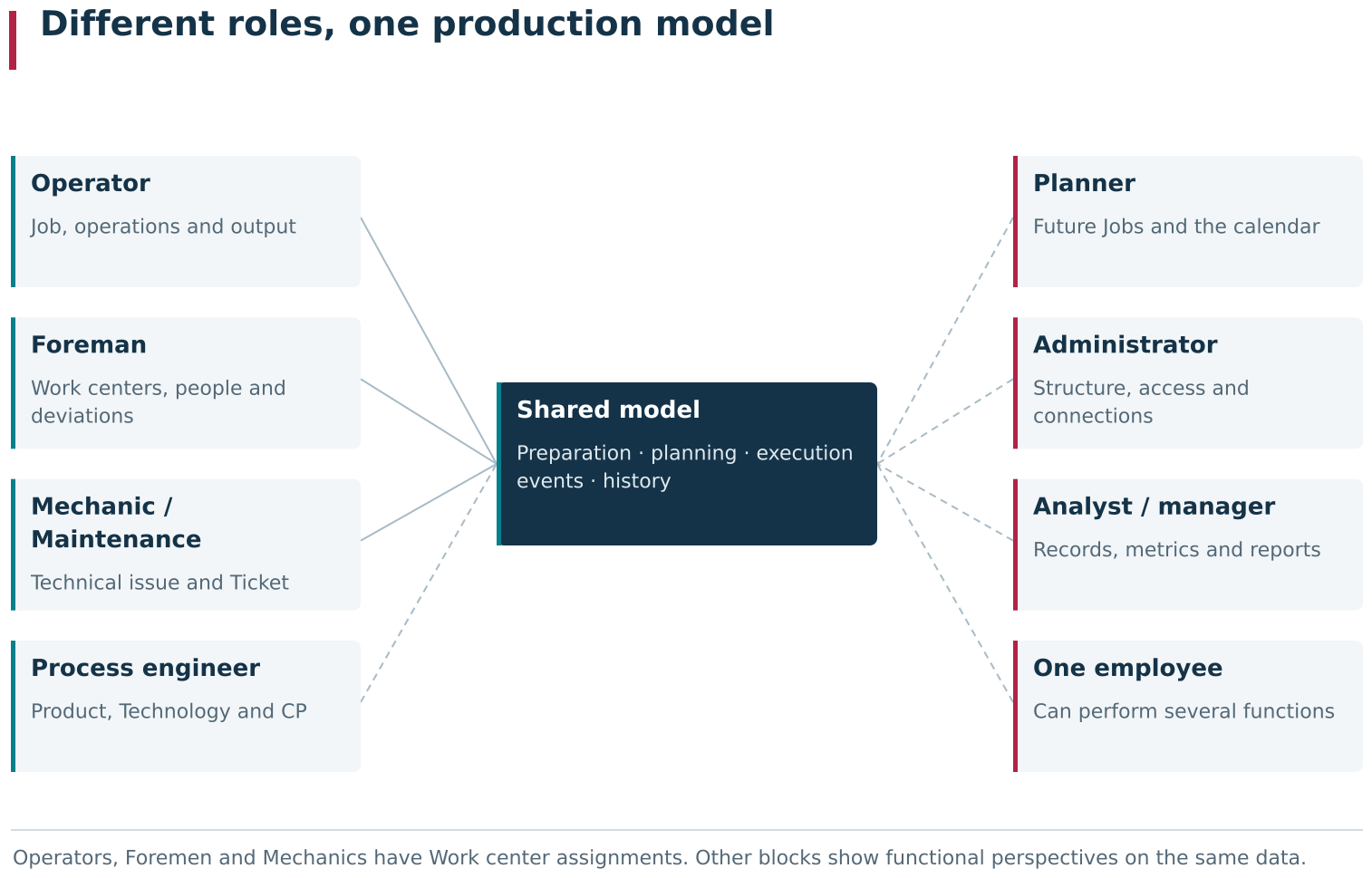
Users work with different aspects of one production model. Operators, Foremen and Mechanics have explicit Work center assignments; process engineers, planners, administrators, integrators, analysts and managers obtain their view through permissions, accessible enterprise scope and functional modules. One person can combine several of these perspectives.
Operator: executing specific production work
For an Operator, DPA primarily answers: “What must I perform on this equipment now, and which result must I register?”
The Operator works with Jobs, their Operations, the current situation at the Work center, and actual output. Depending on configuration, an open personal shift may be required before execution. During work, the Operator sees production context, starts and progresses the Job, registers results, supplies reasons for certain deviations, and completes execution.
This is where planned quantity becomes DPA’s actual production result. A machine can report its own counters and states, but registered Job output has a separate business meaning.
Foreman: supervision, exceptions, and coordination
The Foreman’s focus extends from one Operation to several Work centers and the people working with them.
The Foreman workplace brings together current Jobs, Operator shifts, Tickets, Downtimes, and requests requiring a Foreman’s decision. The Foreman can manage Operator shift context, decide specified exceptions, and distribute technical problems among assignees.
A Foreman is not simply an Operator with more permissions. Their participation is different: the Operator executes production work, while the Foreman supervises, coordinates, and intervenes where a decision or dispatching is needed.
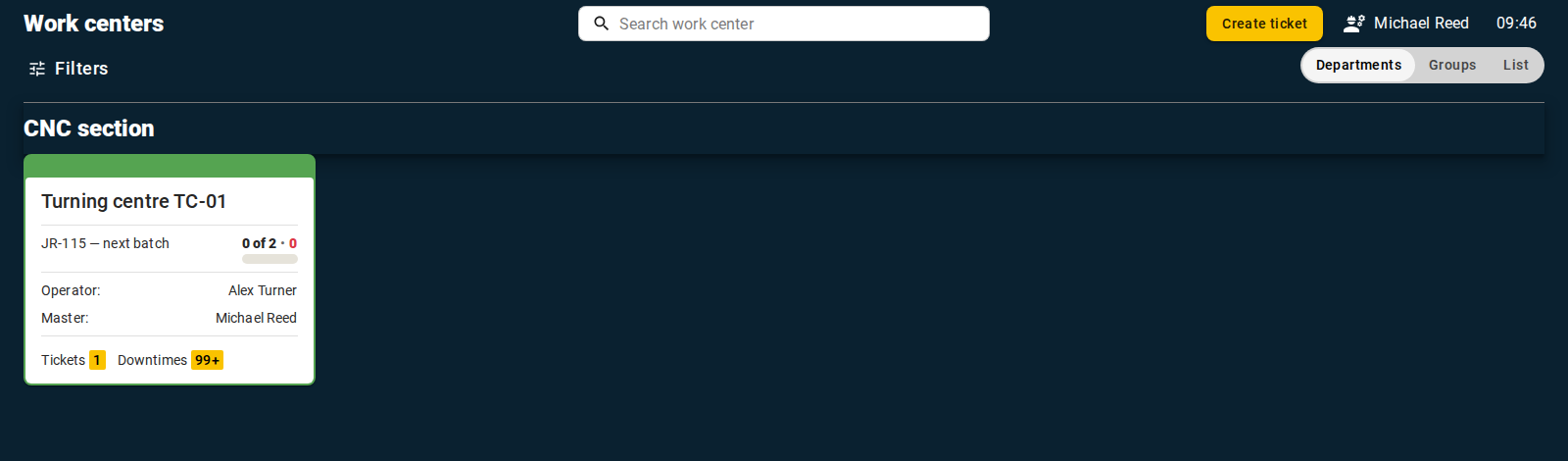
The Foreman workstation brings together the shift context for available Work centers: current Jobs, Operators, Downtime, Tickets and situations requiring a decision. Its focus is the supervision and coordination of several production situations.
Mechanic and maintenance personnel: the technical side of operation
For maintenance personnel, the main concern is equipment condition and the work needed to restore or service it, rather than the manufacturing sequence for a Product.
The Maintenance workplace primarily supports Ticket execution: a Mechanic receives an assigned problem, accepts it, performs the necessary work, and submits the result to the author for acceptance. Other maintenance mechanisms exist alongside Tickets and are described in the relevant chapter.
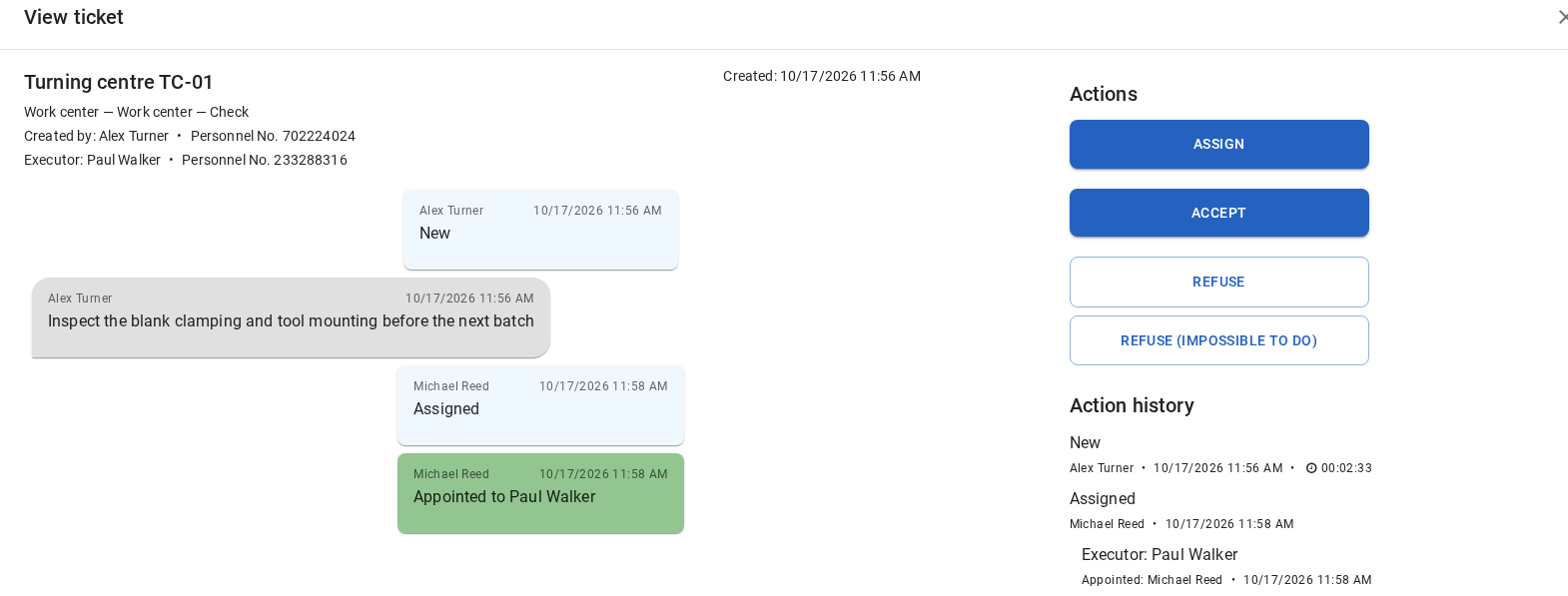
The Maintenance workstation presents a technical issue as a separate piece of work with its own lifecycle. An assigned Ticket can be accepted, started and returned to its author for acceptance. It belongs to maintenance execution rather than the Operator’s production Job.
Technologist and engineer: preparing future execution
Engineering preparation considers production before specific execution begins. It includes Products, Product versions, Technologies, Technology stages, Operations, Control programs, Parameter sets, and associated reference data.
For these users, DPA answers another set of questions: what is manufactured, using which Technology version, on which eligible equipment, with which CP, and with which expected process parameters during operation?
Enterprises can distribute these responsibilities among technologists, CNC programmers, engineers, and other specialists. DPA is concerned with the functions and corresponding permissions rather than the employee’s job title.
Planner and dispatcher: turning demand into specific work
The planner works where the engineering production model becomes future shop-floor load. This includes Production orders, Work orders, Jobs, calendar intervals, Job pools, Shift targets, and Work center assignments.
The main question is “what must be done, where, and when?”. Planning continues after the calendar is saved: actual execution supplies times, statuses, and quantities, allowing expectations to be compared with actual results and subsequent work to be adjusted.
Administrator and integrator: enabling the system as a whole
The administrator sees DPA through its production infrastructure: enterprise structure, users and groups, permissions, Work center accessibility, drivers and equipment connections, system settings, and service health.
The integrator works at a related level, often focusing outward: APIs, exchanges with ERP/MES/APS/BI, equipment interfaces, data imports and exports, and boundaries between DPA components.
One person can fulfil both functions. A small project may have one DPA administrator/integrator; a large enterprise may distribute those responsibilities among IT, industrial automation, and production teams.
Analyst and manager: the overall picture
For an analyst or manager, DPA’s value is the ability to view many production facts as one picture. Dashboards, KPIs, Reports, the Gantt chart, Journals, and statistics show load, output, Downtimes, states, and other measures across equipment groups, departments, shifts, or selected periods.
This analytical role also uses real-time data. A shift manager can watch a continually refreshed Dashboard during shop-floor operation, then use the same accumulated data to review the completed period.
Different people, one production picture
The point is not to memorise professions, but to understand that DPA gives different people the views and tools needed to work with one shared production model.
The Operator sees a specific Job. The Foreman sees a group of Work centers and associated exceptions. The technologist sees the engineering definitions of future execution. The planner sees future work. The Mechanic sees a technical problem. The analyst sees patterns in accumulated facts. The administrator sees the conditions under which these processes work together.
A change to one production object therefore becomes visible to several people. A technologist’s Technology is used in planning; a planned Job appears for the Operator; actual execution becomes visible to the Foreman and enters analytics; and a problem can pass to maintenance personnel. Users work with different aspects of one system rather than maintaining parallel versions of production.
7. DPA as an integrated system
The number of functional areas can initially make DPA look like several separate applications. The main interface includes Monitoring, planning, Technologies, CPs, Journals, analytics, and settings, while the Operator workplace, Foreman workplace, and Maintenance workplace appear visually independent.
A more useful view is that the main interface, role-specific workplaces, and specialised services form one system sharing a common production context.
The central pair: DPA Server and DPA Host
DPA Server and DPA Host form the central architectural pair.
DPA Server is closest to the equipment. Through drivers and industrial interfaces, it receives machine data and helps convert machine-specific information from CNC equipment, PLCs, robots, and lines into common states, events, and other data DPA can use.
DPA Host operates at the next level, where machine data meets the enterprise production model: Work centers, Jobs, Technologies, users, CPs, Downtimes, Journals, and other objects. DPA Host combines DPA’s main production functions and user interface. It provides access to the principal functional modules, retains much of the production context, and coordinates interaction with additional services.
A simplified main flow is:
equipment → DPA Server → DPA Host → production context → DPA screens and history.
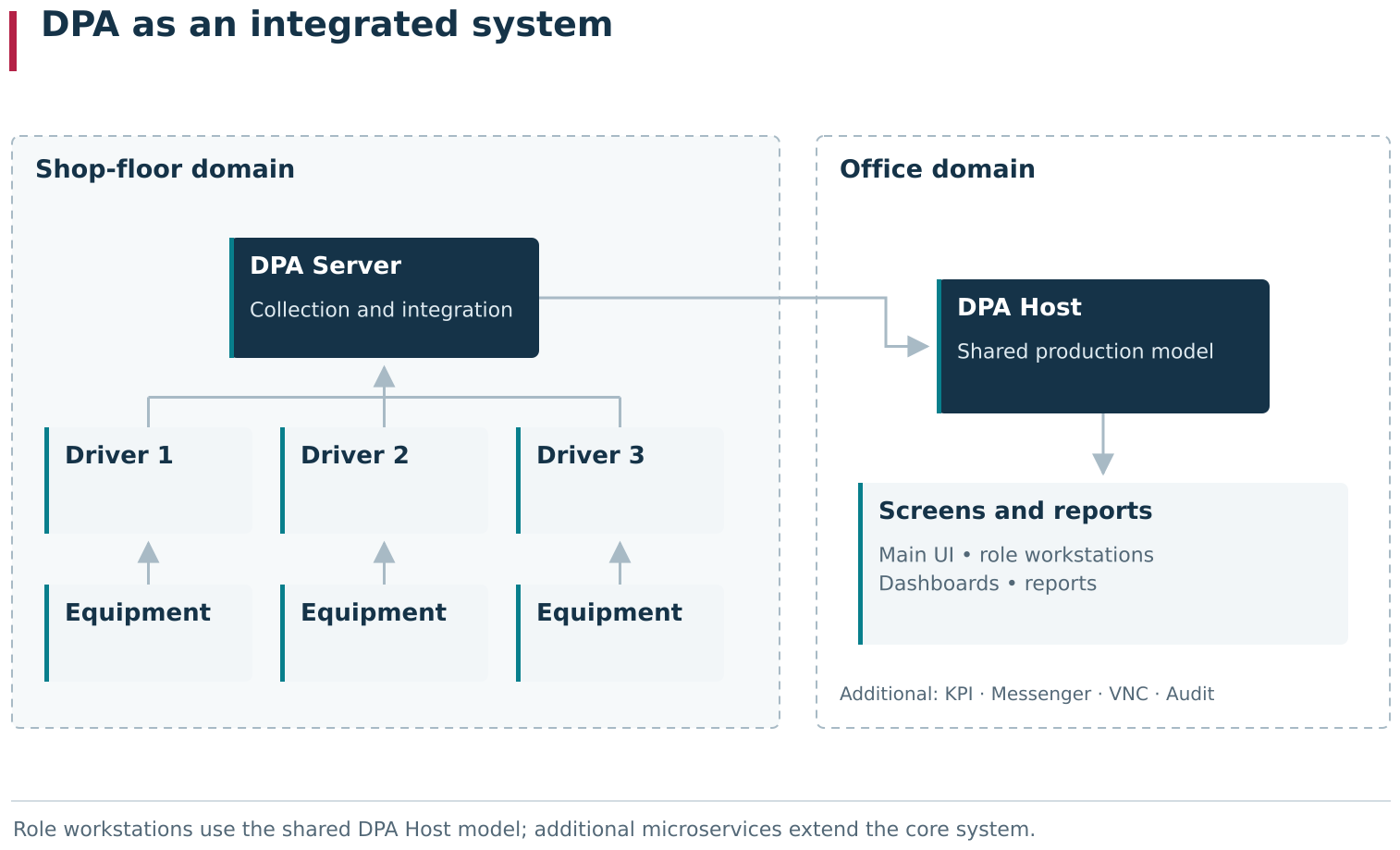
The simplified system map shows how DPA components meet around a shared production model. Equipment sends machine data through DPA Server; DPA Host connects it with Work centers, Jobs, CPs, people and history; the main UI and role workstations provide different entry points into that context. Specialised services extend individual DPA Host functions.
This is an orientation diagram, not a claim that every object follows identical linear processing. DPA Server primarily handles equipment and real-time data; DPA Host handles the central production model and user interaction with it.

Under Settings → Monitoring, DPA Host and connected DPA Servers appear within one administrative structure. From the Host, the user can navigate to servers, drivers and their data. This screen provides a practical reference for the core DPA Host ↔ DPA Server relationship.
The main interface and specialised workplaces
Most engineering, administration, analytics, and planning functions open through DPA Host’s main interface. It contains Enterprise structure, Monitoring, planning, Products, Technologies, Control programs, Journals, Dashboards, Reports, settings, and other functional areas.
Three role-specific workplaces operate alongside it:
- Operator workplace;
- Foreman workplace;
- Maintenance workplace.
They have their own navigation and focus on different tasks, so they can look like separate applications. They nevertheless use the same enterprise model rather than separate copies of production data, providing specialised ways to perform each role’s tasks.
For example, a Job created in planning appears in the Operator workplace, and its actual result becomes visible in the main interface, the Foreman workplace, and analytics. A Ticket created in a production context can pass through a Foreman and the Maintenance workplace while remaining the same object.
Specialised services connect to the shared system
Not every DPA capability runs inside one process. Some specialised functions use separate services with which DPA Host interacts as independent components.
Examples include:
- KPI: calculating, aggregating, and storing specialised measures, from time series to totals for a selected period;
- Tool management: extended tool-management processes;
- Messaging service: delivering messages and notifications;
- VNC: remote connection to an equipment screen;
- Audit: a separate security-event auditing service.
Other specialised components are supported as well. The installed set depends on enterprise requirements and the system configuration.
This separation has practical architectural benefits. Resource-intensive or specialised functions can run outside DPA Host, distributing computational load without enlarging the main process with components an installation does not need. Individual functional areas can also evolve without further complicating the central application.
For users, specialised features consequently have their own service boundaries. A lost VNC service connection, for example, affects remote access without necessarily making Monitoring or planning unavailable. A notification delivery failure does not undo a production event already registered. KPI and tool management also have their own calculations, data, and diagnostic points.
A specialised service extends the shared system rather than becoming a separate version of DPA.

The Microservice settings page shows specialized services as separate components connected to DPA Host. An additional function extends the shared system while retaining its own service boundary.
Installations need not look identical
The modular architecture allows DPA to be configured around an enterprise’s needs. One project can start with DPA Server, DPA Host, and real-time equipment monitoring. Another immediately needs planning, the Operator workplace, and CP management. A third emphasises KPIs, tool management, notifications, or remote access.
An absent specialised module does not necessarily make an installation incomplete. The relevant question is which production tasks the project must address and which components it actually uses.
The basic processes remain connected. Equipment connected through DPA Server appears in DPA Host as Work centers and production data; role-specific workplaces use the same context; and additional services obtain or provide specialised information through the shared system.
One system, several entry points
For users, the architecture amounts to a simple idea: DPA can have several interfaces and separately running services, all supporting one production picture.
An engineer enters through the main interface, an Operator through the Operator workplace, a Foreman through the Foreman workplace, a Mechanic through the Maintenance workplace, and a manager through a Dashboard. Behind these entry points are the same Work centers, Jobs, states, CPs, production events, and history.
When a later feature appears to be a standalone module, ask which shared DPA objects it relates to and whether some of its work passes through a specialised service. These relationships usually explain where its data comes from, who sees the result, and where a problem should be investigated.
8. From current telemetry to production context and history
One of DPA’s main strengths is seeing equipment operation as it happens. Work center state, Indicator values, the running CP, equipment messages, current output, and other data are available without waiting for shift completion or preparing a separate report. The production picture changes with the actual process.
The same events also gradually become production history. Alongside them, context explains what happened, where, when, and as part of which work.
It is useful to consider three connected views of the same production process:
- current: what equipment and production are doing now;
- contextual: which Work center, Job, person, CP, shift, or production situation the information relates to;
- historical: how events were retained over time and what can be reconstructed afterwards.
These are perspectives on the same process, continually connected in practical workflows, rather than three independent systems.
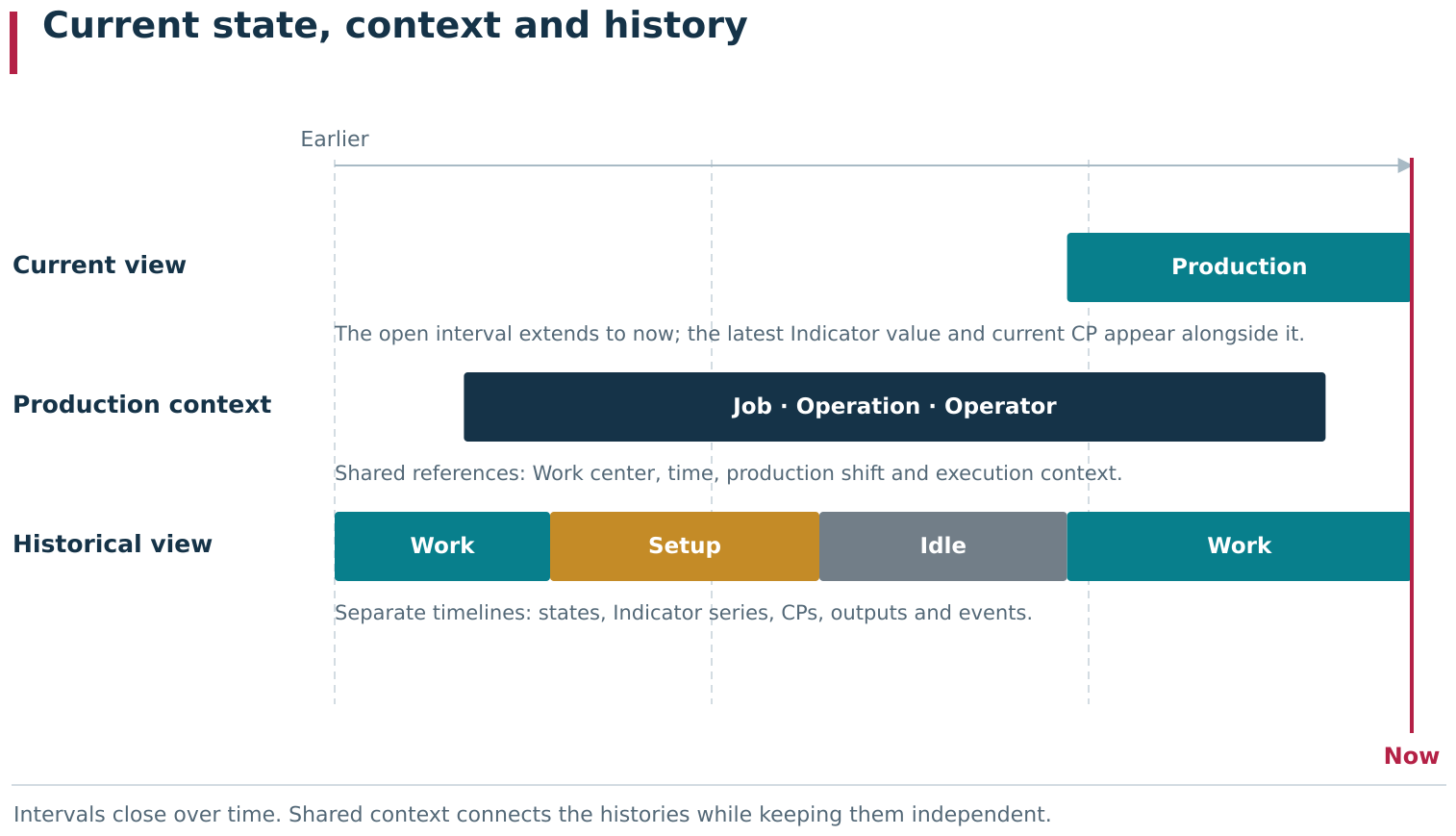
A production situation has current, contextual and historical views at the same time. Current values and open intervals show what is happening at the boundary of now; the Work center, Job, Operator, CP and shift give these records production meaning. Over time, the same states, values and events form separate histories. Shared context connects the records while each retains its own identity.
Current state has value in its own right
The lowest level of DPA’s production picture is machine data: values, events, and messages arriving from equipment. These reveal the current Work center state, process parameters, modes, messages, active CP, and other available signs of the real process.
This information answers questions arising every minute on the shop floor: is the machine producing or idle, which CP is running, is load changing, is output occurring, and has an alarm appeared?
Real-time visibility is useful by itself. Users need not build a report or wait for shift completion to understand equipment operation. Monitoring, Dashboards, and role-specific workplaces can show the picture during production.
DPA also provides more than a state lamp. The current picture around a Work center can include active and planned Jobs, equipment state, output, Operator context, and other related information. Users see both the machine signal and its place in production.
Production context explains the meaning
The same machine state can mean different things according to what was happening in production. Spindle operation alone does not identify the Product being manufactured. A stopped machine does not explain the Downtime reason. A filename on the CNC does not automatically identify the CP version prescribed by the executing Technology.
Context comes from relationships between system areas. The Work center is often the common reference point, and time allows processes on it to be compared. Related information can include:
- the executing Job and Operation;
- the Operator and their shift;
- the actual and prescribed CP;
- equipment state and Downtime reason;
- Indicator and process-parameter values;
- registered output;
- Tickets and other events concerning the same situation.
Sharing a context does not make these one entity. DPA can display related facts together because they concern the same Work center and period, while each retains its meaning and lifecycle.
Output makes this especially clear. The machine can report its own production counters while the Operator registers Job output. These sources concern the same production work and can be compared, but DPA stores them as separate facts. This preserves both the machine observations and the business result of Job execution.
Current state naturally becomes a historical interval
Equipment states clearly illustrate the transition from present to history. When a Work center changes state, a corresponding interval starts. While the state continues, the interval remains open and describes what is happening now. When the state changes, the previous interval receives an end time and becomes a completed historical record.
“What is the machine’s state now?” and “which states did it occupy during the shift?” therefore concern the same time-based picture. The current state is its open, most recent end, later examined retrospectively.
The same principle appears elsewhere. An Operator’s personal shift has a start and an end. Job execution acquires actual times and results. CP execution creates its own time records. Indicator values accumulate as time series. Output and equipment events receive timestamps. Information visible during operation gradually becomes material for subsequent analysis.
DPA history consists of several timelines
History is not one enormous table in which every event is a universal row. Different kinds of production facts have their own models and histories.
The same period can simultaneously contain:
- Work center state intervals;
- Downtime reason classifications;
- Indicator values;
- CP and subprogram execution intervals;
- machine output records;
- actual output registered for a Job;
- Operator shift intervals;
- actual Job execution times and results;
- Ticket history.
They can be compared by time and production context, but coincidence on a timeline does not make one a dependent part of another.
A Ticket can be created for a problem arising during a Downtime, while the two remain separate objects. The Downtime reason describes a production interval; the Ticket describes people’s interaction to resolve the problem. Similarly, machine output can occur while a Job runs, while the machine output record and registered Job result remain distinct facts.
This distinction also helps users read data correctly. Two bands overlapping in time do not mean that one automatically caused the other. Sometimes a direct relationship is recorded explicitly; sometimes they are simply different observations of one situation.
Views can refresh at different rates
Because the current picture combines several data streams, its parts need not appear on screen simultaneously. An Indicator time series can already extend almost to the present while a new section of the Gantt state band appears slightly later.
This difference alone does not mean DPA has stopped receiving equipment data. Views have their own collection, processing, and refresh mechanisms. Diagnostics should identify which part of the picture has stopped changing: current values, state intervals, Journal events, or an analytics view.
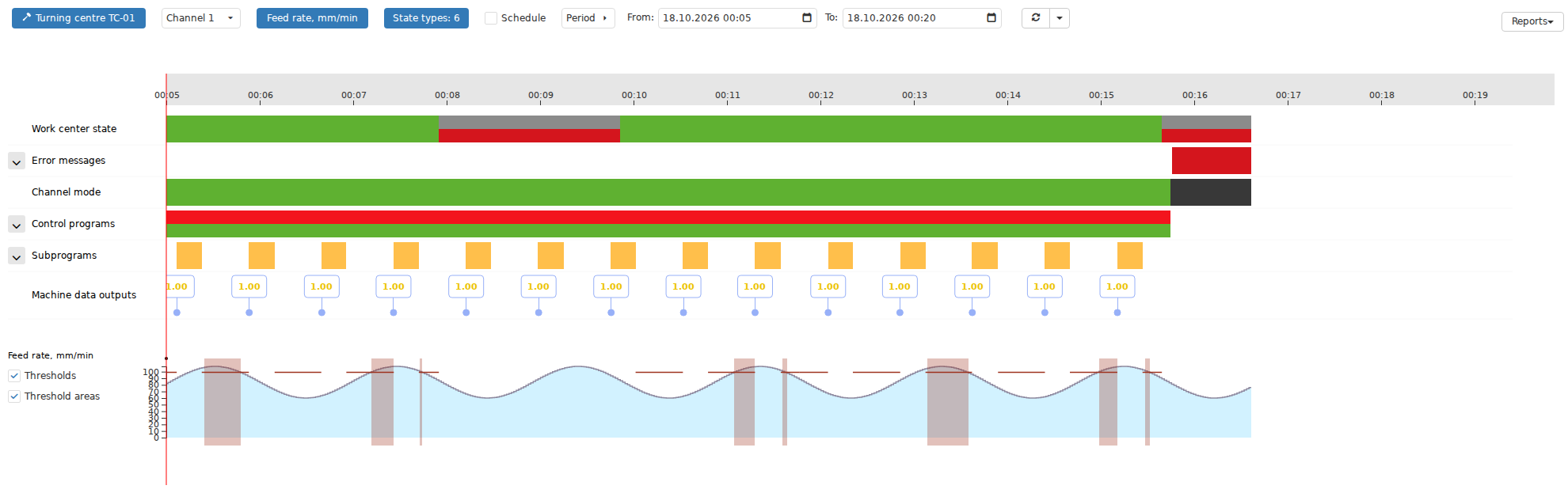
The Gantt chart is especially useful for comparing several production timelines on one screen. Work center states, downtime reasons, control program and subprogram execution, output events, Indicators and other data can share the same time axis. This view helps identify which data continues to update and which temporarily lags or needs a separate check.
This is another reason DPA offers several ways to examine production. A current screen answers “what is happening now?”, a timeline answers “how did the situation develop?”, a Journal supports individual-event investigation, and analytics compares and aggregates accumulated facts.
Real-time observation and history complement each other
Real-time observation lets users notice an event and respond promptly. History reveals its duration, surroundings, recurrence, and consequences.
Seeing a stopped Work center now is one task. Later, users can determine when the stop began, how long it lasted, which Downtime reason was supplied, which Job was executing around that time, who operated the equipment, and which events were recorded. Current state combined with saved context turns an individual machine signal into information useful for production management.
Some analytics also operates in the present. KPIs and Dashboards can aggregate the elapsed part of the current shift or another period and refresh as data arrives. The boundary between real-time observation and analytics is therefore not a simple division between “now” and “later”: history accumulates during production itself.
Practical rule: identify the fact you need first
When reconstructing a situation, start with “which fact do I need?” rather than “which page was it on?”.
For equipment state, examine state history. For a stop reason, examine Downtimes. For actual Job output, examine execution history. For the machine’s own count, examine machine output data. For the CP execution sequence, examine CP history. For people’s interaction around a problem, examine the Ticket.
The common Work center, period, and production context then allow those facts to be assembled into one picture.
This approach recurs throughout the guide. DPA’s strength is the ability to observe actual production now, understand its production meaning, and subsequently revisit the same situation as retained history.
9. Where to answer “what is happening?”
With the current, contextual, and historical views established, the practical question is where to look when investigating a production situation.
DPA has no universal screen equally suited to every question. Different views cover different time scales and aggregation levels. One task needs the latest machine fact, another a sequence over several minutes, another an exact Journal record, and another a shift total or formal period report.
Choose a screen or report according to the question you need to ask of the data, rather than simply using a familiar menu item.
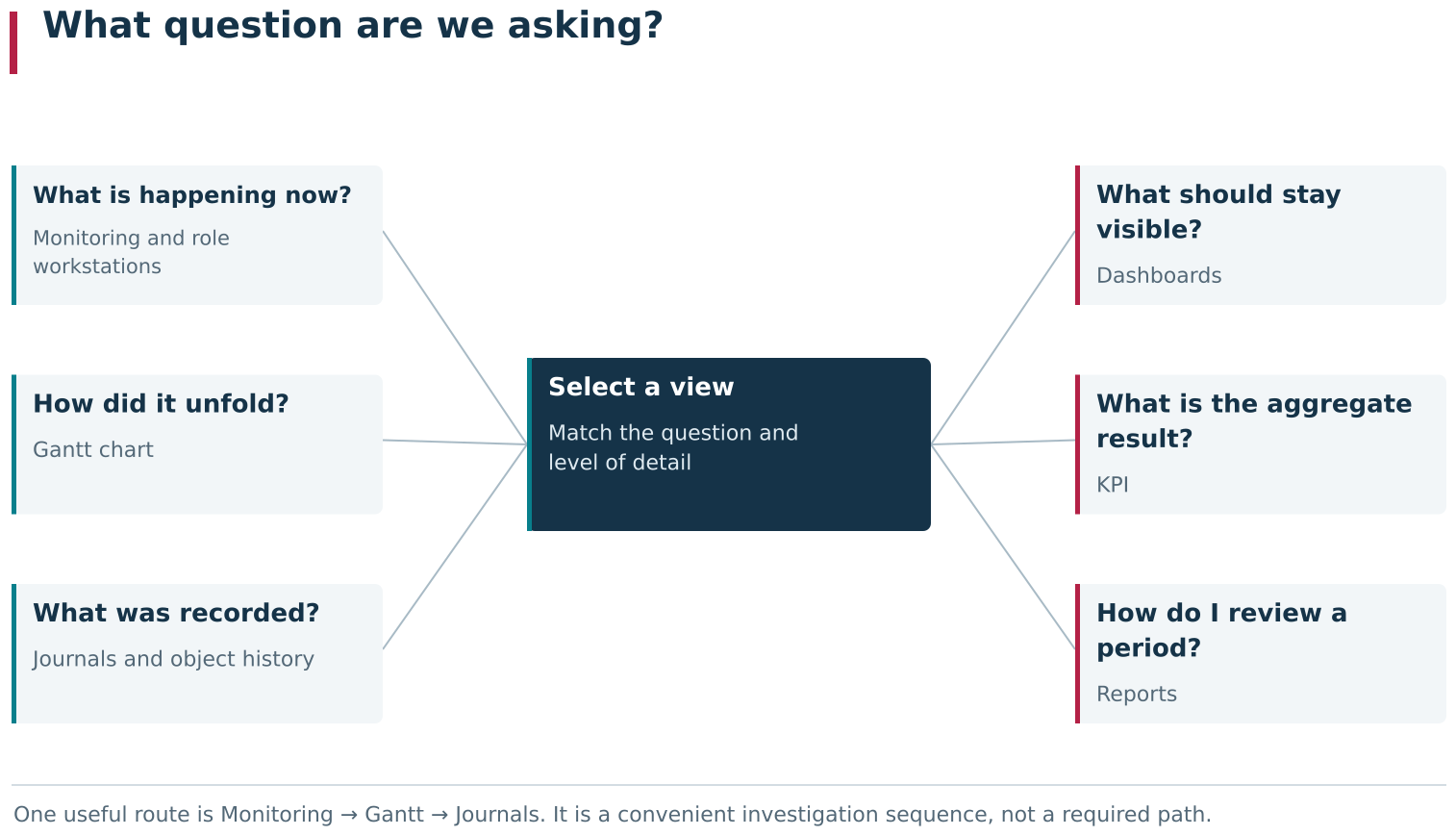
DPA views answer different questions about the same production data. Monitoring shows the present, Gantt charts trace an episode over time, Journals provide exact records, Dashboards maintain an overview, KPI turns accumulated data into a metric, and Reports provide results for a period. Select the screen, report or metric according to the question and required level of detail.
Monitoring: what is happening right now?
Monitoring is the natural starting point for the most current equipment picture and for checking whether data is still arriving.
Current values, states, Indicators, machine messages, and lower-level driver/device data are particularly useful here. Start here for questions such as “is the machine sending any data?”, “what is this parameter’s current value?”, “which state does the system see now?”, or “what is this device reporting?”.
Monitoring explains the present but is not always the best way to reconstruct a sequence. To establish when a situation began, how long it lasted, and what happened around the same time, move to a time-based view.
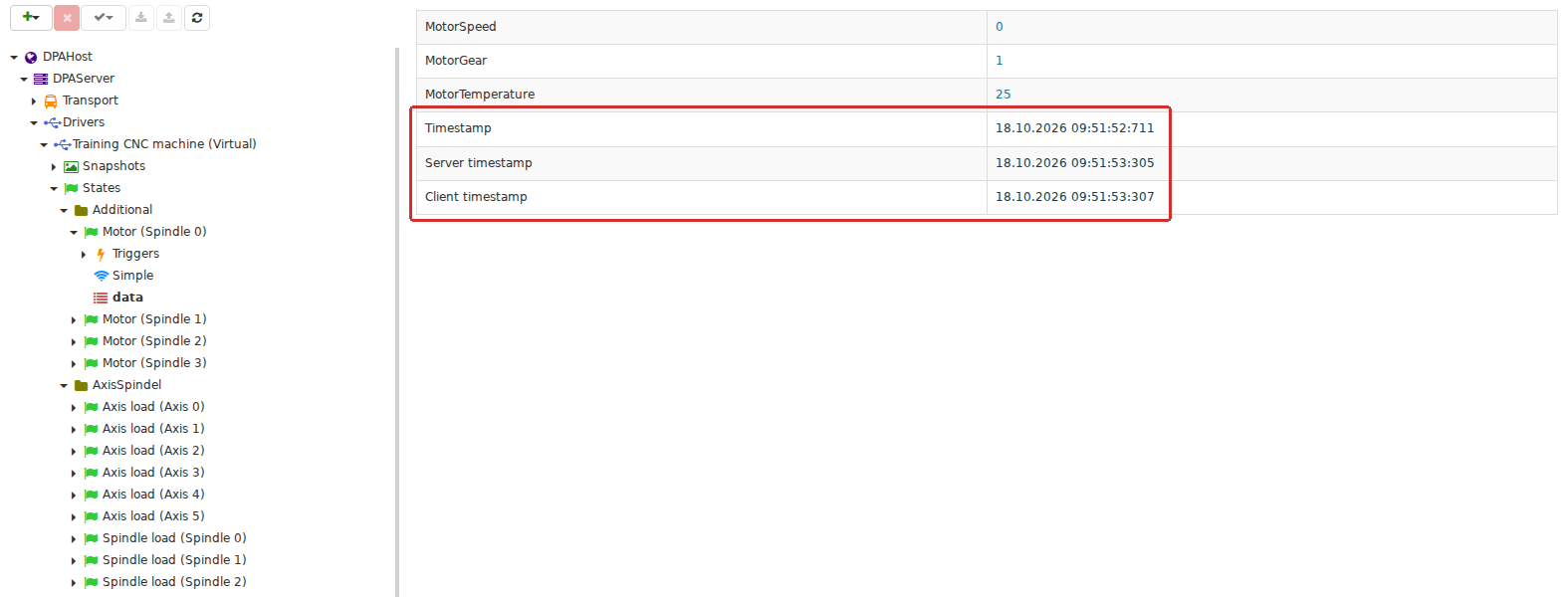
Monitoring lets the user check the latest machine data before it reaches higher-level views. The branch DPA Host → DPA Server → driver → state displays current calculated values and their timestamps, making it a useful starting point for checking whether data is still arriving.
Gantt chart: how did the situation develop over time?
The Gantt chart brings several production data types onto a common timeline. For a selected Work center, it can display equipment states, channel modes, CPs and subprograms, messages, machine output, Indicators, Tickets, the schedule, and other available time-based data.
Its strength is aligning different facts in time. For a machine stop, the chart can show the state’s start and duration, nearby messages, the running CP, parameter changes, and other events from the period. It is often the principal view for examining an episode rather than one instant.
Bands or points coinciding visually do not mean that one event caused another. The chart deliberately aligns independent timelines. It helps reveal possible relationships and choose the fact to investigate next; exact records belong in the corresponding Journal or entity history.
Journals: what exactly was recorded?
Journals provide individual records when a visual overview is insufficient: exact times, states, identifiers, messages, comparison results, and other diagnostic fields.
Depending on the Journal, a record can represent one event or a complete interval. One Journal may show exact CP state transitions; another may show the assembled execution interval with start, end, and final CP execution status. The interval explains duration, while events reconstruct the transition sequence.
Journals are particularly useful for “which record appeared?”, “when did the transition occur?”, “what did the system receive from equipment?”, “which CP version was recognised?”, or “which message accompanied this period?”. Where the Gantt chart shows the picture, a Journal breaks it down into facts.
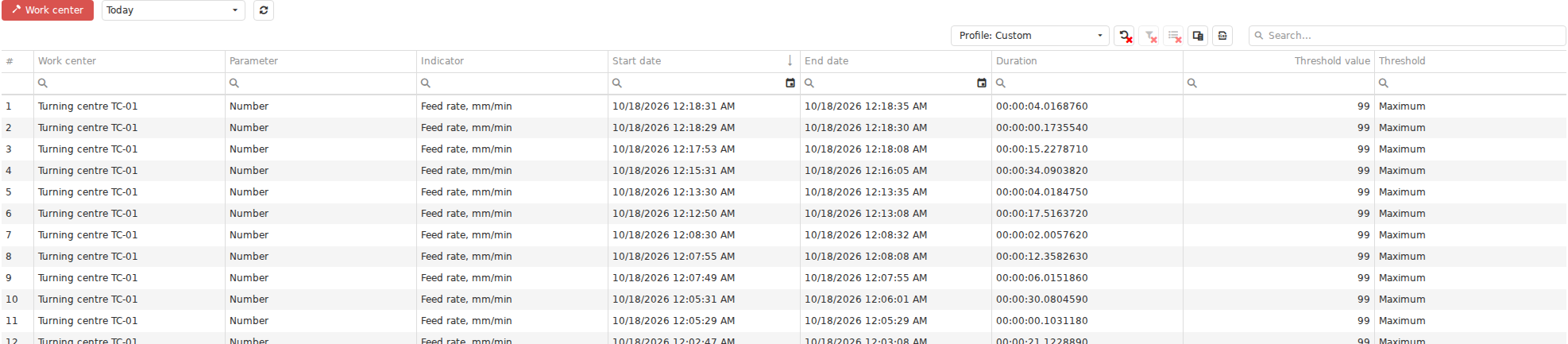
A Journal presents production history as precise records with timestamps and diagnostic fields. After identifying an episode on the Gantt chart, this view helps determine exactly which event or interval was recorded and with what details.
Dashboards: what must remain continuously visible?
A Dashboard supports continuous observation of a selected set of measures, rather than primarily investigating one episode.
It can combine current values, states, production measures, timelines, KPIs, and other widgets important to a role or production area. One Dashboard can suit a large shop-floor screen, another a Foreman, and another a manager or engineer.
Instead of rebuilding the context manually each time, the Dashboard retains the selected view as a ready-to-use working screen. Some measures show current state; others show results accumulated during the current shift or another period.
KPI: how can accumulated data become a measure?
KPI addresses a different class of questions. The concern is a calculated measure derived from production data for selected equipment and a period, rather than one value or episode.
KPIs can process time series and aggregate them, for example by summing, averaging, or calculating duration. The resulting numbers support overall analysis and Dashboard display: the proportion of time in a state, accumulated duration, an average value, or another production measure defined by a formula.
KPI does not replace the underlying timeline. If an aggregate number raises a question, investigate its detailed data through the Gantt chart, Journals, Indicators, or the process history.
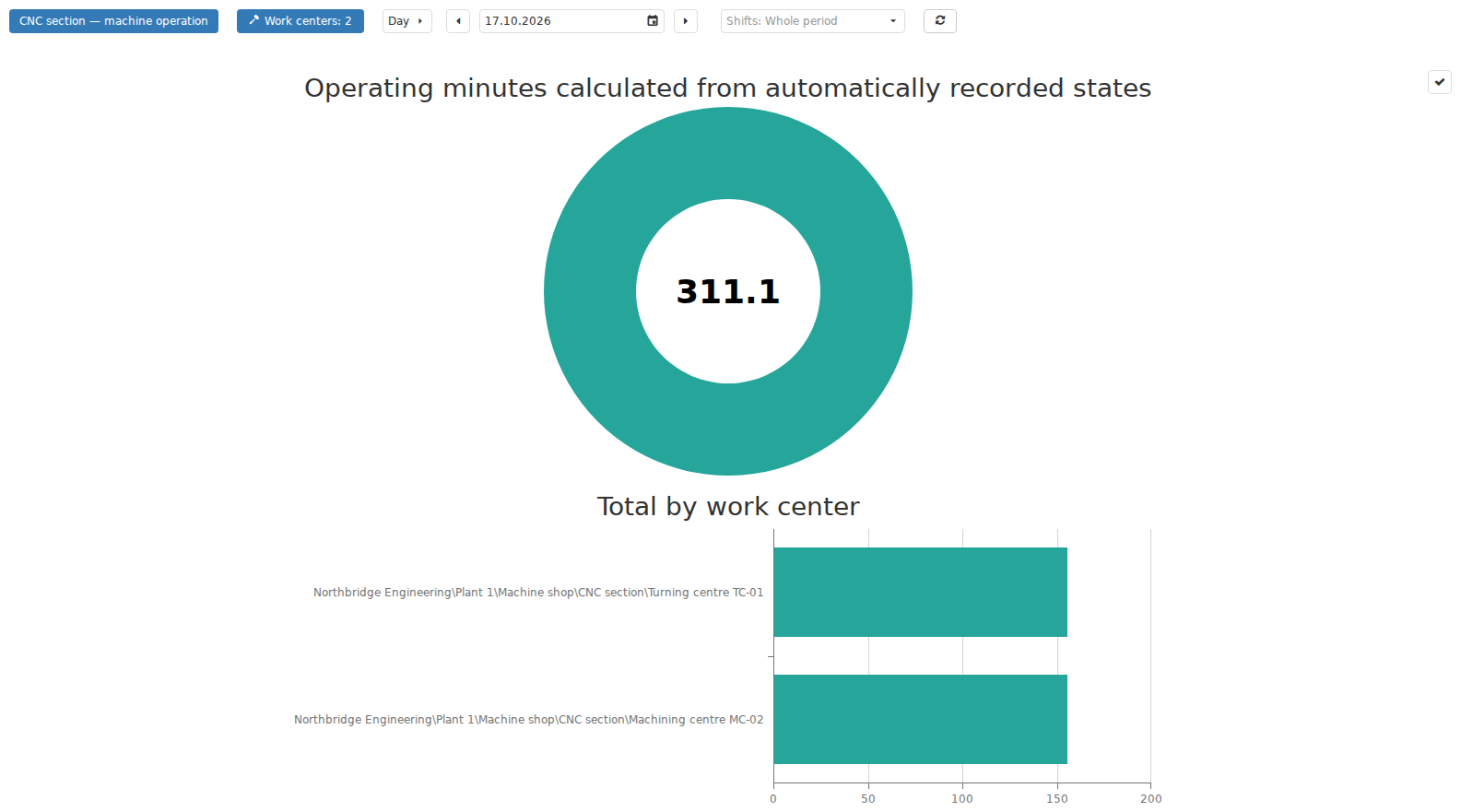
KPI provides a further level of aggregation: time-based data becomes a calculated indicator for a selected period and set of equipment. This view is useful for comparing totals; the number remains a derived result whose meaning can be traced back to the underlying history.
Reports: which retrospective result is needed as a separate output?
A Report is useful when the question is sufficiently specific and a formatted result is needed for selected equipment, a period, or a production context.
Unlike a regularly refreshed Dashboard, a Report is generated from a template and user-supplied parameters. Filters and logic differ between Reports: one analyses CP execution, another planned and actual production, and another output or equipment load.
Reports are especially useful for retrospective analysis, sharing results, and working with a generated file. Understand which facts each Report uses. For example, planned-versus-actual Job analysis uses the registered production result of the Job, not automatically any available machine output counter.

In Reports, the user selects a template and parameters, and DPA generates a separate result that can be downloaded and used outside the current screen. A Report records a particular retrospective view under the chosen conditions.
One question can require several views
A practical investigation often needs several sections. A user can notice a problem in Monitoring, open the same period on the Gantt chart, inspect a Journal for an exact record, and then examine a broader KPI or Report to assess the effect on the shift or production result.
A useful orientation is:
- what is happening now: Monitoring and role-specific workplaces;
- how it developed over time: the Gantt chart;
- what exactly was recorded: Journals and object history;
- which overall picture needs continuous visibility: Dashboards;
- which aggregate measure resulted: KPI;
- which formatted retrospective result is required for a period: Reports.
This is not a mandatory sequence. It helps select the first view and then move from the overall question to the necessary detail.
10. Examples of DPA capabilities working together
So far, this chapter has considered equipment, production entities, people’s roles, current data, and history. DPA’s practical value becomes clearer when several capabilities meet around one production task.
The following examples are not step-by-step instructions. They illustrate how DPA’s parts complement one another within a shared process.
From a planned Job to an actual result
A technologist prepares the Product, Technology, Operation sequence, and required Control program. A planner turns this preparation into a specific Job, assigns suitable equipment, and sets the planned execution interval.
When execution begins, the Operator sees the Job in the Operator workplace and turns the plan into actual work. In parallel, DPA continues receiving machine state, the running CP, Indicator values, and machine output information. The Operator registers the Job’s production result separately, keeping machine data and registered output distinct.
After completion, the plan can be examined as history: when the Job actually ran, which output was registered, what happened to the equipment, and how actual results compared with the plan. One process thus connects engineering preparation, planning, human work, telemetry, and subsequent analysis.
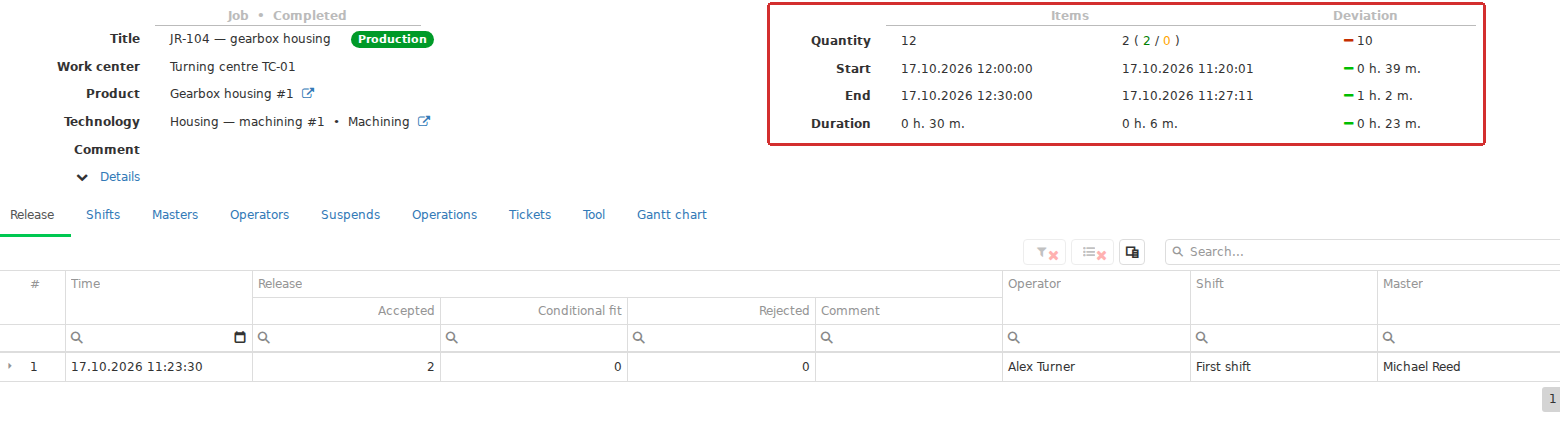
In Analytics → Job analysis, a completed Job combines its plan and actual result: planned and actual times, registered output, the Operator and execution history appear together. The screen shows how one object progresses from future work to a stored production result.
From an equipment stop to coordinating people
Suppose a Work center stops during a shift. Its current state becomes visible in Monitoring or an operational Dashboard. As the stop continues, an interval develops on the timeline, visible on the Gantt chart and classifiable by a Downtime reason where needed.
For the Foreman, the same situation is a production problem needing attention. If its resolution requires organised human work, a Ticket can be created. The Foreman assigns someone; a Mechanic accepts and performs the work through the Maintenance workplace; and the Ticket author subsequently accepts the result.
This illustrates why DPA preserves separate entities. A Downtime explains what happened to equipment time; a Ticket explains how people organised work on the problem. They can describe the same episode and be viewed together, while a Ticket is not an automatically created downtime record and a Downtime does not replace human coordination.
From a Control program to process-parameter control
Engineering definitions and equipment data can be connected for more than identifying the CP that ran. A CP version can have Parameter sets and acceptable process values, with parameters mapped to live Indicators on a particular Work center.
When process-parameter control is enabled and DPA understands the running CP context, current values can be compared with acceptable values and thresholds during production. A deviation has several observable results: the control result can be viewed for the relevant Indicator on the Gantt chart, and violation intervals are retained in the Parameter validation Journal.
This process can also emit events into the Signals system. With a configured response, a deviation passes from the engineering definition of an acceptable range, through live equipment data, to an observable event and subsequent response. DPA thereby connects expected process conditions to actual machine behaviour.
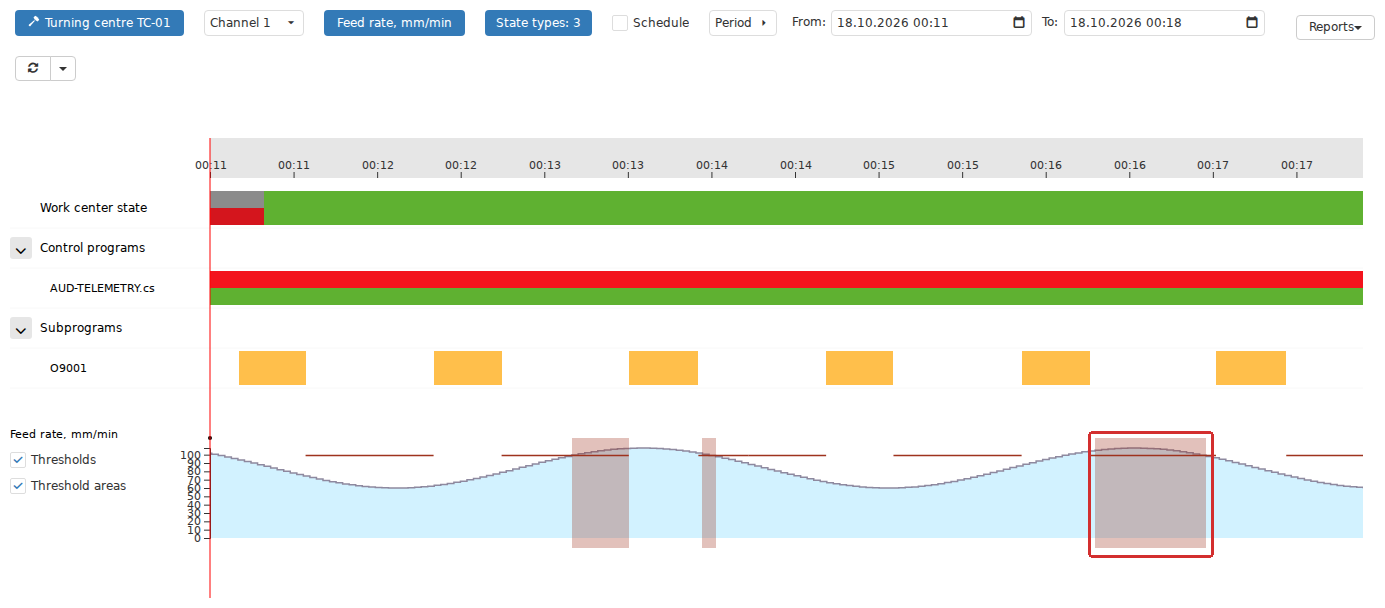
Real-time parameter validation connects engineering limits to live equipment data. For a selected Indicator, the Gantt chart can display its value, Thresholds and Threshold areas, allowing the actual process to be compared with the permitted range for the current production context.
From a shop-floor screen to shift-result analysis
During a shift, a manager or Foreman need not investigate every event separately. A Dashboard can combine current Work center states, output, and other measures, while KPIs calculate and aggregate characteristics by equipment and time. This view refreshes as production proceeds and highlights where attention is required.
After the period, the same process can be examined in greater depth. The Gantt chart shows state changes and events over time; Journals supply exact records; and a Report produces a predefined retrospective result, such as a comparison of planned and actual performance for the Jobs executed.
The large operational screen supports management while production is under way; the final Report supports review of accumulated results. Time history and aggregate measures connect them, allowing an overall number to be traced back to a particular production episode.
The purpose of end-to-end relationships
In these examples, DPA preserves the distinct meanings of the plan, Job, machine state, CP, output, Downtime, Ticket, KPI, and Journal record. It then relates them through the Work center, time, production context, and human actions.
This is why learning DPA involves more than individual buttons. The more processes share the production model, the easier it becomes to move from “what is the machine showing now?” to what we intended to do, what actually happened, why a deviation arose, who responded, and how it affected the production result.